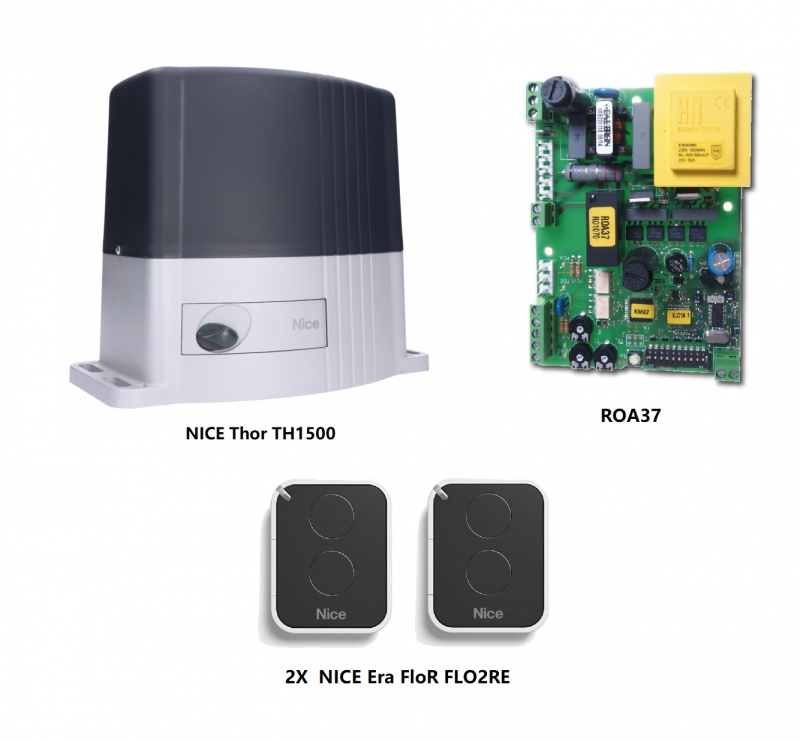
Sliding gate opener kit for gates up to 1500kg – NICE Thor TH1500
| Product availability: | within 3 days | We usually ship the goods within 3 days. |
|---|

within 3 days
€602.07 including VAT
| Weight |
|---|
| 13 kg |
Description of Sliding gate opener kit for gates up to 1500kg – NICE Thor TH1500
NICE THOR TH1500 is an electromechanical operator for a sliding gate with a 230 V AC, built-in control unit and radio receiver. It is designed for a gate weighing up to 1,500 kg and with a leaf length of up to 12 m. It has a ventilated motor and a built-in control unit NICE ROA37. Mechanical limit switches determine the open and closed positions. The operator is non-reversible; in the event of a power failure, it can be released with a key so the gate can be moved manually.
What type of gate is the THOR TH1500 suitable for?
Weight, length and number of cycles must be considered alongside the resistance to gate movement, wind, ice and the condition of the track. The operator is not a substitute for repairing a misaligned or sticking gate. The gate leaf must move smoothly along its entire travel, remain stationary in any position, and have anti-derailment protection as well as sturdy mechanical stops in both directions.
| Max. gate leaf weight | 1,500 kg. |
|---|---|
| Max. gate leaf length | 12 m. |
| Operation | Up to 15 cycles/hour with a 6 m gate leaf, and up to 5 consecutive cycles without a break. Do not automatically apply the 15 cycles/hour rating to a 12 m gate leaf. |
| Resistance to movement | A technician will check the required starting and running force based on the motor torque and pinion; the manufacturer recommends at least a 50% reserve. |
| Rack | Module 4; clearance between the rack and pinion approximately 1–2 mm. |
Choosing a larger motor alone does not replace safety devices and force testing on the completed gate.
What's included
| The kit includes: | NICE-TH1500-D | |||
|---|---|---|---|---|
 |
1 × | NICE Thor TH1500 operator | NICE-TH1500 | |
|
NICE Thor TH1500 operator with control unit ROA37 with a built-in receiver and a gate weight capacity of up to 1,500 kg, and a passage width of up to 12 m |
||||
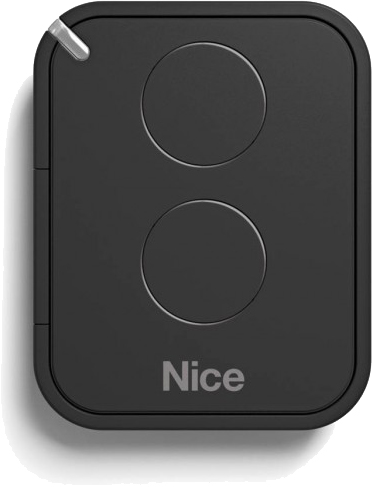 |
2 × | NICE Era FloR FLO2RE | NICE-FLO2RE | |
|
Two-button remote control for operating a gate automatically from a distance. You can use it to control two devices or send two different commands to one device. |
Detail | |||
 |
2 × | Release key | ||
|
In the event of a power failure, it is used to disengage the operator's gear so the gate can be moved manually by pushing or pulling. |
||||
What else do you need for safe operation?
| What | Why | Type |
|---|---|---|
| Photocells | Passage monitoring; connection here. |
|
| Warning light | Movement indication; output 4–5 supplies 230 V AC. |
|
| Remote control | Built-in receiver, storing remote controls. |
|
| STOP and safety edges | Protection of hazardous areas as specified in the design. |
|
| Gear rack and stops | Motion transmission and mechanical track stops. |
|
Installing the drive and gear rack
Installation and electrical work must be carried out by a qualified technician. Disconnect the power supply before opening the drive and secure it against being switched on. Prepare the conduits and cable entries so that water cannot get into the motor; the base must not be flooded. Keep the cover and manual release accessible.
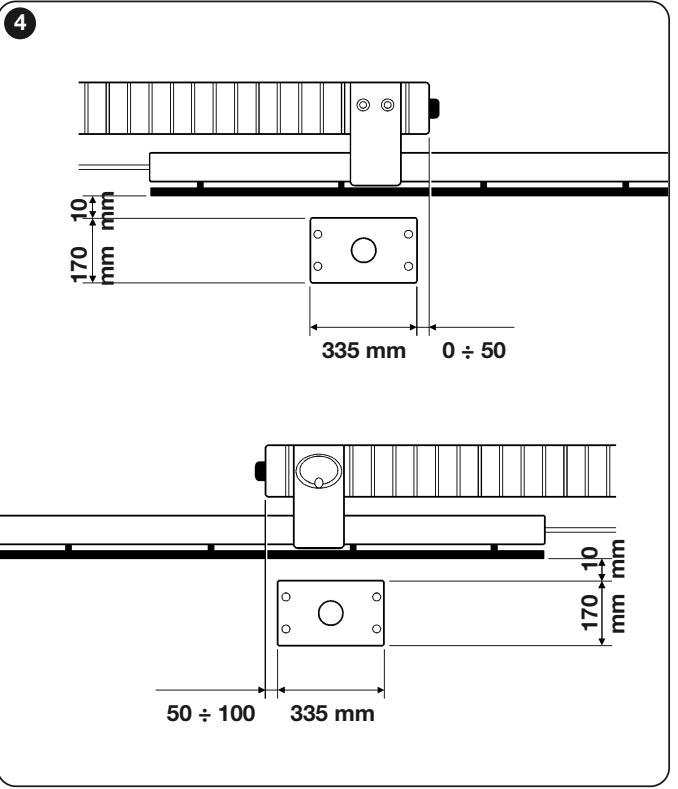
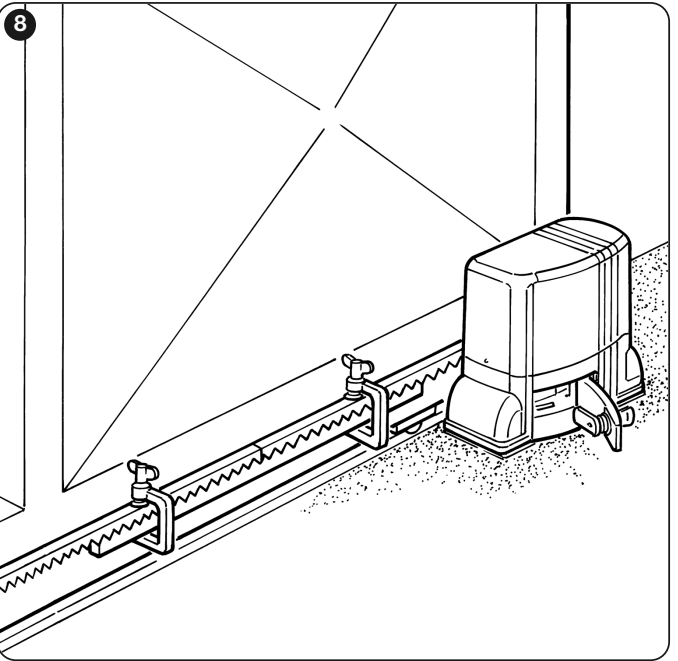
- Prepare the foundation and conduits according to the installation drawing. The base plate must be level, parallel to the gate's direction of travel, and securely anchored. Also determine its position according to how the gear rack is attached.
- Install the motor only after the foundation has cured. Set the height and secure it; the drive pinion must not support the weight of the gate leaf.
- Disengage the gearbox and fit the gear rack while moving the gate leaf by hand. The individual sections must form a straight line, with no step in height.
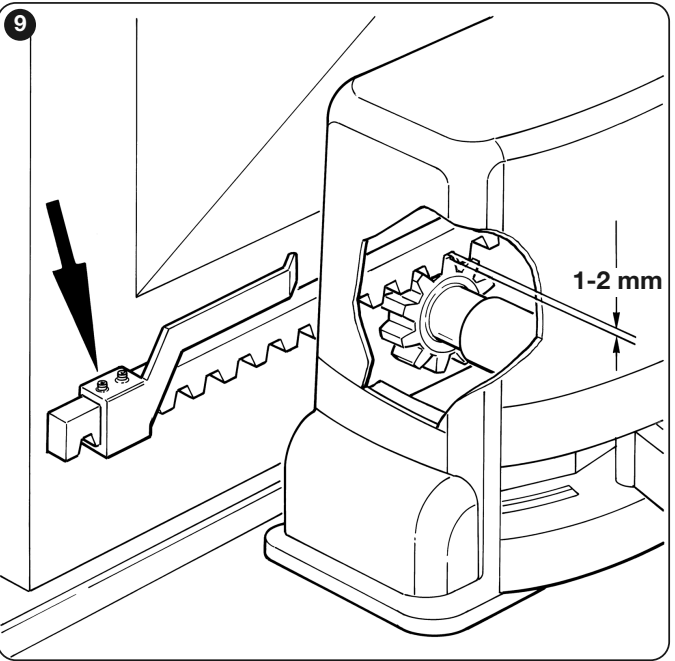
- Maintain approximately 1–2 mm clearance between the gear rack and pinion along the entire travel path. Manually check the full travel in both directions and tighten the fasteners.
Setting the limit switches
- With the gate released, move it by hand to the open position and stop approximately 2–3 cm before the fixed mechanical stop.
- Slide the corresponding limit-switch bracket along the gear rack until the switch activates. Then slide it further in the same direction by at least 2 cm and secure it.
- Set the closed position in the same way. The bracket must reliably engage the lever without striking the drive housing.
- Engage the gearbox, test both directions slowly, and check the run-on distance and that the correct FCA/FCC LED lights up. The gate leaf must not hit the fixed stops while moving.
Manual release during a power failure
The gate must be stationary. Disconnect the power and secure the gate leaf against moving on its own, especially on a slope or in windy conditions. Do not handle the gate while it is moving or put your hands into the gear teeth.
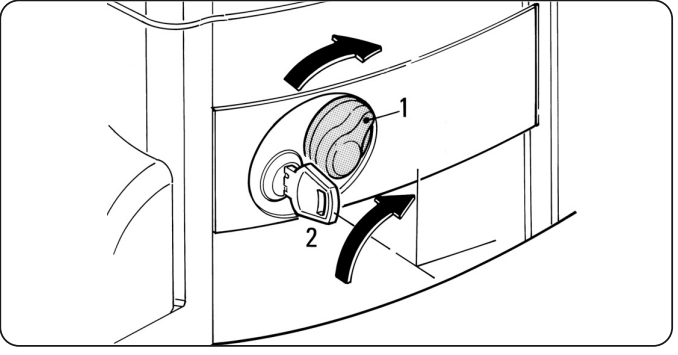
- Turn the lock cover and insert the key.
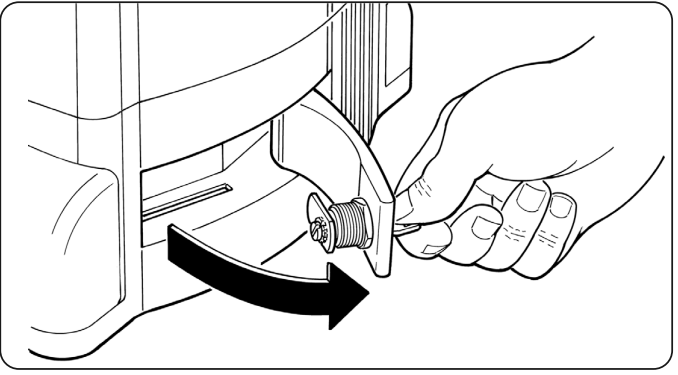
- Turn the key 90° clockwise and pull the handle towards you. The gate leaf can now be moved by hand.
- To re-engage the drive, close the handle, turn the key the other way, and move the gate slightly by hand until the gearbox engages mechanically. Remove the key and put it away.
Wiring
| Connection | Cable as specified in the instructions | Max. length |
|---|---|---|
| Power supply | 3 × 1.5 mm² | 30 m |
| Warning light | 2 × 0.5 mm² | 30 m |
| Antenna | RG58 coaxial cable | 20 m, recommended length under 5 m |
| Photocells TX / RX | 2 × 0.5 mm² / 4 × 0.25 mm² | 30 m / 30 m |
| Key switch | 4 × 0.25 mm² | 30 m |
For a power cable longer than 30 m, a technician must specify a larger cross-section, for example 3 × 2.5 mm², and protective earthing at the drive. Cable cross-sections and types must be checked for the specific route, circuit protection, and environment; lay power and control cables separately.
Control board, terminals, and polarity
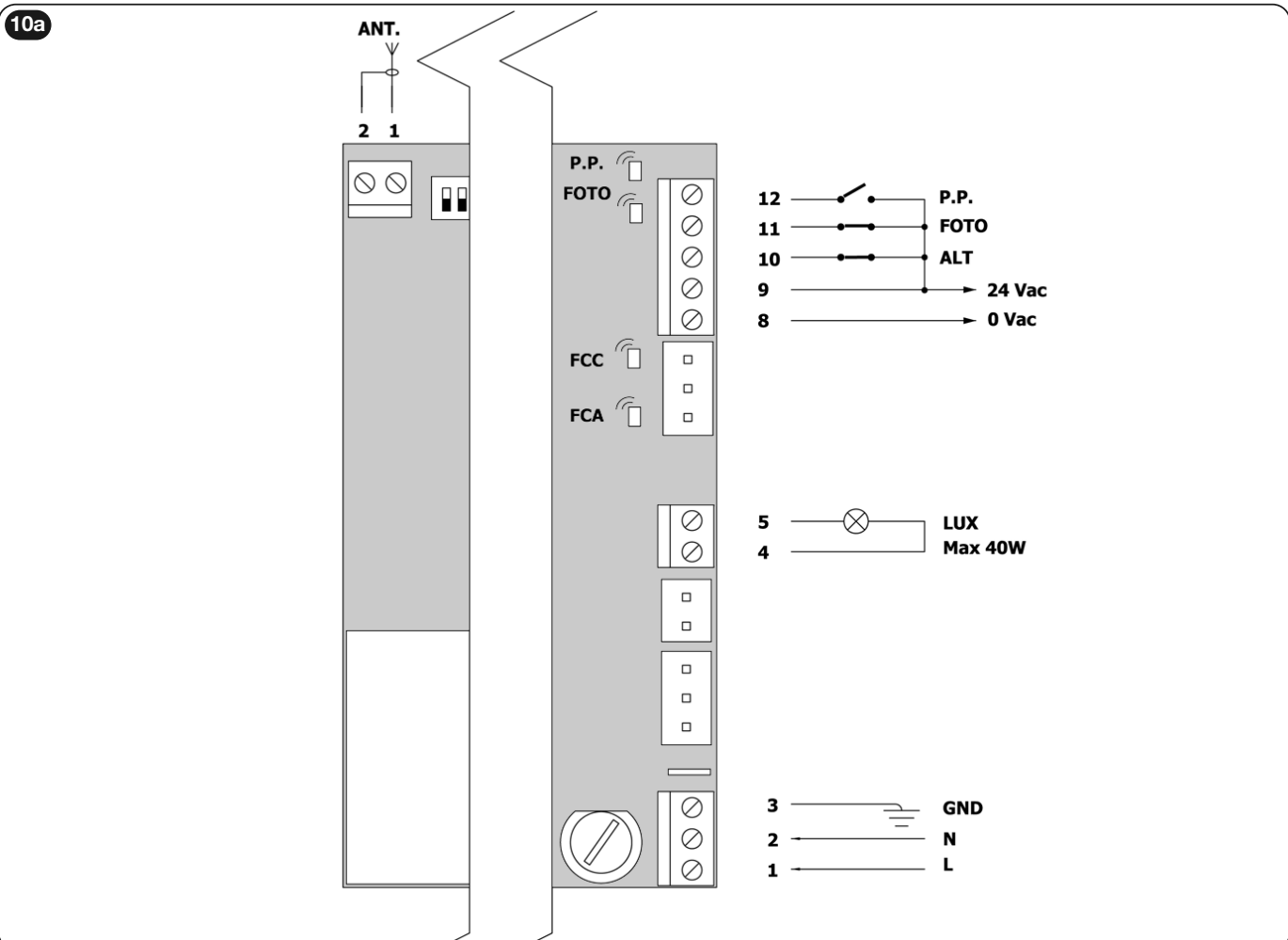
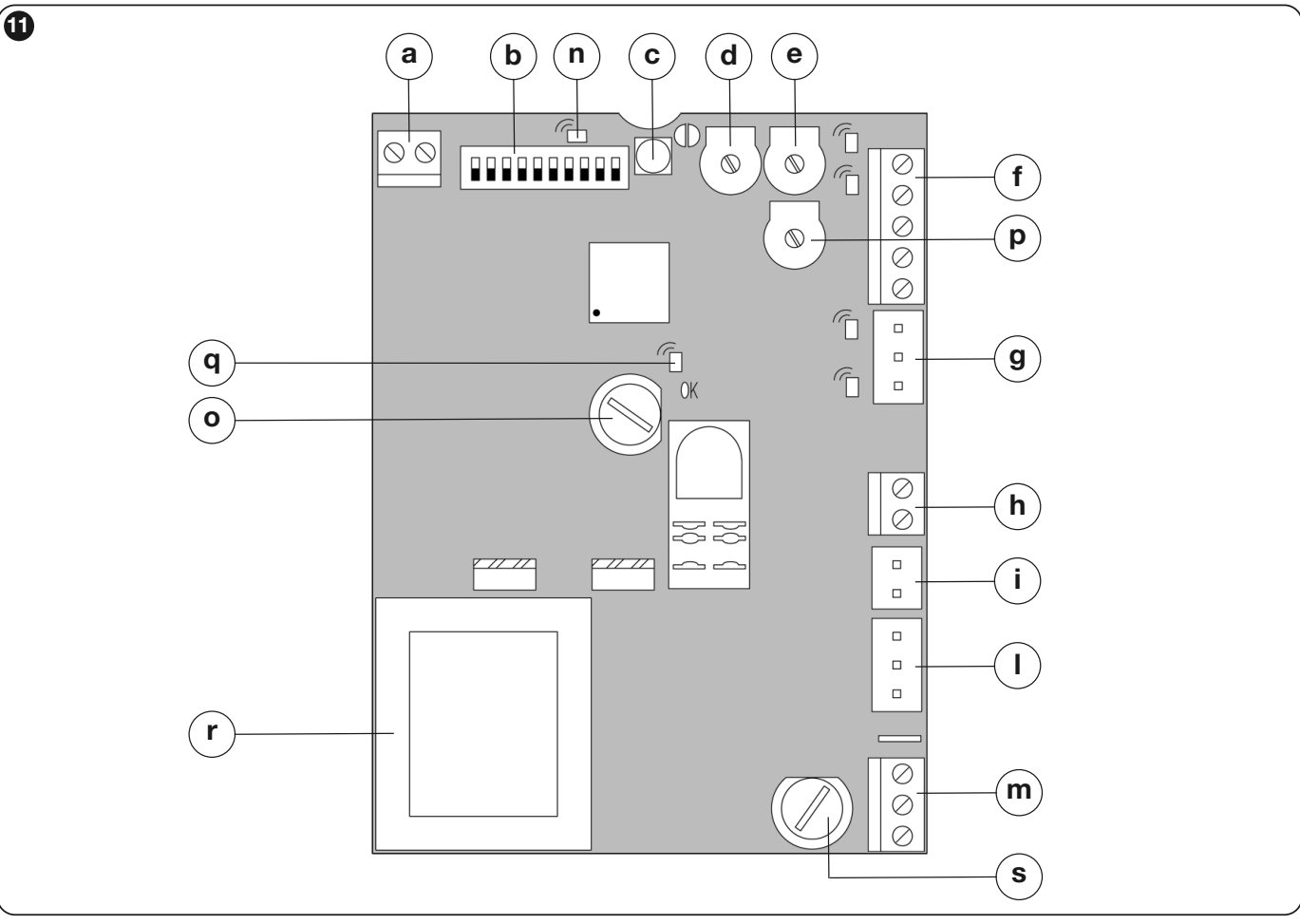
The built-in ROA37 has 10 DIP switches, TL/TP/F trimmers, and a receiver button. Terminal 12 is the P.P. command (step-by-step); this input is not a Fototest power output.
| Terminal | Function and connection |
|---|---|
| 1 / 2 / 3 – mains supply | 1 = L, 2 = N, 3 = PE (GND protective earth). 230 V AC, 50 Hz power supply. |
| 4–5 – warning light | 230 V AC, max. 40 W. Use ELAC, not low-voltage ELDC. |
| 8–9 – accessories | 8 = 0 V AC, 9 = 24 V AC, tolerance ±25%, total max. 150 mA. This is AC voltage, so there is no fixed positive or negative terminal. |
| 9 COMMON | Common contact for control and safety inputs; not protective earth (PE). |
| 9–10 ALT | Voltage-free NC stop contact with brief reverse movement. |
| 9–11 FOTO | Voltage-free NC photocell contact. |
| 9–12 P.P. / SS | Voltage-free NO command: open – stop – close – stop. |
| Separate ANT. 1–2 | 1 = antenna coaxial cable centre conductor, 2 = shield. Numbers 1–2 on the antenna connector are not mains terminals 1–2. |
Board legend: a antenna; b DIP; c radio button; d TL; e TP; f control inputs and outputs; g limit switches; h warning light; i capacitor; l motor; m mains; n radio LED; o low-voltage fuse; p force F; q OK LED; r transformer; s mains fuse. Replace fuses only with the power disconnected, using the same type and rating as specified on the installed board.
Bridge unused NC inputs ALT and FOTO to common terminal 9 as shown in the diagram; leave an unused NO input unconnected. Wire multiple NC contacts in series and multiple NO contacts in parallel. A bridge must not replace a required safety device on an operating gate.
Connecting NICE EPM photocells
| Connection | Terminals |
|---|---|
| Power supply for both TX and RX | EPM 1 → ROA37 9 (24 V AC), EPM 2 → ROA37 8 (0 V AC). With AC, there is no fixed +/− polarity. |
| RX safety contact | EPM 4 COM → ROA37 9; EPM 5 NC → ROA37 11 FOTO. Do not use RX terminal 3 NO for this purpose. |
In this wiring configuration, the ROA37 has no separate Phototest output. When using multiple pairs, wire the safety NC contacts in series and calculate the current draw; one EPM pair can draw up to 55 mA. If there is a risk of mutual interference, the EPM manual allows synchronization with AC power by adjusting the SYNC jumper on both TX units and reversing the power supply to one pair. This adjustment must be made by a technician according to the specific layout.
The TX and RX must be precisely aligned opposite each other. For distances over 10 m, adjust the +10m jumper on the RX as described in the EPM manual. The typical effective range of EPM is 15 m; fog, rain, and dust can reduce it. Photocells protect the passageway, not every pinch or shearing point on the gate.
Initial start-up and checking the direction
Before connecting the power, the mechanical stops, limit-switch brackets, protective earth, and safety input wiring must all be in place. If the gate leaf has a pedestrian gate, opening it must disable automatic movement.
- Disengage the motor, move the gate leaf by hand to approximately the midpoint of its travel, then re-engage the drive.
- After switching on, the OK LED should flash approximately once per second. With the travel path clear and the gate away from its limit positions, PHOTO/FOTO, FCA, and FCC should be lit; the command NO input should be off when no command is being sent. The gate should not move by itself.
- Operate the limit switch lever to check that the correct FCA or FCC LED goes out. If there is a fault, disconnect the power and check the connectors, safety devices, and fuses.
- After completing the setup, use a brief SbS/P.P. command to check that the first movement after power-up is opening. Stop it if it moves in the opposite direction. The reverse direction may also reverse the effect of the safety devices.
If the initial direction is reversed
Disconnect the mains and verify that the system is de-energized. Following the original diagram, rotate the motor connector and the limit-switch connector by 180°. Switch on and repeat the opening test from halfway along the travel path. Do not reverse the direction by swapping the safety inputs or increasing the force.
The TH1500/ROA37 uses trimmers and DIP switches to set the operating time and functions.
Testing the completed gate
- Test full opening and closing, correct stopping before the mechanical stops, and smooth movement.
- Test each safety device separately. Interrupt the photocell beam at the TX, at the RX, and between them; check that the gate stops or reverses as expected.
- The technician must measure the forces of the completed gate and set the lowest force that ensures reliable movement. Photocells and the F setting do not replace an assessment of all hazard points.
- Only after all tests have been passed should you hand over the manual, keys, instructions for manual operation, and maintenance schedule.
DIP switch and trimmer settings
A technician must make adjustments while the gate is stationary. Disconnect the power before working on the wiring. After changing the mode, time, or force, retest full opening and closing and all safety devices.
| DIP 1 | DIP 2 | Mode |
|---|---|---|
| OFF | OFF | Hold-to-run – movement only while the command is held. |
| ON | OFF | Semi-automatic – full movement after a brief command. |
| OFF | ON | Automatic – closing follows opening and a pause. |
| ON | ON | Automatic + Always close – after power is restored, closing may follow with a 5 s pre-flash. |
|
DIP |
Function | Effect |
|---|---|---|
| 3 ON | Condominium mode | While opening, further Step-by-step commands are ignored; while closing, a command reverses the direction. Not in hold-to-run mode. |
| 4 ON | Pre-flashing | 5 s before movement; 2 s in hold-to-run mode. |
| 5 ON | Closing after photocell activation | Automatic mode: the gate closes 5 s after the passageway is clear. Semi-automatic mode: when FOTO is triggered during closing, automatic closing is activated after the set pause. |
| 6 ON | FOTO also active during opening | Interrupting the beam also stops opening; in semi-automatic/automatic mode, movement resumes once the beam is clear. |
| 7 ON | Soft start | Reduces jolting on start-up. |
| 8 ON | Slowdown | The TL setting must account for slowdown beginning approximately 50–70 cm before the limit switch. Motor torque is also reduced; the gate may stop if resistance is too high. |
| 9 ON | Brake | Braking at the end of movement: first gentle, then more intense. |
| 10 | Unused | No function in this version. |
| Trimmer | What it adjusts | How to check |
|---|---|---|
| TL | Maximum opening/closing time. Range according to the manual: approximately 2.5 to over 40 s; with TLM extension: approximately 40 to over 80 s. | In semi-automatic mode, perform a full opening and closing cycle. Allow a margin of 2–3 s. If the range is insufficient, use the TLM extension according to the control board. When deceleration is enabled, set the time based on when deceleration begins as well. |
| TP | Pause time before automatic closing. Approximately 5 to over 80 s. | Enable automatic mode, open the gate fully, and measure the actual pause before closing begins. |
| F | Force / motor torque. | Confirm the setting by measuring impact forces and performing a safety test. Increasing F is not a way to overcome a mechanical fault in the gate. |
Built-in receiver and remote controls
The ROA37 has a built-in multi-code receiver 433.92 MHz. It supports the O-Code/FloR/TTS family, or Flo, or Smilo. The first remote control programmed determines the family for subsequent remote controls. The FLO2RE included in the kit belongs to the FloR family. Program the remote controls with the gate stationary.
Mode I – programming the entire remote control
- Hold the RADIO/receiver button until its LED lights up (approximately 4 s), then release it.
- Within 10 s, hold the chosen button on the new remote control for approximately 3 s, until the receiver confirms programming with three flashes.
- Another remote control can be programmed in the same way within the next 10 s; otherwise, wait for the mode to end.
| Button in Mode I | Assigned command |
|---|---|
| 1 | Step-by-step |
| 2 | ALT – stop |
| 3 | Open |
| 4 | Close |
A one- or two-button remote control uses only the corresponding first button(s). On the TH1500, the second button is not automatically assigned to pedestrian opening.
Mode II – assigning one command to a selected button
| Number of times to press RADIO | Command |
|---|---|
| 1 | Step-by-step |
| 2 | ALT – stop |
| 3 | Open |
| 4 | Close |
Briefly press RADIO as many times as the number of the required command. The LED will flash the same number of times. Within 10 s, hold the selected button on the remote control for approximately 3 s, until three flashes confirm that it has been programmed. Repeat the procedure for each additional button.
Adding a remote control using a working remote control
Near the receiver, at a distance of approximately 10–20 m, hold the button on the new remote control for at least 5 s and release it. On the old remote control press the corresponding button 3 times; then press the button on the new remote control once. The new remote control will inherit the assignment of the old one. In Mode I, you can use any button on the old remote control; in Mode II, use the button assigned to the required command. Leave powered only the receiver you want to program.
When powered on, the receiver LED indicates the family: 1 flash for Flo, 2 flashes for O-Code/FloR/TTS, 3 flashes for Smilo; 5 flashes means the memory is empty. To select a different family, first erase the receiver’s entire memory as described in the following section.
Troubleshooting and common faults
| Symptom | Meaning / what to check |
|---|---|
| OK: approximately 1 flash/s | The control unit is running and waiting for a command. |
| OK: rapid double flash | An input or DIP switch setting has changed. |
| OK: very rapid flashing for approximately 3 s | Initial test after switching on the power supply. |
| OK: irregular flashing | The test or internal check failed; check the power supply and wiring, and contact a service technician if the problem persists. |
| FOTO / ALT not lit | The NC safety circuit is open. Check the photocells, contacts, and wiring. |
| FCA / FCC | When the corresponding limit switch is activated, its LED goes out. If the function is reversed, check the direction and connector. |
| Gate stops during deceleration | Possible excessive resistance or loss of torque during deceleration. Check the mechanics first, then the TL/DIP 8 setting. |
If the motor does not respond, first check the power supply, protection device, status of the safety inputs, and command. If the movement is in the wrong direction, correct it as described in the procedure below. If you notice unusual noise, damage, or jerky movement, stop using the gate; do not increase the force as a substitute for repair.
Erasing the memory
The receiver button erases its radio memory, not the mechanical settings of the DIP switches and trimmers. With the gate stationary, hold the button: after approximately 4 s the LED lights up, after a further 4 s it goes out, and after approximately another 4 s it starts flashing.
| Releasing the button | Result |
|---|---|
| Exactly during the 3rd flash | Erases all programmed remote controls. |
| Exactly during the 5th flash | Erases the receiver’s entire memory, including settings and code family. |
After the memory is completely erased, the first new remote control will determine the code family again. Check the operating mode and operating time settings separately.
Regular inspection and maintenance
Arrange for professional maintenance at least every 6 months. For intensive use or harsh environments, the service plan may specify a shorter interval.
- After disconnecting the power, check the fastenings, corrosion, cables, and water ingress.
- Check the wear on the pinion, rack, guide, and stops, as well as their play and manual operation.
- Clean the photocells and check the manual release. After switching the power back on, test all safety devices, stopping, and forces.
- Keep a service record and the manual. Do not enter the gate opening while the gate is moving; keep remote controls and fixed control devices out of children’s reach.
NICE TH1500 technical specifications
| Power supply / motor | 230 V AC, 50 Hz / single-phase asynchronous |
|---|---|
| Power consumption according to the manual | 350 W, 500 W peak |
| Current / capacitor | 1.6 A / 14 µF |
| Rated torque | 12 Nm (360 N according to the manual) |
| Maximum torque of older version | 35 Nm according to the enclosed Czech manual; check the specific version when replacing it |
| Rated speed | 0,16 m/s |
| Max. gate leaf weight / length | 1 500 kg / 12 m |
| Operating cycles | 15 cycles/hour with a 6 m gate leaf; max. 5 consecutive cycles |
| Protection rating / electrical class | IP44 / I – protective earthing |
| Thermal protection | 140 °C |
| Temperature | −20 to +50 °C |
| Rack | Module 4 |
| Auxiliary output | 24 V AC ±25%, total max. 150 mA |
| Flashing light | 230 V AC, max. 40 W |
| Operator weight | 11,5 kg |
| Radio | 433,92 MHz, integrated in ROA37 |
Dimensions and installation space
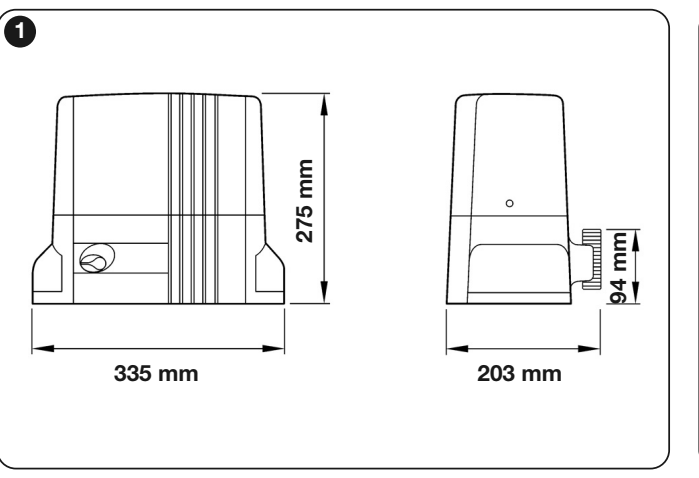
The TH1500 installation drawing shows a footprint of 335 × 203 mm and an overall height of 275 mm. When choosing a location, leave enough space to open the cover, access the key and safely operate the manual release.
We can help you choose the right setup via contact. Please specify the gate length and weight, the expected number of cycles and, for a replacement, include a photo of the rating plate and control board.
How can I order this item?
Choose the option that suits you:
- order online: use the buy button to add the goods to your shopping cart (you will find the buy button here in the product variants table).
- order by email: place your order at [email protected]






