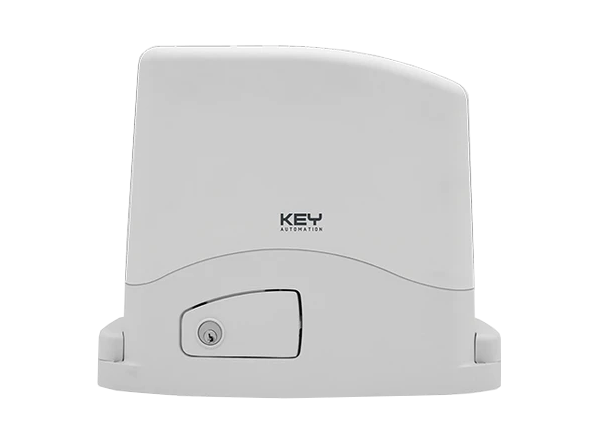
KEY Turbo S (TUS11324) - sliding gate operator for gates weighing up to 1100 kg
| Product availability: | within 14 days | We normally dispatch goods within 14 days. |
|---|
within 14 days
€631.78 including VAT
| Weight |
|---|
| 10 kg |
Description of KEY Turbo S (TUS11324) - sliding gate operator for gates weighing up to 1100 kg
Drive unit KEY Turbo S (TUS11324) is designed for a sliding gate weighing up to 1,100 kg. It is equipped with 24 V electric motor, so even intensive use. The gate leaf reaches a speed of 20 cm per second. The control unit is designated CT-10324 and the drive unit also includes a so-called electromechanical limit switch — a spring with microswitches. The drive unit has a built-in receiver for the radio signal.
KEY Turbo S TUS11324 – drive unit only
This is a non-reversible drive for a sliding gate with mechanical limit switches. The accessories shown in the diagrams are examples of wiring only; they are not a list of items included with the drive unit.
For installation and mechanical assembly, refer to the TURBO S manual. The operating procedures below are for the CT10324 control unit shown, with a five-digit display, UP, MENU, DOWN-RADIO and SBS buttons, and BASE/ADV menus. Before setup, compare the terminal markings and motor selection on your own control board with the illustration shown.
The duty cycle does not allow unlimited continuous operation. A maximum of 50 cycles/hour applies to a reference gate leaf 4 m long, weighing 200 kg, at a temperature of 20 °C. For a longer gate leaf, reduce this figure proportionally (8 m: by 50%); above 20 °C, reduce it by 15% for every additional 5 °C; for a gate at the maximum permitted weight, reduce it by 50%. Speed depends on the weight of the gate.
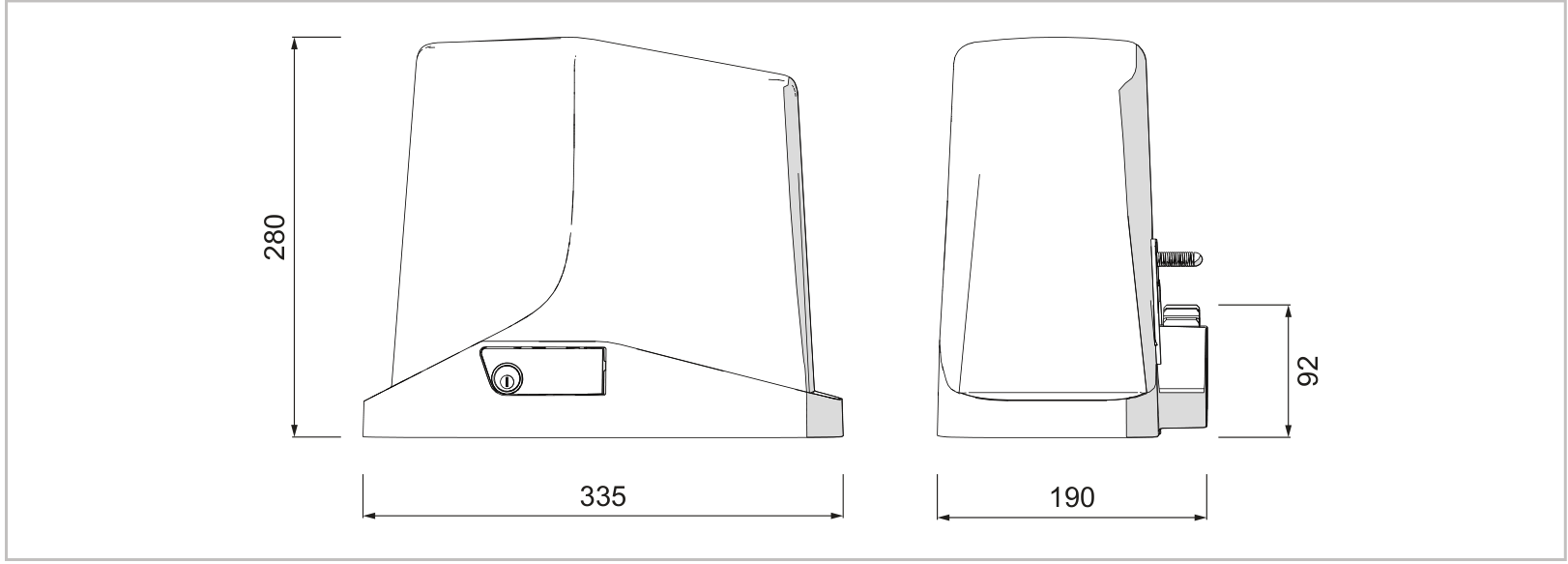
Mechanical installation of the drive unit
Electrical connections, setup and testing must be carried out by a qualified installer. When released, the gate must move smoothly, must not start moving on its own, and must have secure mechanical stops in both the open and closed positions. The gate must run on a level track, not up or down a slope. The installation area must not be subject to flooding. The manufacturer requires safety edges to protect all potential crushing points (hands, feet and similar); other protective devices and their locations must be determined according to the risks posed by the specific gate.
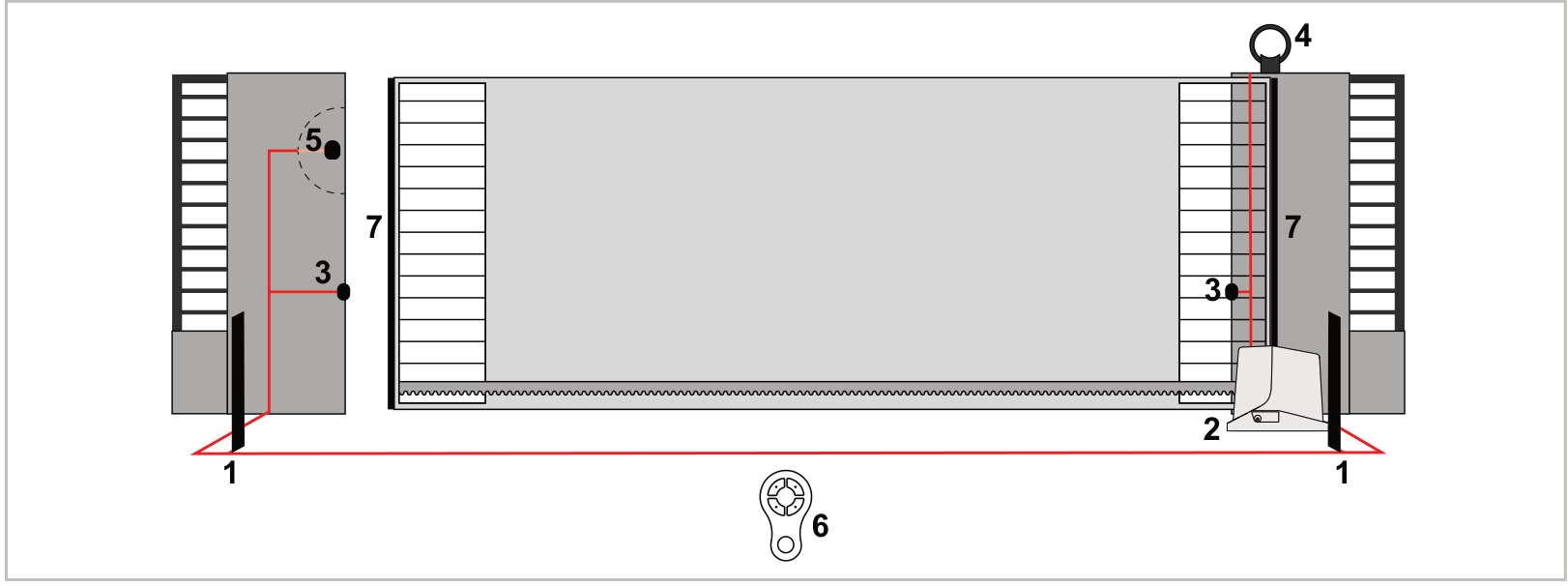
List of accessories
- 2 – drive unit
- 3 – photocells
- 4 – warning light
- 5 – key switch
- 6 – remote control
- 7 – safety edges
The placement of safety devices must be based on the actual risks posed by the specific gate.
Base plate and fixing
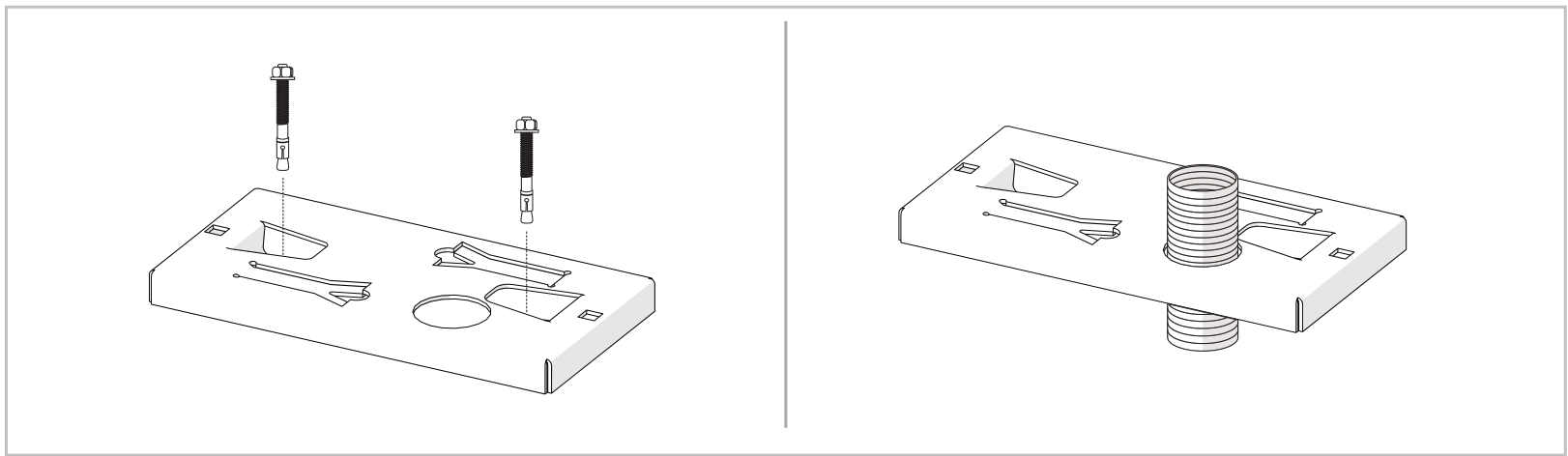
- Determine the position using the dimensions of the drive unit, base plate and rack. Install conduits for the cables. Secure the base plate with heavy-duty anchor bolts, or set it in concrete as shown in the drawing.
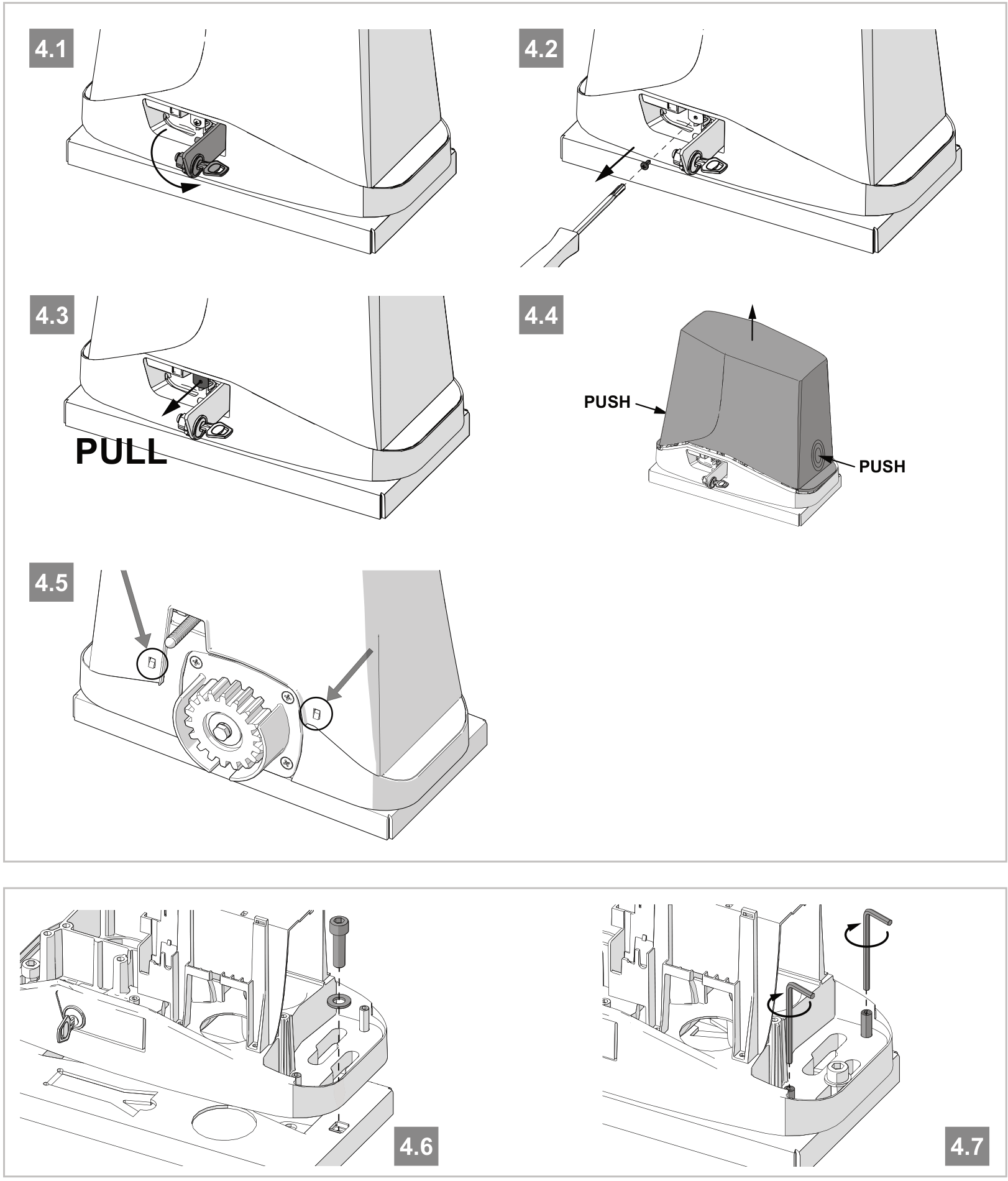
- Release the drive and open the cover. Place the drive unit on the base plate and insert the two Allen fixing bolts. For an alternative fixing method, use the inner slots in the casting so the fixing does not interfere with the cover.
- Level the drive unit. If adjustment of the rack is insufficient, use the four levelling screws as shown in Figure 4.7. Tighten the two main fixing bolts securely; the drive unit must remain stable throughout the full travel. Check the fixing again after several movements.
Toothed rack and mechanical limit switches
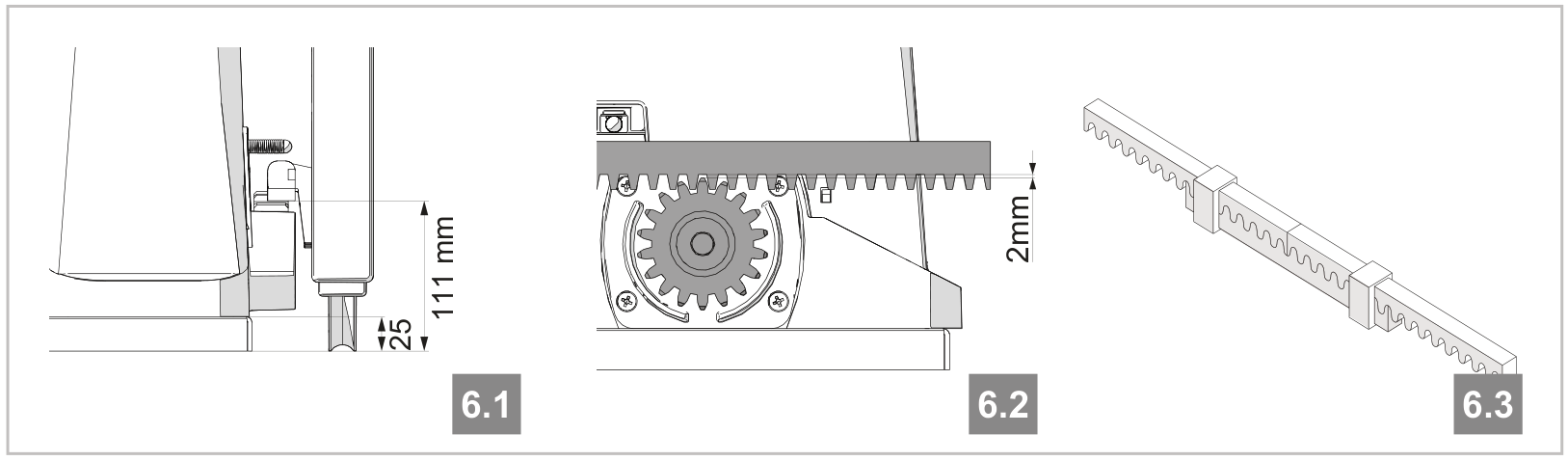
- With the drive released, open the gate fully. Place the first rack section on the pinion and fix it to the gate using screws and spacers.
- Move the gate by hand, aligning the next sections with an auxiliary piece of rack. After adjustment, maintain a 2 mm clearance, so the weight of the gate does not rest on the drive pinion.
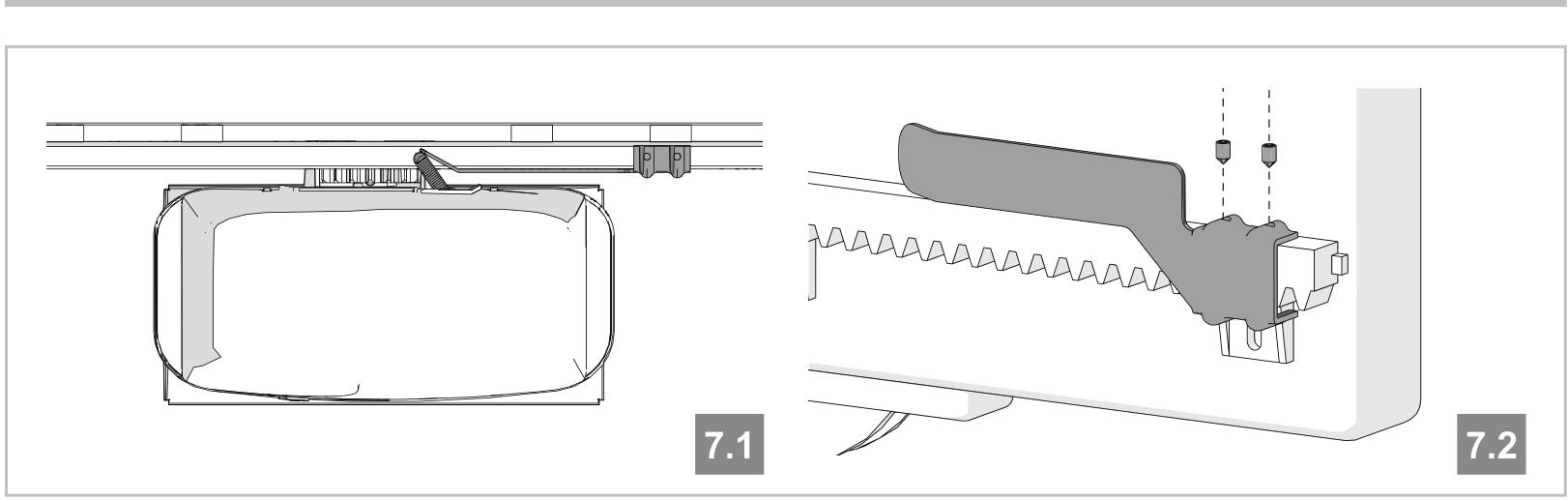
- Fit the mechanical limit-switch actuators at the ends of the travel. Depending on the weight of the gate, leave a gap between the gate and the fixed mechanical stop of 30–50 mm; the actuator should press the limit switch before the gate hits the stop.
- Secure the actuators firmly as shown in the drawing, at both the open and closed positions. The stops must prevent derailment, and their position must not allow the actuator to hit the gear wheel.
Wiring and separation of power supplies
The power supply for this drive unit is 230 V AC, 50/60 Hz; the motor operates at 24 V DC. The control board itself is powered by a 24 V AC transformer. Do not interchange mains and low-voltage wiring. The power supply must have protective earthing, suitable overcurrent protection, a residual-current device and a disconnecting device for overvoltage category III. Disconnect the mains and any backup power supply before opening the unit or connecting wires.
| Connection | Cable | Maximum length |
|---|---|---|
| 230 V supply | 3 × 1.5 mm²; for lengths over 20 m: 3 × 2.5 mm² | up to 20 m / over 20 m, maximum 50 m |
| FLASH warning light / LED courtesy light | 3 × 0.55 mm² | 20 m |
| Antenna | RG58 | 10 m; less than 5 m recommended |
| Electric lock | 2 × 1.5 mm² | 10 m |
| TX photocell | 2 × 0.55 mm² | 20 m |
| RX photocell | 4 × 0.55 mm² | 20 m |
| Safety edge | 2 × 0.55 mm² | 20 m |
| Key switch | 4 × 0.55 mm² | 20 m |
| Motor | 2 × 1.5 mm² | 10 m |
The cable must be suitable for the installation environment; the manufacturer specifies H03VV-F for indoor use and H05RN-F/H07RN-F for outdoor use. Connect the protective conductor at the control unit.
Manual release in the event of a power failure
- The gate must be stationary. Disconnect the power supply and secure the gate against unintended movement.
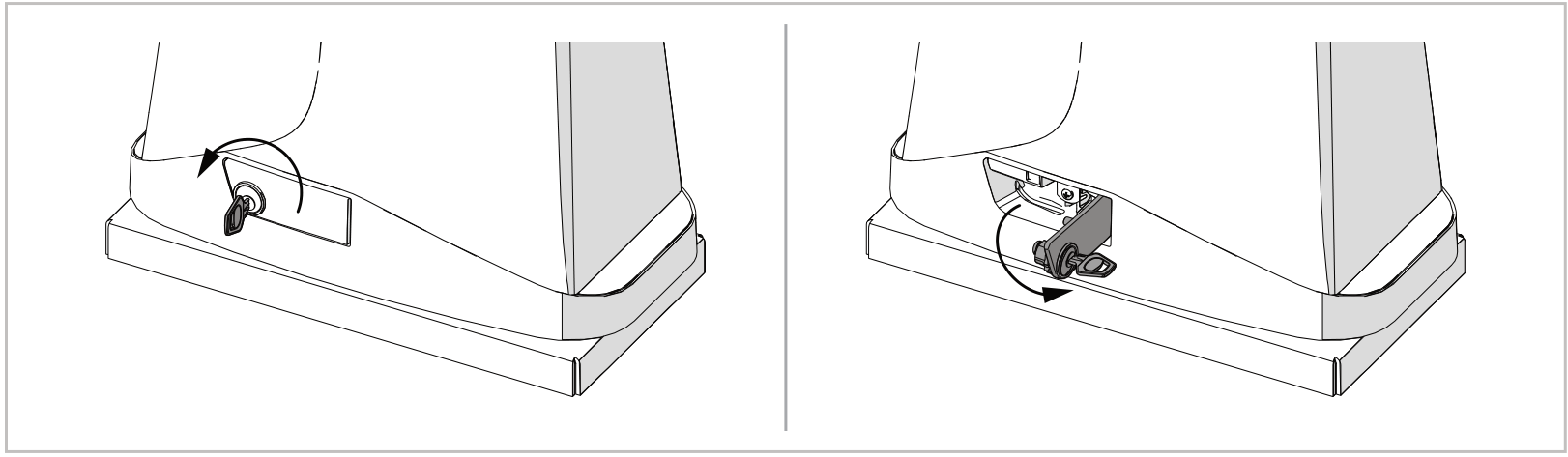
- Insert the release key and turn it 90° counterclockwise.
- Flip the release lever out until it is perpendicular to the drive. You can now move the gate manually.
- Re-engage the drive mechanically before operating it under motor power again. Do not engage it while the motor is running; this could damage internal components.
CT10324 control board
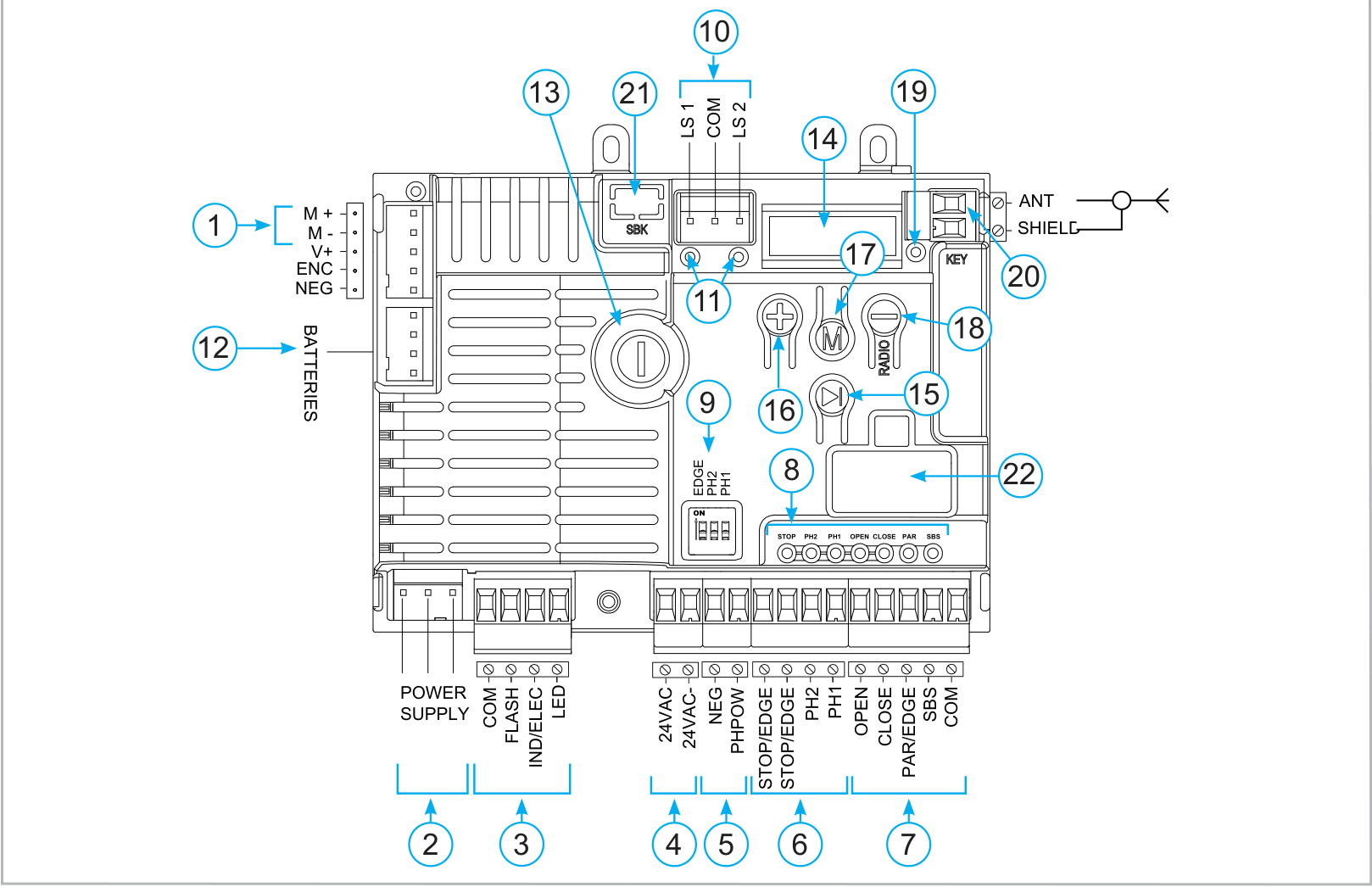
Orientation as shown: heatsink on the left, display and control buttons on the right, main terminal blocks at the bottom. Labels on the board and in the diagrams remain as originally shown. The M1+/M1− designation in the manual table corresponds to the M+/M− connector shown in the image.
Board labels
- 1 – M+/M−, motor
- 2 – Transformer power supply
- 3 – FLASH, IND/ELEC, LED
- 4 – 24 VAC for accessories
- 5 – PH-POW and NEG, power supply for safety devices
- 6 – Safety inputs
- 7 – Control inputs
- 8 – LEDs for safety and control inputs
- 9 – EDGE, PH2, PH1 DIP switches
- 10 – Limit switches
- 11 – Limit switch LEDs
- 12 – KBP/KBPN, backup battery charger
- 13 – 1.6 AT fuse, slow-blow
- 14 – Five-digit display
- 15 – SBS, step-by-step
- 16 – UP (+)
- 17 – MENU
- 18 – DOWN-RADIO (−)
- 19 – RADIO / KEY LED
- 20 – Antenna
- 21 – Optional SBK energy-saving module
- 22 – Optional KUBE / PowerBus interface
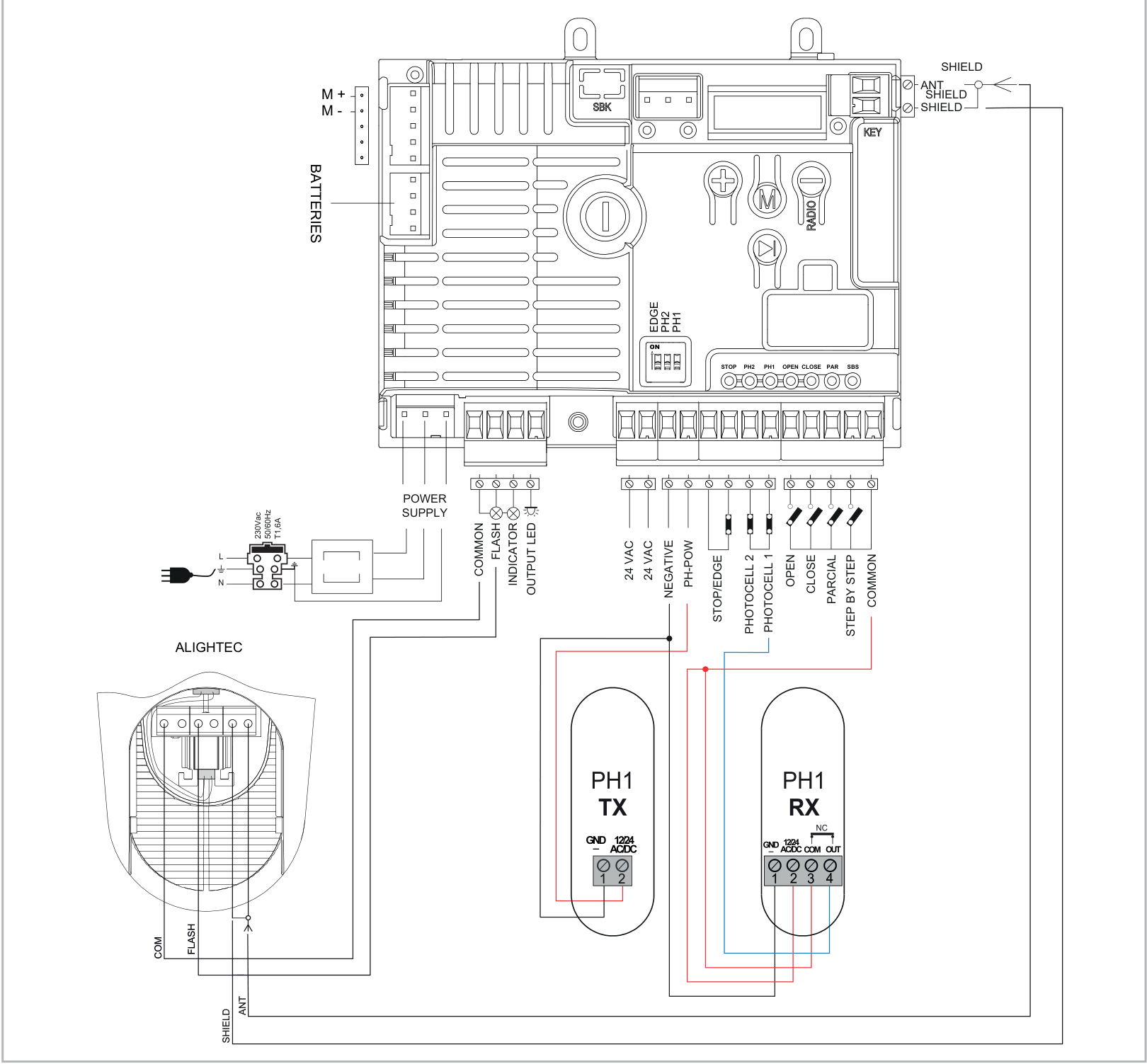
Overall wiring diagram for the board and accessories
The diagram shows the complete board, transformer and mains supply, ALIGHTEC warning light, antenna, PH1 TX/RX photocells and control contacts.
Terminals, polarity and power supply limits
| Terminals | Function and wiring |
|---|---|
| L / N / PE | L = 230 V AC line; N = neutral; PE = protective earth. AC has no +/− polarity. |
| POWER SUPPLY | Board supply from the transformer: 24 V AC (+10% / −15%), 50/60 Hz. Do not connect 230 V here. |
| M+ / M− | Positive (+) and negative (−) terminals for the 24 V DC motor; also labelled M1+/M1− in the image. |
| V+ / ENC / NEG at the motor | In this wiring setup do not use; these are not the photocell power supply terminals. |
| 24 VAC / 24 VAC | Pair of accessory terminals: unregulated 24 V AC, maximum 200 mA. No +/− polarity; inactive when running on battery power. |
| PH-POW / NEG | PH-POW = positive (+) pole, NEG = negative (−) pole of the unregulated 24 V DC supply for safety devices; PH-POW limit is 200 mA. The mode is associated with PHOTO TEST. |
| COM at the outputs | Common positive (+) pole for the FLASH, IND/ELEC and LED outputs. |
| FLASH | Warning light connected between COM (+) and switched FLASH (−): 24 V DC, maximum 15 W. The output can be set to steady or flashing operation. |
| LED | Auxiliary lighting between COM (+) and switched LED (−): unregulated 24 V DC, maximum 15 W. |
| IND/ELEC | Common COM (+), switched IND/ELEC (−). IND mode: indicator light, 24 V DC / maximum 5 W. ELEC mode: electric lock, 12 V DC / maximum 15 VA. The mode is set by INDIC LIGHT. |
| COM at the inputs | Common point for PH2, PH1, OPEN, CLOSE, PAR and SBS; internally positive. A control or safety contact is voltage-free; no +/− polarity is specified at its terminals. |
| LS1 / LS2 / COM | Limit switch connector; check the corresponding LEDs. |
| BATTERIES | Connect the KBP/KBPN charger as instructed in the relevant manual. |
| ANT / SHIELD | ANT = signal, the coaxial cable's centre conductor; SHIELD = shielding. This is not a +/− power supply pair. |
The total current draw of all devices on the relevant power output must remain within its limit. Do not confuse the unregulated DC output with 24 V AC. For accessories, use the terminal block terminals shown in the diagram, not NEG/V+/ENC at the motor connector.
PH1 and PH2 photocells – polarity-sensitive wiring
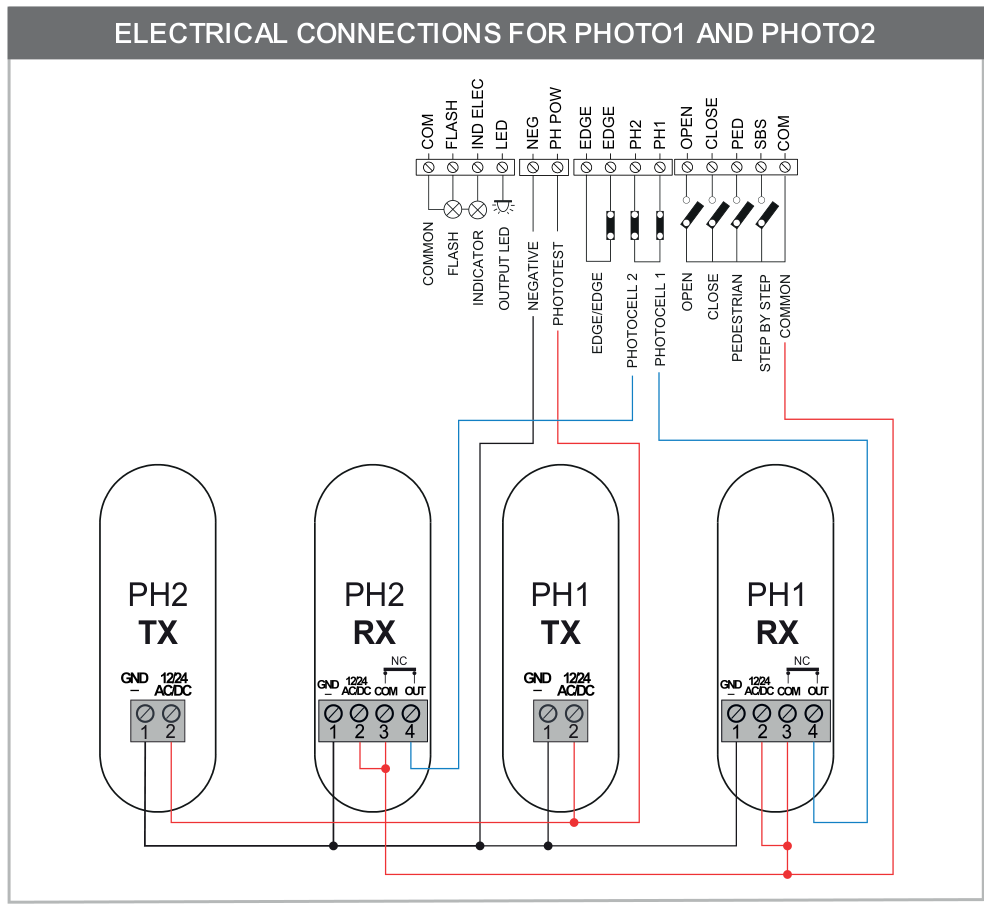
| Device | Connection for the four-terminal RX shown |
|---|---|
| TX units for both pairs | TX 1 / GND (−) → board NEG; TX 2 / 12/24 AC/DC (+) → board PH-POW. |
| RX units for both pairs | RX 1 / GND (−) → board NEG; RX 2 / 12/24 AC/DC (+) → COM (+). |
| PH1 RX contact | RX 3 / COM → board COM; RX 4 / OUT (NC) → PH1. The RX 2–3 jumper is shown in the original diagram. |
| PH2 RX contact | RX 3 / COM → board COM; RX 4 / OUT (NC) → PH2. The RX 2–3 jumper is shown in the original diagram. |
Numbers 1–4 apply only to the TX/RX shown. Other photocells may have different terminals; connect their power supply and NC contact according to their own instructions. COM and OUT on the receiver are relay contacts, not power supply +/− terminals. When wired according to this diagram, the contact’s common point is connected to the board’s COM terminal.
PH1 stops and reverses movement while closing; the gate cannot close while it is active. PH2 depending on the setting, protects opening or both directions; when the circuit opens, it stops movement and resumes opening once the obstruction is cleared. The FOTO1 SETUP and FOTO2 SETUP settings change how it operates.
Photocell testing and energy-saving mode
During photocell testing, TX power is controlled via PH-POW. In ADV, set PHOTO TEST: 0 = off, 1 = PH1, 2 = PH2, 3 = both pairs. Test only correctly connected devices.
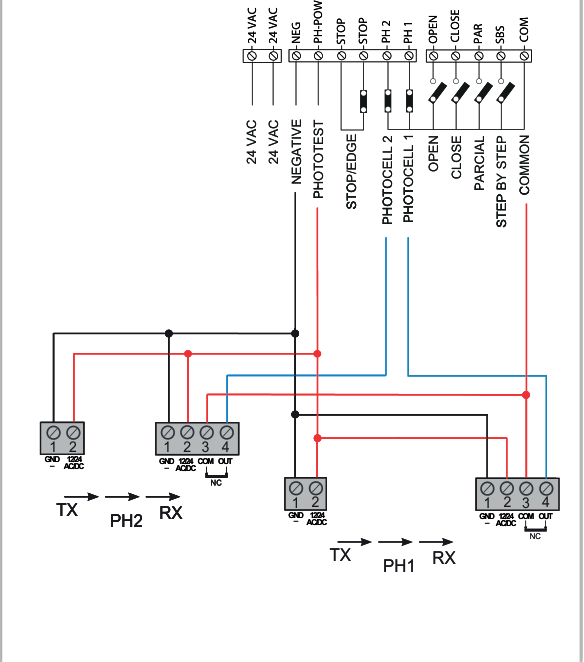
In the energy-saving wiring configuration, the positive supply wires for both TX and RX are connected to PH-POW (+), and the negative wires to NEG (−); the RX contacts remain connected between COM and PH1/PH2. Enable STAND BY in BASE. PHOTOTEST is not available when STAND BY is enabled. Do not combine these two diagrams.
Safety and control inputs
| Input | Function |
|---|---|
| EDGE / EDGE (STOP/EDGE), pair | Voltage-free STOP NC input or safety edge; TYPE EDGE: 0 = STOP NC, 1 = 8k2 resistive, 2 = NC contact, 3 = dual 4k1 resistive. When the edge is triggered, it briefly reverses movement and stops. |
| PH1 / COM | NC contact for the closing photocell. |
| PH2 / COM | NC contact for the photocell, according to the selected mode. |
| OPEN / COM | NO opening contact. |
| CLOSE / COM | NO closing contact. |
| SBS / COM | NO step-by-step contact, as configured in SBS SETUP. |
| PAR (PED) / COM | NO partial-opening contact; the STOP TWO parameter allows it to be changed to STOP or a second opening edge. |
Configure the second edge on PAR (PED) using STOP TWO. For EDGE2, SETUP EDGE must be set to 0 so that the first edge, EDGE1, is triggered only during closing. EDGE2 protects during opening and briefly reverses movement when activated. The EDGE DIP switch does not disable this second input.
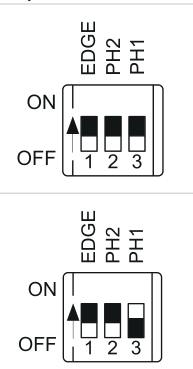
The ON position disables the corresponding safety function. When safety devices are connected, the corresponding DIP switch must be set to OFF. An unused input may be disabled only if permitted by the installation’s safety design: set its DIP switch to ON and confirm by holding UP (+) and DOWN-RADIO (−), until the LED for that input stops flashing. This does not fix faulty photocells or a faulty safety edge.
Initial startup and motor selection
- Check the mechanical fixings, stops, rack, free movement, earthing, and correct wiring of the safety devices. Switch on the power only after completing the wiring.
- When the travel limits have not been learned, LEARN TO DO is displayed. Press UP to cycle through the status, number of cycles, motor current, and board type, firmware and serial number; press MENU to return to the normal display.
- Before learning, select the correct model in ADV → MOTOR SETUP. For KEY Turbo S TUS11324 is option 3 in the menu shown. Select the value according to the model list for the relevant board; changing the motor type restores the factory settings and requires the travel limits to be learned again.
Automatic travel learning
Learning with the standard slowdown range
- Disengage the drive, move the gate to approximately the midpoint of its travel, then re-engage the drive.
- Press and hold UP (+) and MENU for approximately two seconds. The gate will begin opening slowly; the display shows LEARN OPEN1.
- If the gate starts closing instead of opening, stop it using DOWN-RADIO (−). Press SBS to restart learning in the opposite direction.
- The motor stops at the opening limit switch. After approximately two seconds, it starts closing; the display shows the closing-learning status.
- Learning ends when the closing limit switch is reached. Then run several complete cycles and test all safety devices and forces.
Learning must be completed fully and correctly before handover. According to the manufacturer, interrupt learning by triggering EDGE, PH2 or PH1, or by disconnecting the power supply. After successful learning, the BASE/ADV parameters can be changed.
Custom slowdown points
In BASE, set LENGH SLOW to P (custom setting), then start learning from the midpoint as described above. When the open position is reached, the drive starts closing. At the desired slowdown point during closing, press SBS; the display shows CLOS1 SLOW. Once closed, the gate starts opening again; press SBS at the slowdown point during opening (OPEN1 SLOW). After reaching the open position, the gate closes for the final time. If a point is not set, it is automatically set to 20% of the total travel.
Programming BASE and ADV
- Press and hold MENU. When BASE is displayed, release the button to open the basic menu; to access ADV, hold it for approximately five seconds and release when ADV appears.
- Scroll through the items using UP and DOWN-RADIO. The name and value alternate on the display.
- To edit, hold MENU until the value starts flashing, then release the button. Change the value using UP/DOWN-RADIO.
- Hold MENU until the display stops flashing to save the new value. Briefly press MENU to exit the menu.
The tables explain the available options and what they do. Force, speed and safety-function settings must be based on measurements taken on the specific gate. A higher REACT TIME value means a lower impact force, not a more powerful motor.
BASE basic menu
1. AUTO CLOSE
0–900 s; 0 = automatic closing disabled.
2. PHOTO CLOSE
0–30 s; closing time after passing through PH1; 0 = disabled.
3. REACT TIME
0–10; 0 = maximum impact force, 10 = minimum.
4. OPEN SPEED
1–5; opening speed from minimum to maximum.
5. SL-OP SPEED
1–5; opening speed during slowdown.
6. CLOSE SPEED
1–5; closing speed from minimum to maximum.
7. SL-CL SPEED
1–5; closing speed during slowdown.
8. SBS SETUP
0: open–stop–close–stop; 1: open–stop–close–open; 2: open–close; 3: apartment-block mode with timer (AUTO CLOSE ≠ 0); 4: apartment-block mode with immediate closing.
9. STOP TWO
0 = disabled; 1 = PAR as STOP NO; 2 = STOP NC; 3 = NC opening edge; 4 = 8k2 opening edge; 5 = 4k1 opening edge. For EDGE2, SETUP EDGE must be set to 0; DIP has no effect on this second input.
10. LENGH SLOW
P = custom points learned; 1–100% of travel for deceleration when opening and closing.
11. BLACK OUT
0 = no action after a power failure; 1 = closing.
12. STAND BY
0 = off; 1 = energy saving by switching off the photocells when the gate is closed. Requires the appropriate wiring; PHOTOTEST is not possible with this function.
ADV advanced menu
1. FOTO1 SETUP
0 = checks PH1 before opening from the closed position; 1 = opens even if PH1 is activated.
2. FOTO2 SETUP
0 = PH2 active in both directions; 1 = active only when opening; 2 = activation switches on auxiliary lighting for TIME LIGHT.
3. PHOTO TEST
0 = off; 1 = PH1 test; 2 = PH2 test; 3 = test of both pairs.
4. TYPE EDGE
0 = STOP NC; 1 = 8k2 resistive safety edge; 2 = NC contact safety edge; 3 = 4k1 double resistive safety edge.
5. SETUP EDGE
0 = EDGE1 active when closing; 1 = EDGE1 active when opening and closing. When triggered, it briefly reverses the direction of travel. For a second safety edge on PAR, it must remain set to 0.
6. TEST EDGE
0 = safety-edge test off; 1 = on.
7. SETUP PART
0–100%; partial opening range.
8. CLOSE PART
0–900 s; closing time from partial opening; 0 = off.
9. FLASH SETUP
0 = steady output; 1 = flashing output.
10. PRE SETUP
0 = pre-flashing before opening and closing; 1 = before closing; 2 = before opening. Disabled when PRE TIME = 0.
11. PRE TIME
0–20 s; pre-flashing time; 0 = off.
12. SETUP LIGHT
0 = light stays on for TIME LIGHT after movement ends; 1 = while the gate is open, then for TIME LIGHT; 2 = for the set TIME LIGHT duration.
13. TIME LIGHT
0–900 s; auxiliary lighting duration.
15. WIND REACT
0 = off; 1 = if an attempt is made to open the closed gate, the drive will try to close it again.
16. HOLD TO RUN
0 = standard control; 1 = movement occurs while the control contact is held.
17. INDIC LIGHT
0 = off; 1 = open indicator; 2 = slow flashing when opening, fast flashing when closing, steady light when open, two flashes and a pause when stopped short of the closed position; 3 = electric lock; 4 = magnetic lock with an active output when closed, via an external relay with a 24 V DC coil.
18. CYCLE SERVI
0–200 × 1,000 cycles; service interval; 0 = off.
19. SETUP SERVI
0 = off; 1 = service reminder indicated by continuous flashing when the gate is closed, if CYCLE SERVI is non-zero.
20. ELECT TIME
1–10 s; electric lock activation time, or deactivation time for a magnetic lock.
21. BOOST SETUP
0 = off; 1 = high-speed start.
22. ENCOD SETUP
Encoder type display: 0 = virtual, 1 = physical. In the wiring configuration shown in this manual, the V+/ENC/NEG terminals at the motor are not used.
23. MOTOR SETUP
Select the model and restore the factory settings. For the KEY Turbo S TUS11324, use the value 3 in the corresponding motor list on the displayed controller; see the Reset section below for the procedure.
Remote controls and built-in receiver
The controller has a 433.92 MHz OOK receiver with memory for 150 transmitters. To enter RADIO, hold DOWN-RADIO for approximately two seconds. Exit the menu by briefly pressing MENU, or it will close after seven seconds of inactivity. Program the remote near the control board; if you disconnect the antenna wire to reduce interference, reconnect it afterwards.
Programming a remote-control button
- Exit any other menu and hold DOWN-RADIO until RADIO MENU appears.
- Briefly press DOWN-RADIO to select the function according to the number of presses shown in the table. The KEY LED flashes the corresponding number of times, with a pause of about one second.
- Within seven seconds, hold the desired remote-control button for a few seconds near the control board. For LEARN ALL, you can press any button.
- A long flash of the KEY LED, lasting about three seconds, confirms that the button has been stored. A series of short flashes means the button is already in memory. The same function can be assigned to another button within the next seven seconds.
| Number | Function |
|---|---|
| 1 | LEARN SBS – step-by-step |
| 2 | LEARN PAR – partial opening |
| 3 | LEARN OPEN – opening only |
| 4 | LEARN LIGHT – switch lighting on/off |
| 5 | LEARN ALL – buttons 1 SBS, 2 partial opening, 3 opening only, 4 lighting |
Light switched on with the remote control must be switched off with the remote control.
Deleting a stored button
- Enter RADIO MENU.
- Hold DOWN-RADIO until the KEY LED lights up, then release the button.
- Within seven seconds, hold the remote-control button to be deleted until the KEY LED starts flashing, then release it.
- Confirm deletion by pressing DOWN-RADIO. A long flash of the KEY LED confirms deletion.
If the remote was stored using LEARN ALL, this procedure deletes all functions assigned to it.
Erasing the entire remote-control memory
- In RADIO MENU, hold DOWN-RADIO: the KEY LED lights up after about three seconds; keep holding until it goes out, then release the button.
- The LED starts flashing slowly. At the third flash briefly press DOWN-RADIO.
- A long flash of the KEY LED confirms that all remotes have been erased.
Adding a new remote using one that is already stored
- At the control unit, hold down the button on the new remote for at least five seconds.
- On the remote already stored, hold down the button for the desired function for at least three seconds. After the first step is completed correctly, the gate will not move during this step.
- Hold down the same button on the new remote again for at least three seconds.
- Hold down the same button on the old remote again for at least three seconds. Successful storage is confirmed when the copied command is executed.
Restore factory settings
Resetting settings via MOTOR SETUP and deleting remote controls are separate procedures. If the motor type is not changed, the manual specifies restoring the factory settings without having to relearn the travel path. If you change the type, the travel path must be relearned.
- Hold MENU until ADV appears. Use UP/DOWN-RADIO to select MOTOR SETUP.
- Hold MENU until the motor type number starts flashing.
- Select value 3 for KEY Turbo S TUS11324 according to the corresponding list of board motors.
- Hold MENU during the countdown 50 → 0. Release when DONE appears. Exit the menu by briefly pressing MENU or after seven seconds of inactivity.
Display, input and warning light diagnostics
First, eliminate the cause. The error message will then clear after a full movement to the relevant limit switch, or by briefly pressing MENU without moving the gate. Only work on the mechanism and terminal blocks after disconnecting the power supply.
| Message | Meaning / check |
|---|---|
| LEARN TO DO | The travel path has not been learned. |
| READY | Gate closed; control unit restarted. |
| OPEN ING / CLOSE ING | Opening / closing in progress. |
| STOP OPEN / STOP CLOSE | Movement stopped while opening / closing. |
| FOTO1 / FOTO2 | PH1 / PH2 input active; check the photocell, obstruction and wiring. |
| ALIGN MENT | Position realignment in progress. |
| OPEN | Gate open with no active closing timer. |
| PAR TIAL / PART OPEN | Partial opening / stopped in the partially open position. |
| TIME CLOSE / TIME PART | Closing countdown from fully / partially open; the remaining time is displayed during the last ten seconds. |
| LEARN STOP | Learning stopped by a safety device activation or an intentional stop. |
| LEARN OPEN1 / LEARN CLOS1 | Learning the opening / closing travel path. |
| SLOW OPEN1 / SLOW CLOS1 | Determining the slowdown points automatically. |
| OVER LOAD1 | Motor current has risen sharply; check for an obstruction and mechanical resistance. |
| EDGE | Safety edge active or incorrectly wired. |
| FOTO TEST | Photocell or safety edge test failed; check operation and wiring. |
| Flashing beacon / KEY LED | Event |
|---|---|
| 2 fast flashes + pause + 1 | Automatic learning |
| 4 fast flashes + pause, three times | Obstruction detected |
| 2 fast flashes + pause, three times | PH1/PH2 photocell activated |
| 5 fast flashes + pause, three times | Safety edge activated |
| 3 fast flashes + pause, three times | Photocell or safety edge test failed |
| 6 fast flashes + pause, three times | Short circuit or overload on the FLASH, IND/ELEC or LED output |
Press UP repeatedly to display the number of complete cycles (NCY), the motor's instantaneous current in mA, and the board type/firmware version/serial number. Red LEDs indicate safety inputs and limit switches; green LEDs indicate control inputs. A flashing LED after switching the safety DIP requires the corresponding confirmation; do not disable functioning safety devices to resolve a fault.
Checks and maintenance
Before handing over the system, test all components, photocells, safety edges, commands, stops and manual release, and measure impact forces. The installer must provide the manual, safety instructions, documentation and maintenance schedule. For normal domestic use, the manufacturer recommends an inspection every six months; adjust the interval according to usage.
When the system is safely shut down and released, users may clean the photocell lenses with a slightly damp cloth and remove leaves or stones. Repairs, adjustments and professional inspections must be carried out by a technician. In the event of a fault, disconnect the power supply and call a service technician; malfunctioning safety devices must be repaired immediately. Keep the key and remote controls out of children's reach.
Technical specifications of the KEY Turbo S TUS11324
| Parameter | Value |
|---|---|
| Brand: | KEY Automation |
| Model: | Turbo S (TUS11324) |
| Control unit: | CT-10324 |
| Drive power supply: | 230 V |
| Motor power supply: | 24V |
| Limit stop: | electromechanical switch |
| Power consumption: | 300 W |
| Motor current: | 1.3 A |
| Gear module: | M4 |
| Max. load: | 1100 kg |
| Speed: | 20 cm/s |
| Protection rating: | IP44 |
| Operating temperature: | -20 / +55 °C |
| Torque | 38 Nm |
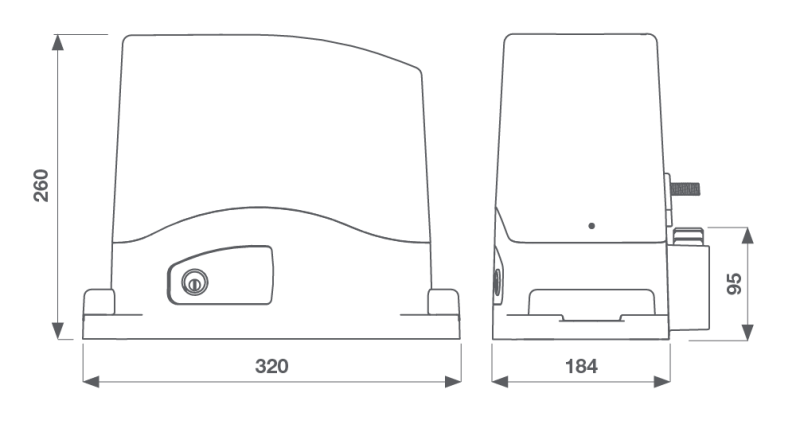
| Dimensions (L × W × H) | 335 × 190 × 280 mm |
| Drive weight | 8,8 kg |
| Maximum cycles per hour | 50 under the reference conditions specified above |
| Noise | ≤ 70 dB(A) |
| Integrated receiver | 433,92 MHz OOK; 150 transmitters |
How can I order this item?
Choose the option that suits you:
- order online: use the buy button to add the goods to your shopping cart (you will find the buy button here in the product variants table).
- order by email: place your order at [email protected]






