Hormann LineaMatic - standalone operator for a sliding gate up to 300kg/6m, 4511323 (A)
| Product availability: | In stock | We normally dispatch goods within 24 hours. |
|---|
In stock
€513.92 including VAT
| Weight |
|---|
| 15 kg |
Description of Hormann LineaMatic - standalone operator for a sliding gate up to 300kg/6m, 4511323 (A)
The operator is designed for sliding gates with a travel length of 6m/300kg. The closed end position is detected by a magnet and a REED contact. The travel and forces are learned during commissioning. The operator is non-reversible.
The operator includes a built-in control unit with an integrated bidirectional receiver for operating the operator using remote controls. The advantage of the bidirectional receiver is that it lets you check the status of the open gate directly on the remote control.
Hörmann LineaMatic 4511323 is an operator for sliding gates up to 6 m wide and 2 m high. For a ground-tracked gate, the limit is 300 kg, and for a cantilever gate, 250 kg. The infill and local wind load must be assessed together with the gate’s mechanical resistance.
Installation, mains connection and commissioning must be carried out by a qualified person. Before opening the operator, disconnect the mains and any emergency battery. Secure the gate leaf against unintended movement and protect both the main and secondary closing edges, as well as the rack-and-pinion engagement point.
Standalone LineaMatic operator and related kits
| Version | Selection |
|---|---|
| Standalone LineaMatic 4511323 (A) | Operator for replacement or adding to an existing setup. Accessories are selected separately. |
| LineaMatic 4511323 kit (D) | An alternative kit option. Check the product page for the contents of the specific kit. |
| LineaMatic 4511323 kit (B) | Another kit variant; do not infer its contents from the motor being the same. |
Accessories and their connection
Specific examples shown in the diagrams include EL301, EL31, SLK, HOR 1, UAP 1/UAP 1-300 and HNA Outdoor. These are not included with the standalone operator. Hörmann SK-SET LineaMatic 437989 is a separate accessory offering. Always compare the wiring with the markings on the supplied device.
LineaMatic installation
Preparing the gate and foundation
The gate must move smoothly and evenly by hand, have stable guidance and be mechanically secured against running off the track. Disable locks and mechanical stops that prevent motor-driven movement. The operator is not a substitute for repairing a gate that is difficult to move or damaged.
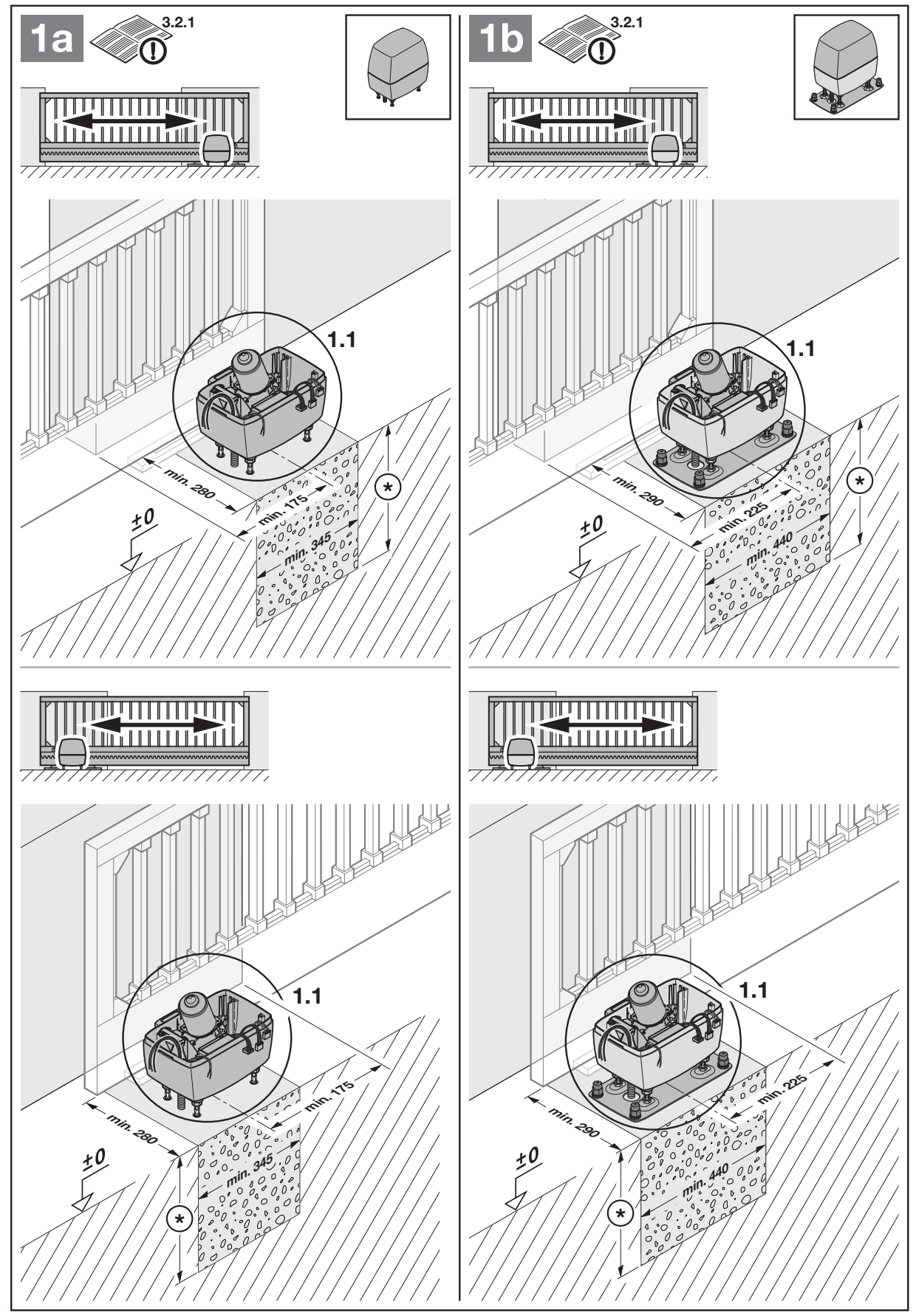
Choose the foundation to suit installation with or without a floor plate. For a setup without closing-edge protection, the section drawing shows the minimum foundation dimensions as 345 × 280 mm; observe the specified clearances of 175 mm without a plate or 200 mm with a plate and the orientation relative to the gate shown in the full diagram. When closing-edge protection is used, a larger foundation is required, as shown in the relevant PDF drawing. Choose a frost-free depth according to the installation site; the 80 cm specified in the manual is an example for Germany. The concrete must be sufficiently cured before installation; for a floor plate, the manufacturer requires compacted concrete of at least grade B25/C25.
Anchoring and installation height
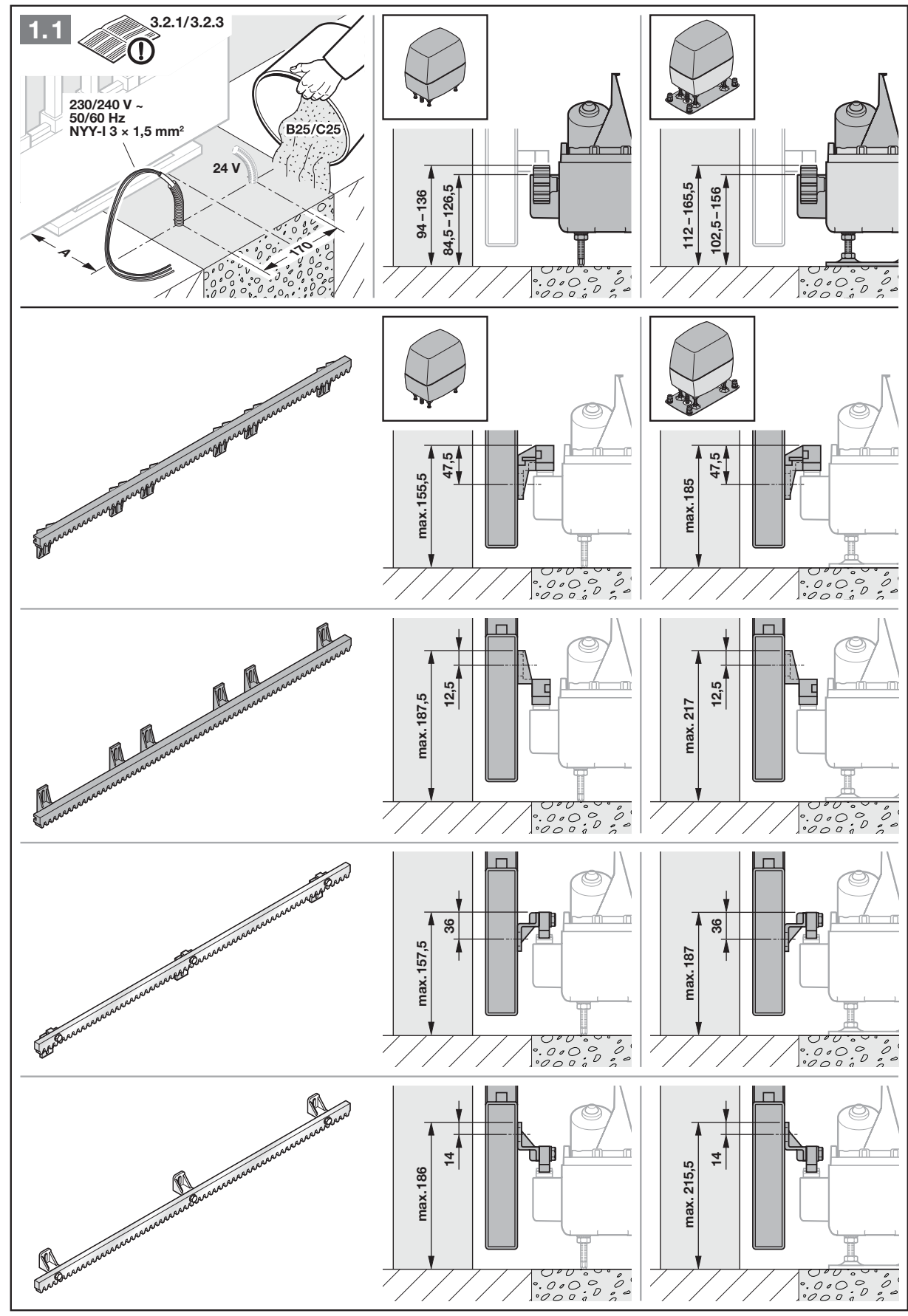
The operator position depends on the specific rack. Dimension A shown in the drawing is not interchangeable between different racks.
| Rack designation | Dimension A |
|---|---|
| 436444 | 124–136 mm |
| 438759 | 126–138 mm |
| 438631 | 125–129 mm |
| 438632 | 129–133 mm |
For anchor screws, use the drilling template and drill holes Ø 12 mm, 80 mm deep. For heavy-duty anchors and a floor plate, the holes are Ø 10 mm, 105 mm deep; the drawing specifies a tightening torque of 45 Nm for the anchoring shown. Protect the operator from dust and swarf. The installer must verify the load-bearing capacity of the actual substrate and the suitability of the supplied anchors.
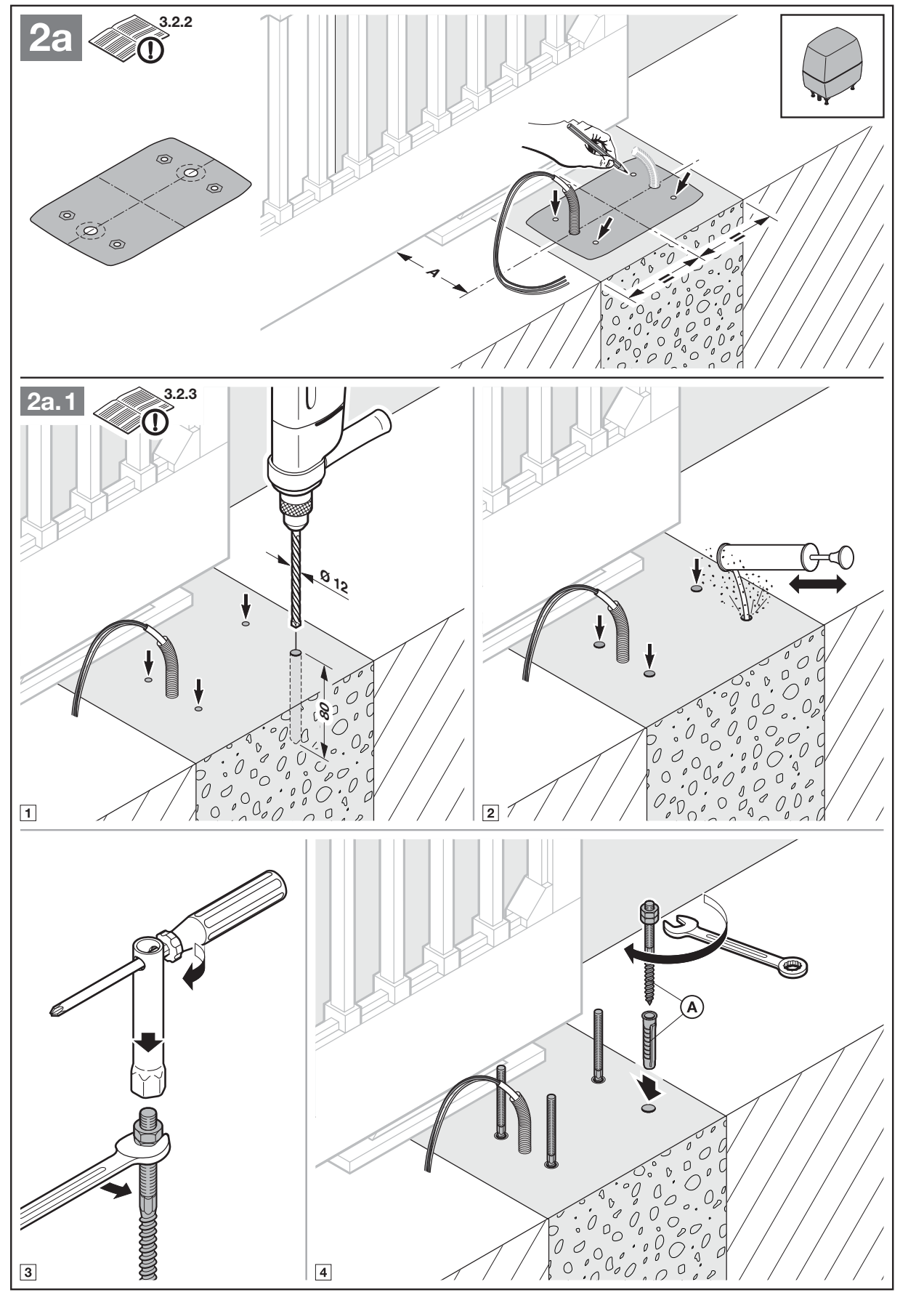
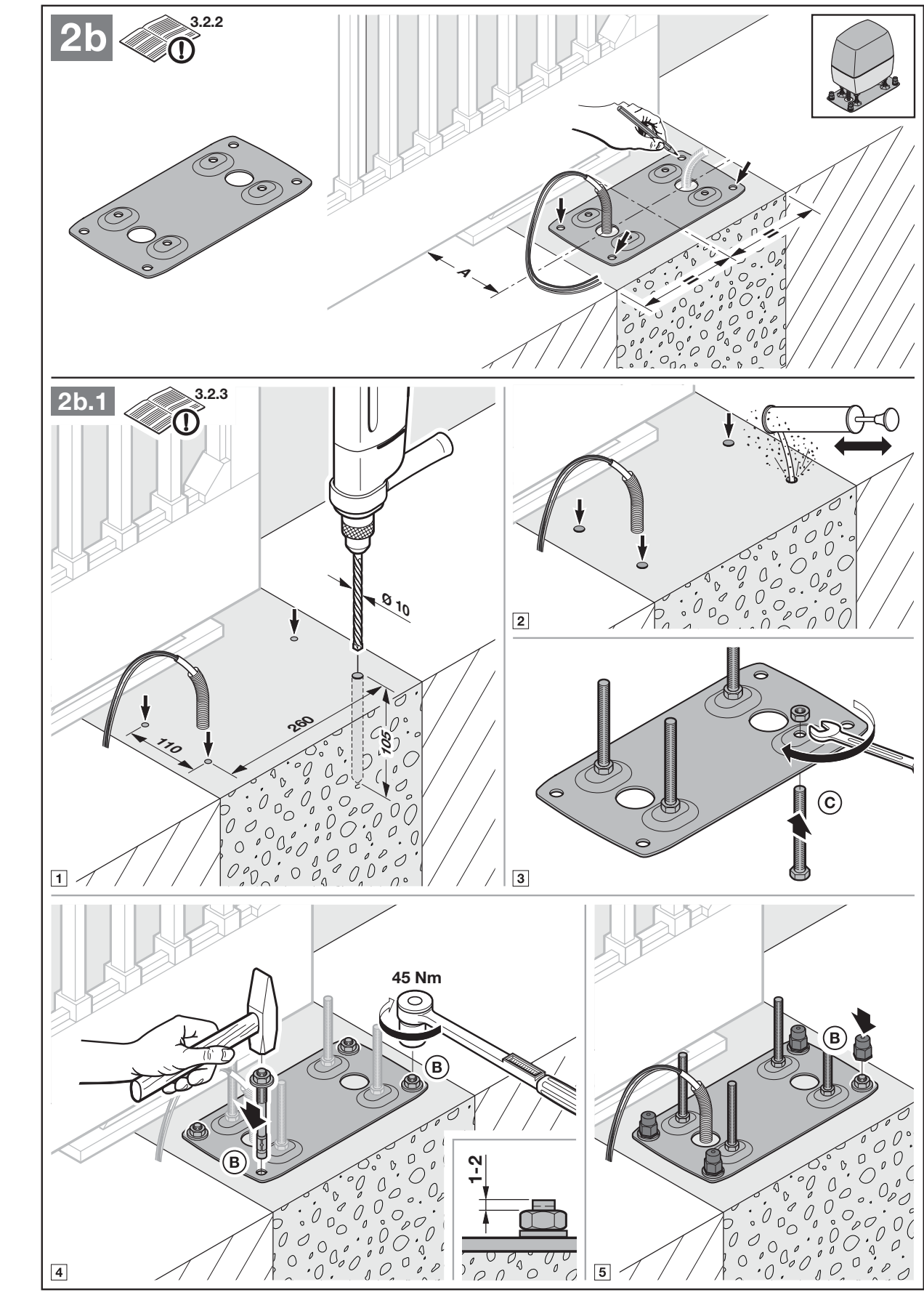
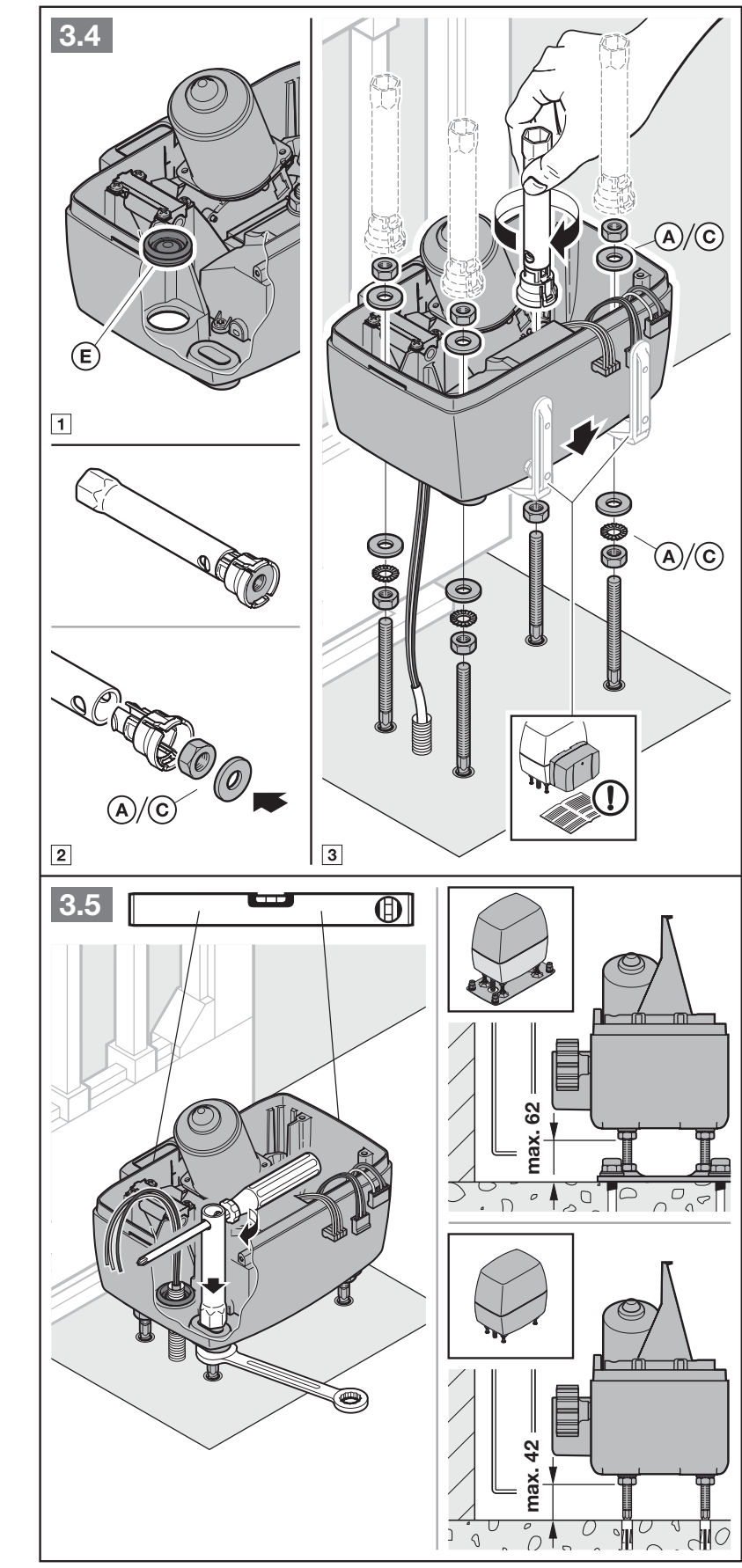
Fit the conduit seals and feed the cables into the housing from below. Position the operator level and secure it firmly. With the cover open, protect the electronics from moisture; after installation, seal the housing against water and insects.
Rack and end-position magnet
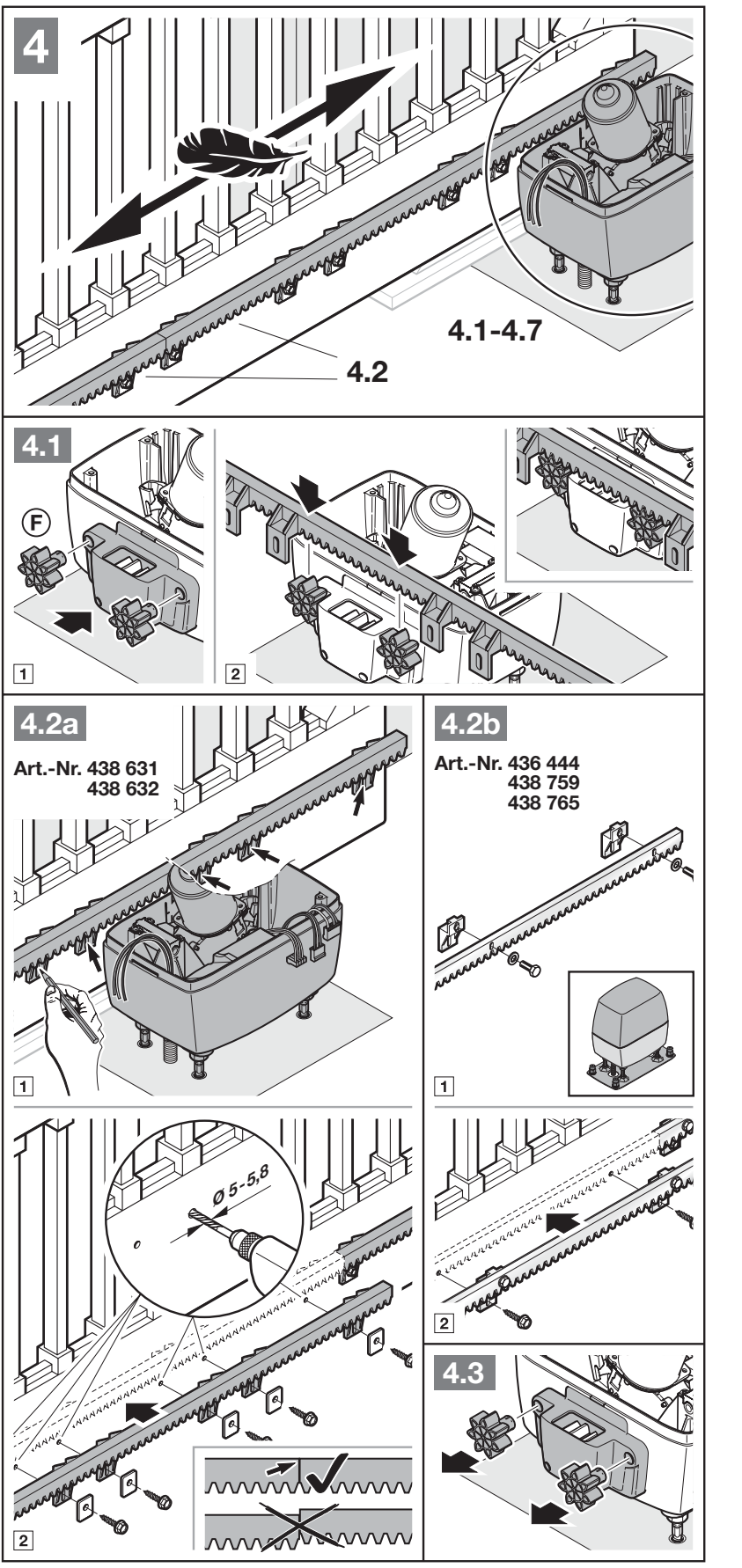
The operator must be released when installing the rack. The joints between individual sections must align smoothly without any offset. After installation, align the rack, pinion and operator housing with one another; observe the dimensions in the relevant diagram, not values taken from another brand. Incorrect meshing can cause unwanted reversing.
The closed end position is detected by a magnet and a REED contact. Move the gate manually to the closed position, pre-install the magnetic slide in the middle position, and secure it approximately 20 mm from the REED contact as shown in the picture. Check the final position and make fine adjustments during the learning run.
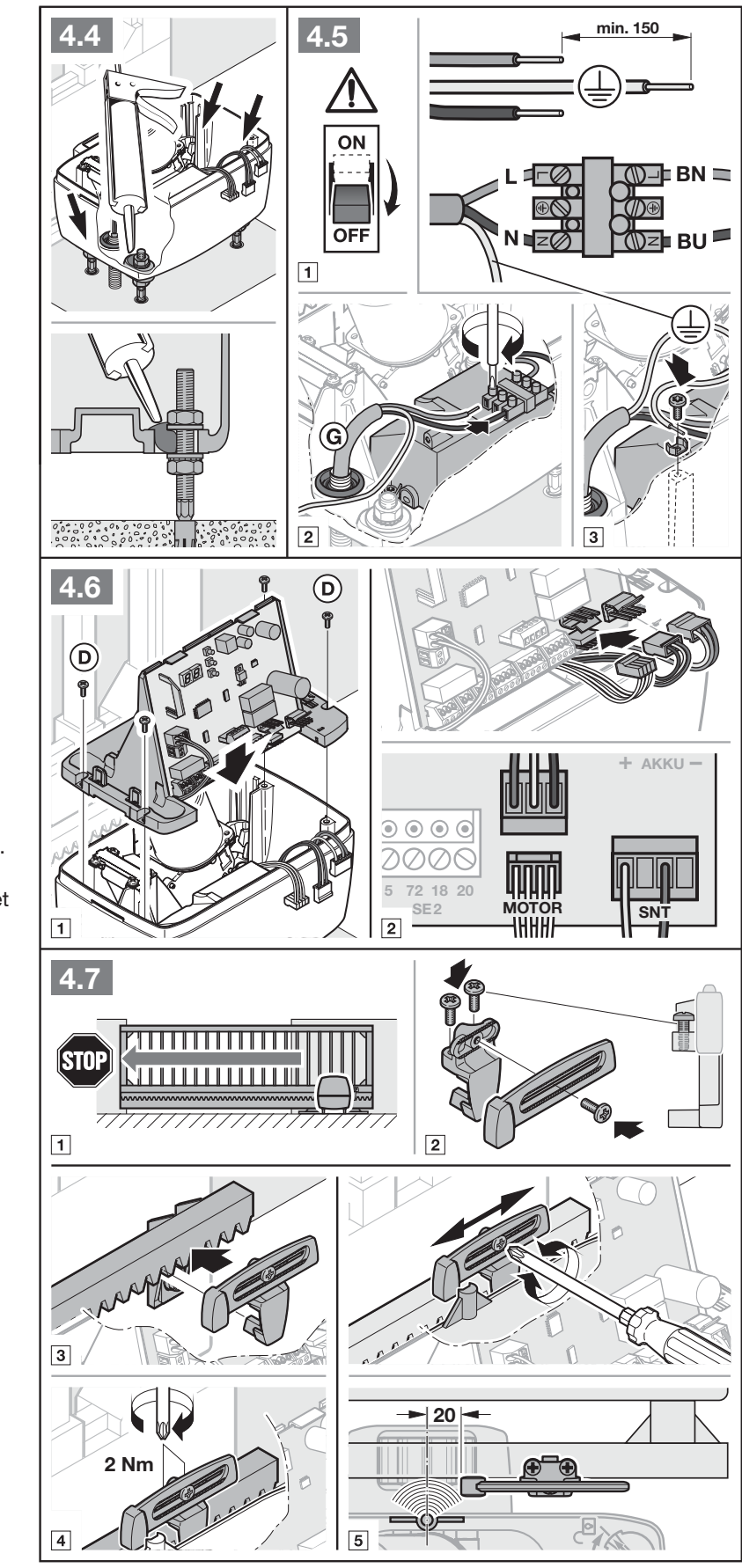
Wiring and separation of voltages
| Circuit | Requirement |
|---|---|
| Mains | 230/240 V AC; 3 × 1.5 mm² supply cable, with a suitable underground cable installed in the ground as specified in the instructions. Separate conduit. |
| Accessories | Route 24 V circuits separately from the mains. Terminals for 0.5–2.5 mm² conductors. |
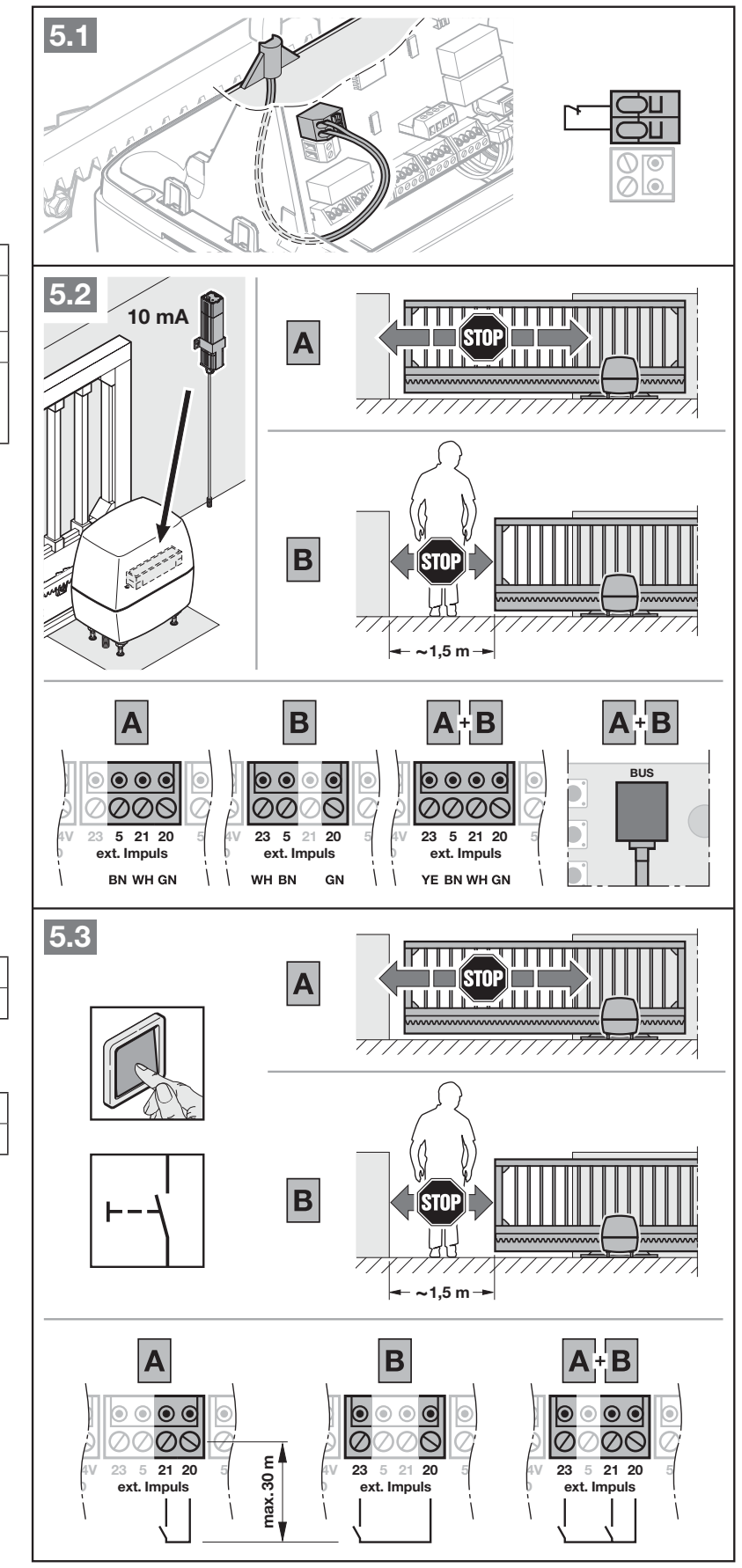
| External push button | Maximum cable length: 30 m. |
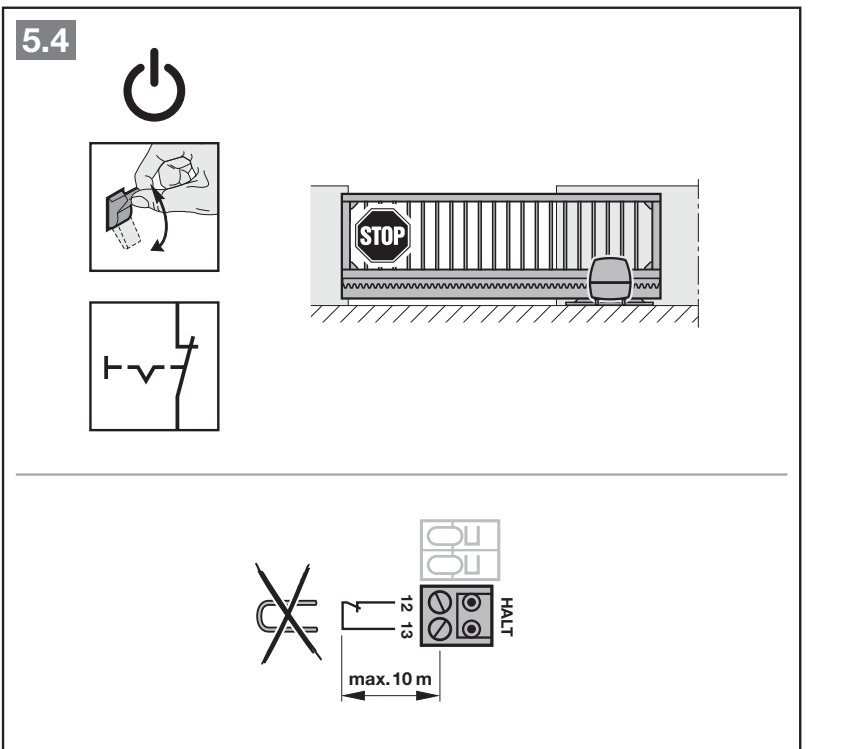
| HALT and safety circuits shown in the diagrams | Maximum cable length: 10 m, depending on the specific wiring diagram. |
| Extending underground cables | Use a suitable IP65-rated junction box; the connection must not be left unprotected underground. |
Manual release and re-engagement
- Disconnect the mains and any HNA Outdoor unit. Secure the gate against uncontrolled movement.
- Open the cover and turn the release mechanism to the release position as shown in the picture. The motor with the gear wheel lowers into the housing; gently press it down if necessary.
- Move the gate manually and in a controlled manner. Keep your hands clear of the rack engagement area.
- To re-engage the drive, turn the mechanism to the locked position while gently lifting the motor. The gate must re-engage with the drive before reaching the limit switch.
- Refit the cover. When power is restored, the drive may perform a reference run in the closing direction; keep the area clear and supervise the gate.
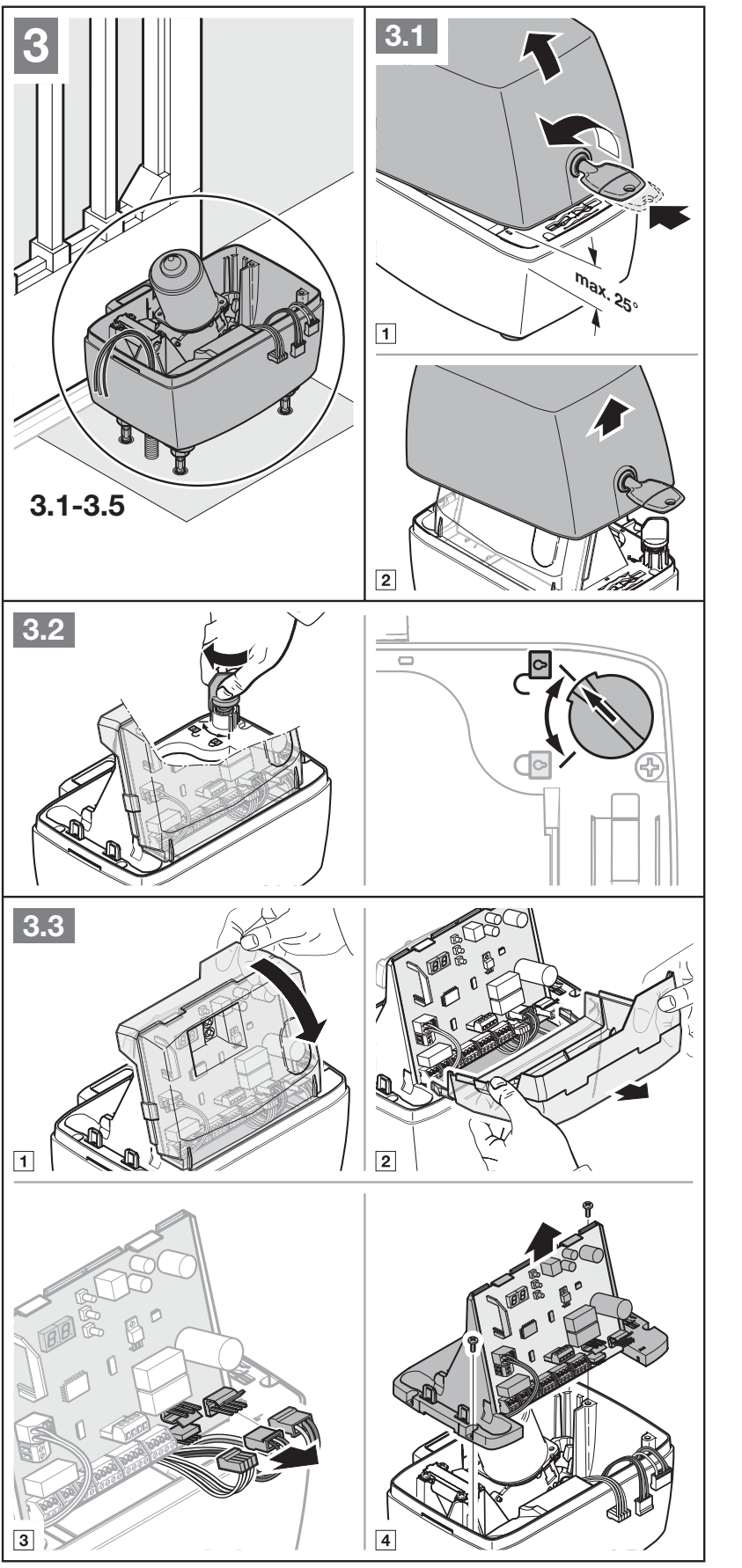
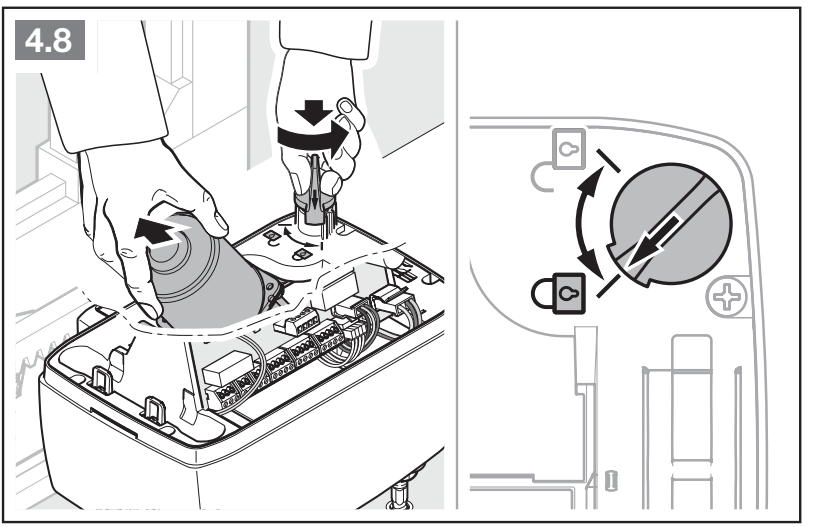
Orientation of the control board
The diagram is oriented with the buttons T_AUF, P and T_ZU at the top and the long row of terminals at the bottom. BUS is at the top, next to the buttons, REED and HALT on the left, SE3 on the raised section above SE1/SE2 at the bottom. MOTOR, SNT and the AKKU connection are on the right. Use the connector labels to distinguish signal, motor and power circuits.
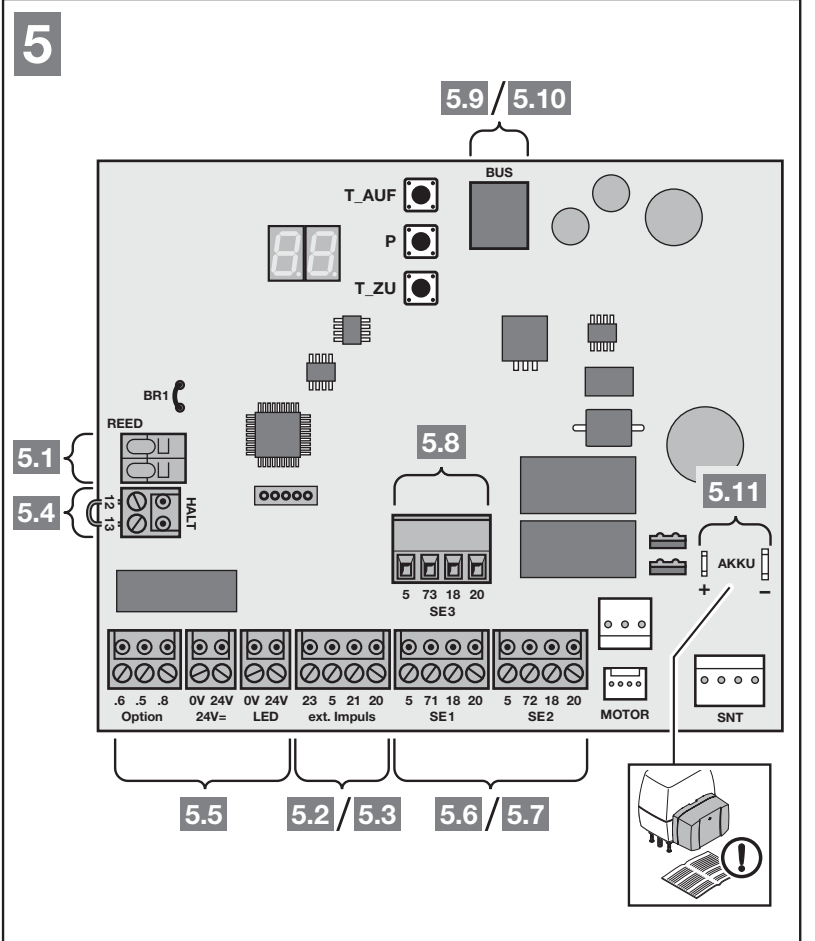
Power supply, polarity and control terminals
| Terminal / connector | Function and limit |
|---|---|
| Mains section L / N and housing PE | 230/240 V AC mains, 50/60 Hz; L is live, N is neutral and PE is protective earth. AC has no positive or negative polarity. Connect the supply cable to the mains section, not to the signal terminals. |
| 5 / 20 | 5 = positive (+24 V DC), 20 = 0 V (−). Total current draw of accessories: maximum 250 mA; include all connected devices in the total. |
| 24 V=: 24 V / 0 V | Separately labelled DC output: 24 V = positive, 0 V = negative. For example, use it for a 24 V light as shown in the diagram; it is not a 230 V output. |
| 21 / 20 | NO potential-free pulse or contact that switches to 0 V. Push buttons can be wired in parallel; the contact itself has no positive or negative polarity. |
| 23 / 20 | NO potential-free partial-opening command; 23 is the signal and 20 is the common 0 V, not a power supply pair. |
| HALT 12 / 13 | NC potential-free STOP; 13 = 0 V, 12 is the input. When installing the STOP switch, remove the original 12–13 jumper and connect the NC contact. |
| REED | Reed switch limit sensor as fitted originally; do not connect an external voltage source. |
| BUS | System accessories with a matching connector. This is not a universal positive/negative output for arbitrary devices. |
| MOTOR / SNT / AKKU | Motor, mains section and designated emergency battery. Use the original connectors and observe the indicated polarity; disconnect the battery as well before working on the unit. |
Applying an external voltage to the control inputs may damage the electronics. Do not connect 230 V to 21/23/HALT or SE. HALT is not a monitored PLc-level safety input; do not use it in place of an SE protective device.
SLK beacon and Option relay
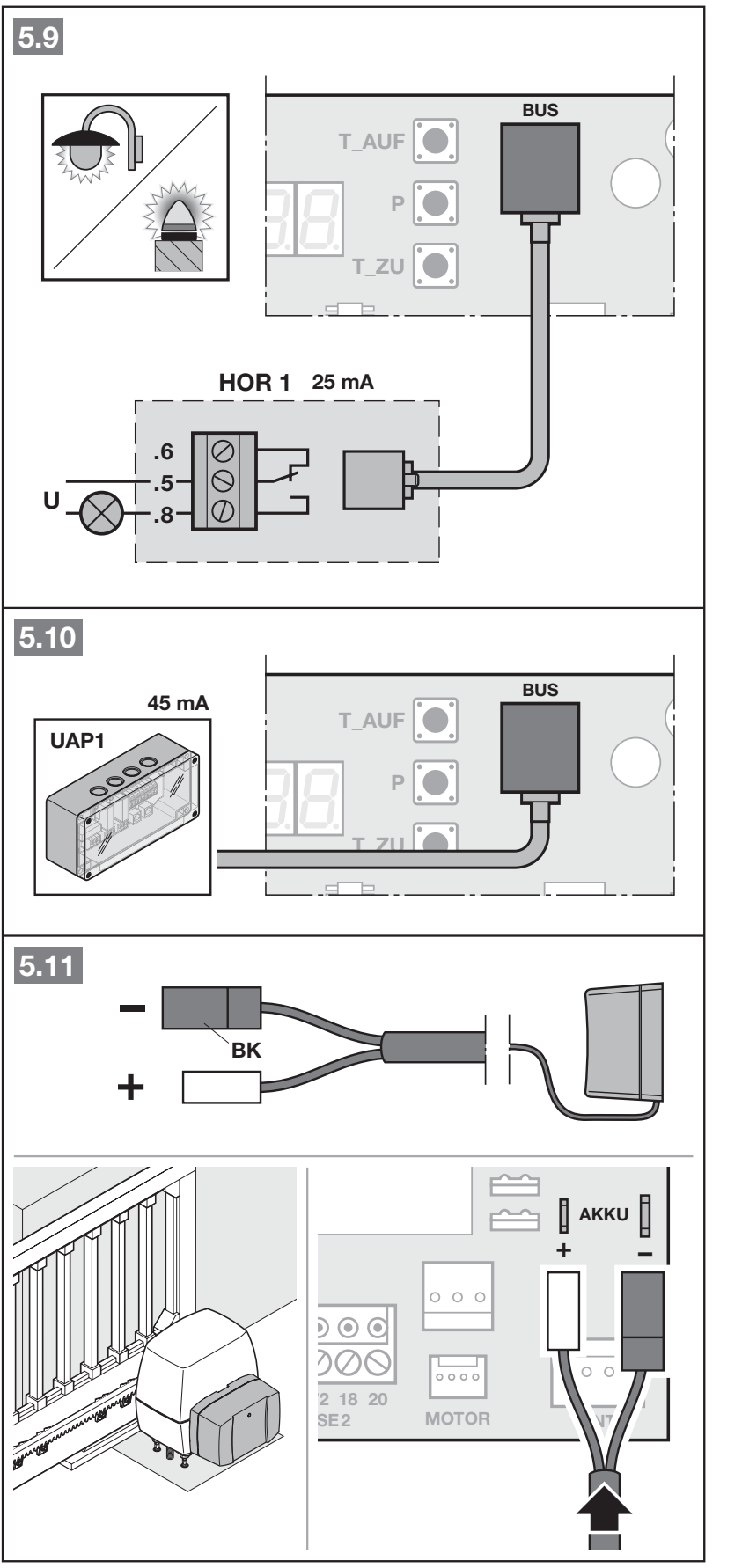
Relay Option has potential-free contacts .5 common, .8 NO, .6 NC. For a 24 V light, the diagram uses 24 V (+) → .5, .8 → light, light return → 0 V (−). For a polarity-sensitive light, connect its positive input to the switched supply from .8 and its negative input to 0 V. The manufacturer specifies for this 24 V light max. 7 W; also observe the total accessory limit—the 7 W rating does not increase it. The internal relay function is set in menu 31.
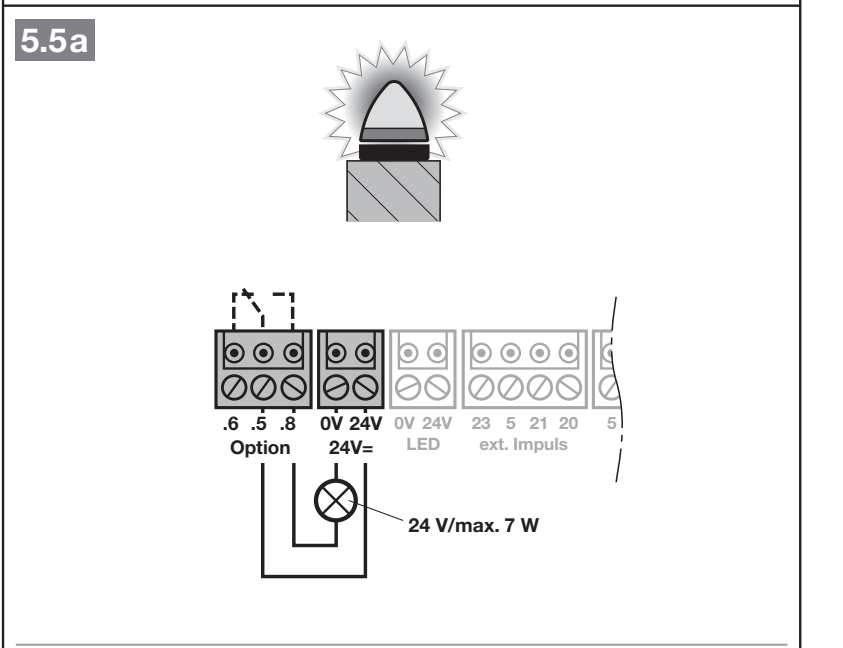
A 230 V light has its own external mains supply; the manufacturer's diagram specifies a maximum of 500 W. Mains conductors must have additional insulation extending all the way to the connection point. This wiring must be carried out only by an electrician, in accordance with the complete PDF; 230 V must not enter low-voltage circuits.
Photoelectric sensors and SE1/SE2/SE3 safety inputs
| Input | Terminals and original response |
|---|---|
| SE1 | 5 = +24 V DC; 20 = 0 V (−); 18 = test, 71 = signal. Active during closing; briefly reverses direction. |
| SE2 | 5 = +24 V DC; 20 = 0 V (−); 18 = test, 72 = signal. Active during opening; briefly reverses direction. |
| SE3 | 5 = +24 V DC; 20 = 0 V (−); 18 = test; 73 = signal. Acts during closing, briefly reversing direction. |
SE1 and SE2 support dynamic two-wire photocells, tested or non-tested three-wire photocells, an 8k2 resistive safety edge, and designated edge protection. Photocells are shown here for SE3; do not use the resistive-edge wiring for SE1/SE2 on SE3. Two photocells on one circuit require an LSE2 expander. According to the manual, non-tested safety devices are permitted only for property protection.
EL301 – exact wiring according to the original diagram
EL301 is a dynamic two-wire assembly with a current draw of 35 mA as shown in the diagram. For SE1, connect TX 0 V and RX 0 V → 20, the marked terminal TX → 71 and the marked terminal RX → 71. For SE2, replace 71 with terminal 72; for SE3, use terminal 73. Terminal 5 and test terminal 18 are not used in this specific EL301 diagram. TX/RX are system terminals; do not assign them your own +24 V supply or polarity based on other photocells.
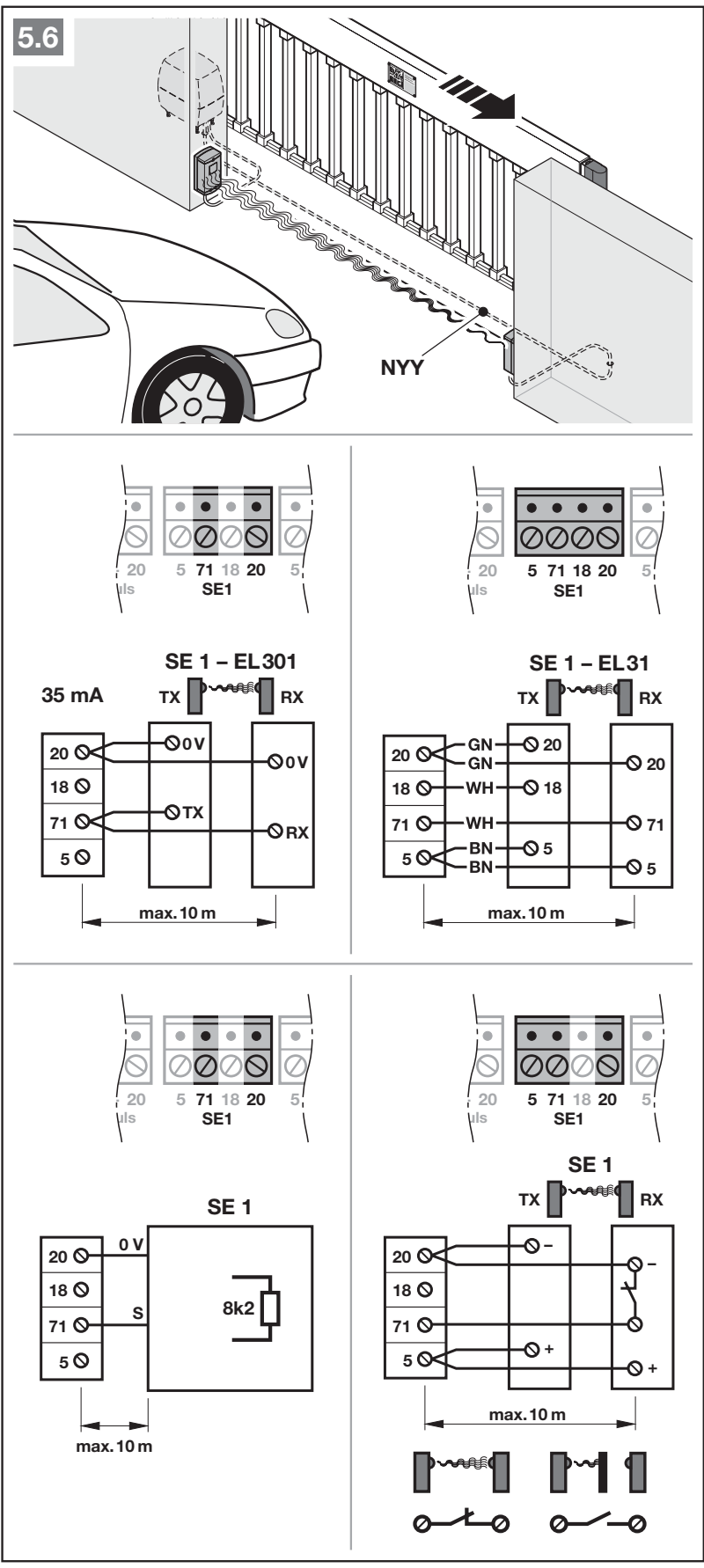
For EL31 the diagram shows receiver RX: 20 → 20 (0 V), 18 → 18 (test), 71/72/73 → 71 (signal for the selected SE), 5 → 5 (+24 V). Transmitter TX has 20 → 20 (0 V), 5 → 5 (+24 V). The original color codes are GN/WH/BN; however, the actual terminal markings and the manual for the supplied photocell take precedence. For another contact with its own power supply, use its own wiring diagram; a volt-free NC contact must not be mistaken for a +/− power supply.
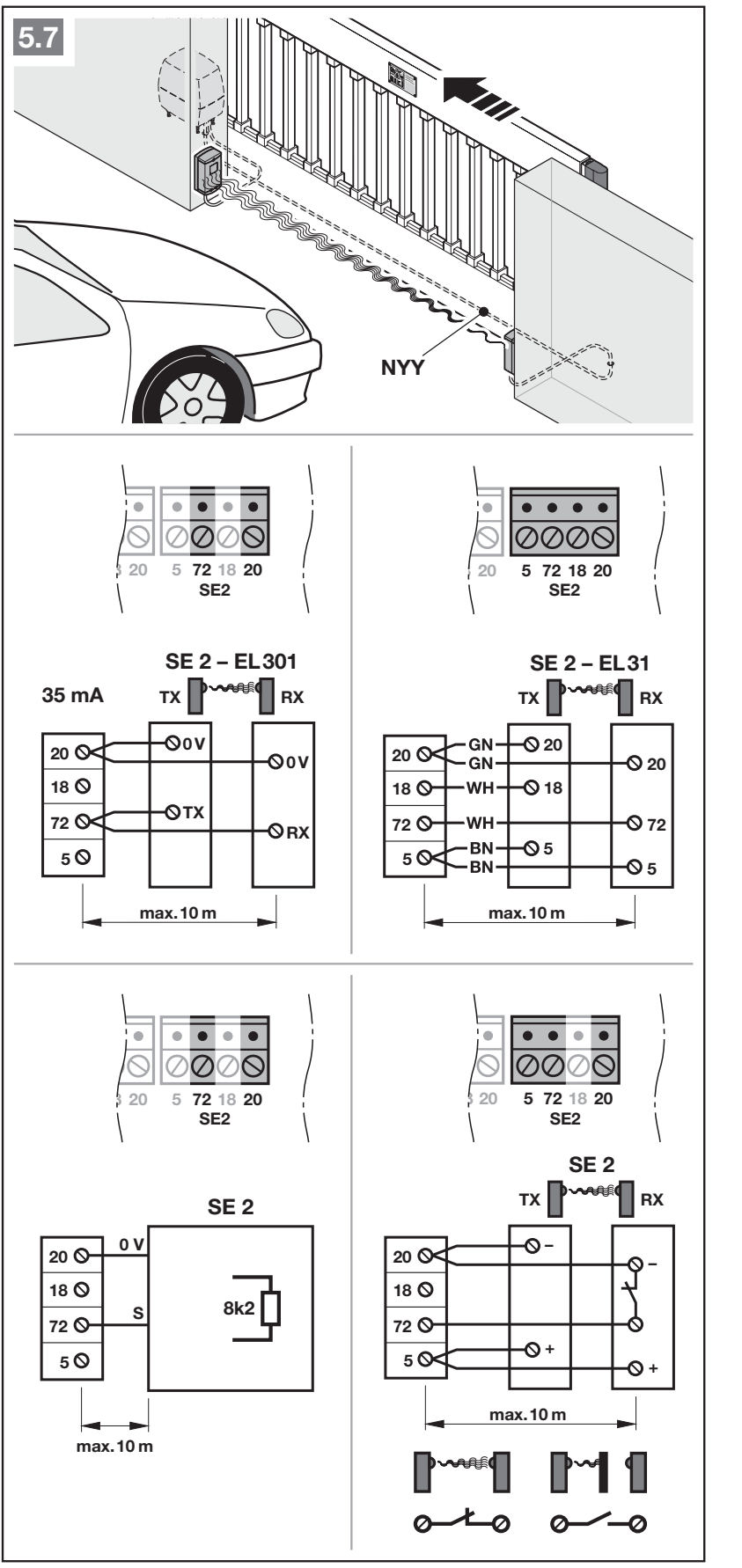
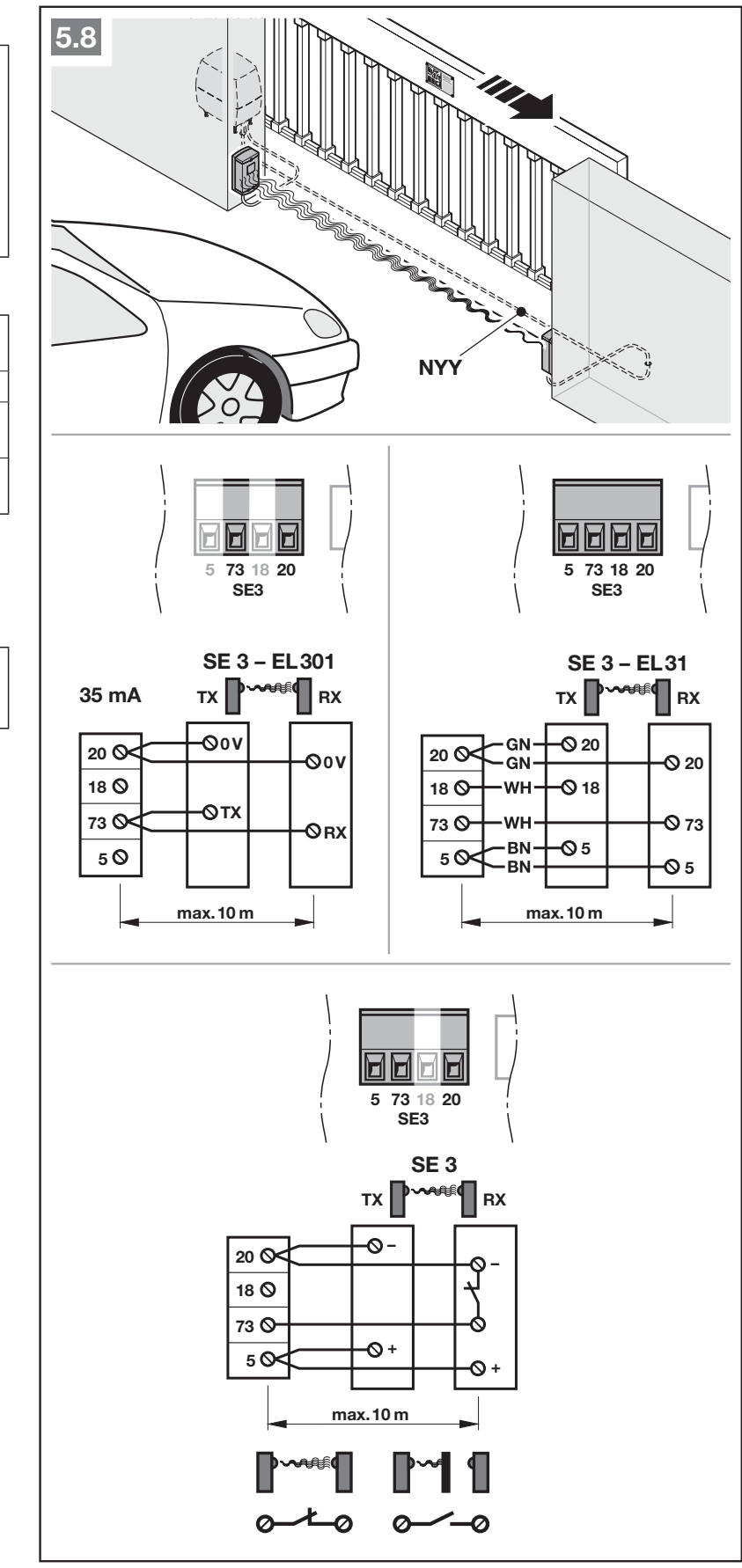
Connect all safety devices before the learning procedure. After adding or changing safety devices, run the learning procedure again using menu 10 and carry out functional tests. A qualified technician must change the direction of operation, reversal, speed and force in the extended menus.
Optional modules and external receiver
| Device | Connection / function |
|---|---|
| External wired receiver | GN → 20 (0 V); BN → 5 (+24 V DC); WH → 21 (impulse); YE → 23 (partial opening). HEI3 BiSecur has a matching connector; ESEI BiSecur connects to the BUS. |
| HOR1 / UAP1 / UAP1-300 | Use the matching BUS connectors as shown; HOR1 draws 25 mA and UAP1 draws 45 mA. External relay functions in menu 30. |
| HNA Outdoor | Connect to the designated AKKU connection; switches over automatically in the event of a mains failure. Unplug the connector before servicing; disconnecting the mains does not disconnect the entire operator. |
Initial setup and type 01 selection
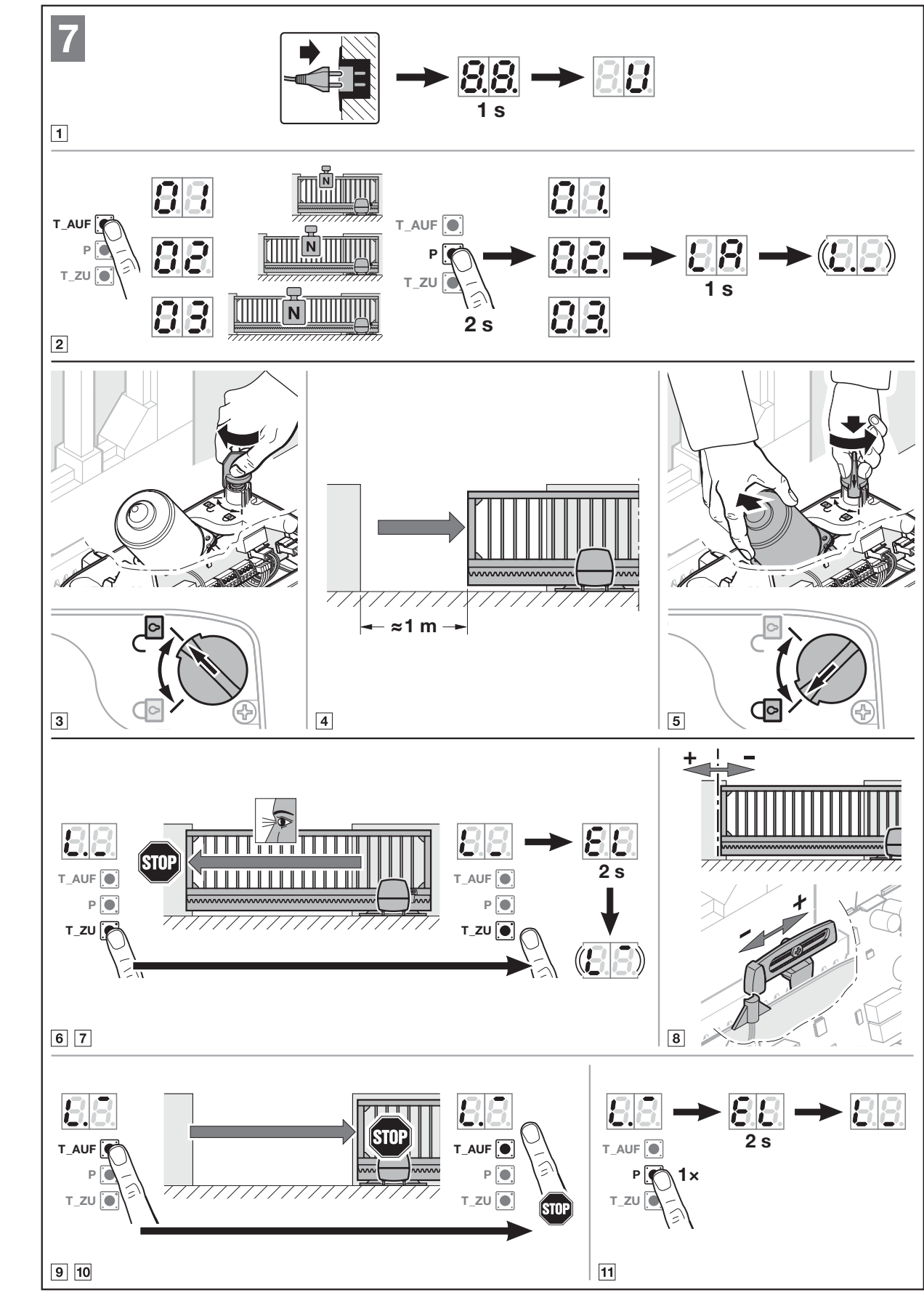
Safety devices must be connected, the optical paths must be clear, the gate must be mechanically sound, and the area must be closed off to people. The end positions, forces and connected safety devices are stored during the learning procedure. The direction is determined during the learning procedure; after successful commissioning, it can only be changed by performing a factory reset and running the learning procedure again.
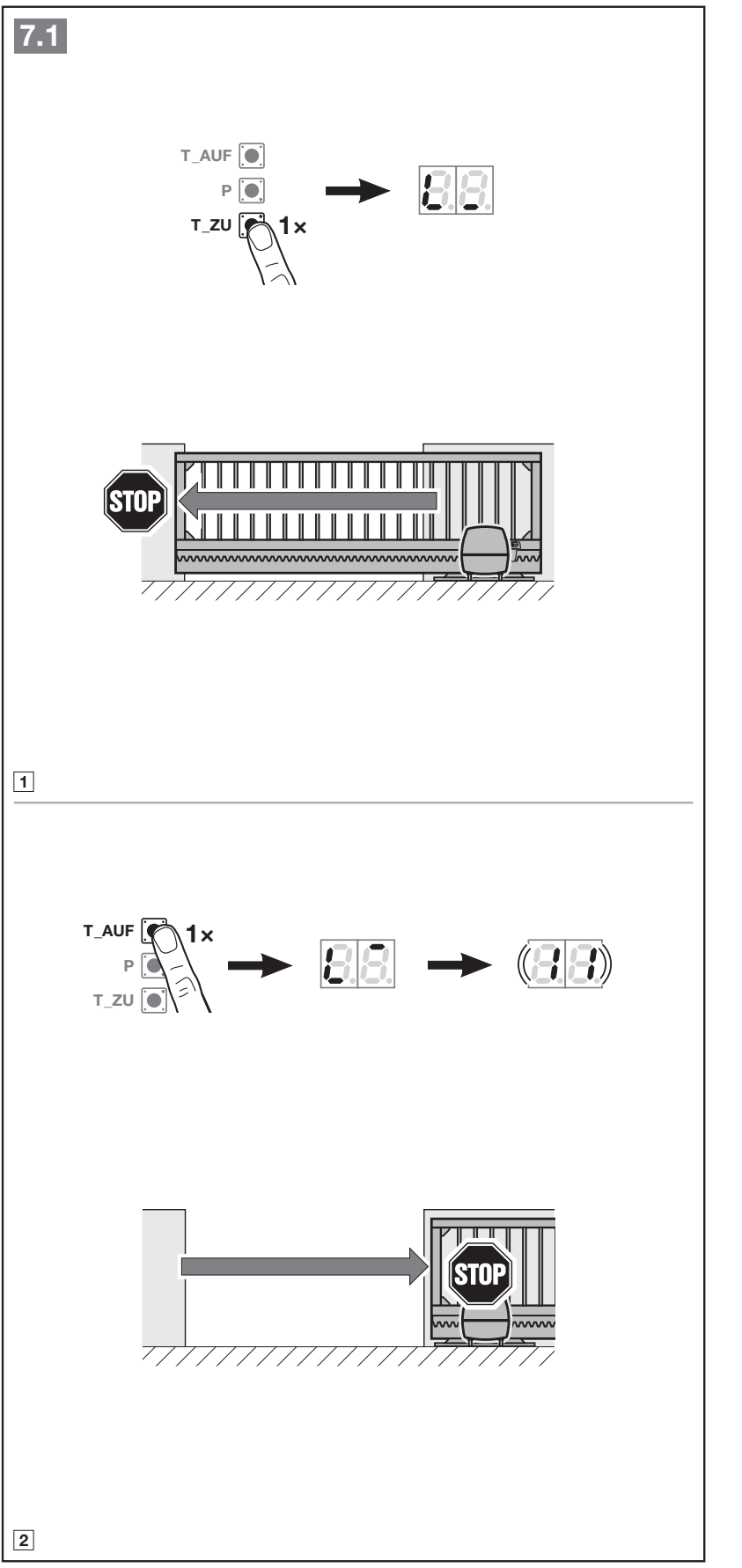
- Switch on the power. The display first shows 8.8., then U. The type is preset at delivery; after a factory reset, use the T_AUF button to select 01 for the standard LineaMatic. Type 02/P or 03/H does not increase this operator's load capacity.
- Press and hold P. After displaying the type and LA, the control unit starts learning the end positions.
- Disengage the operator, open the gate by approximately 1 m, then re-engage the operator. Press and hold T_ZU; the gate must move toward the closed position. If it moves in the opposite direction, briefly release T_ZU, then press and hold it again as instructed by the manufacturer.
- When the gate stops at the magnetic limit switch, release the button you are holding. If the closed position is incorrect, adjust the magnetic carriage and repeat the test.
- Press and hold T_AUF until the desired open position is reached; release it, fine-adjust using T_AUF/T_ZU, then save with P.
- To learn the forces, briefly press T_ZU and let the gate close; then press T_AUF and let it open fully. When complete, 11 flashes to indicate radio learning. No safety device may be activated while the forces are being learned.
- Store the desired transmitters or exit radio learning. Check the safety devices and forces across the full gate travel, fit the covers, and show the user how to disengage the operator manually.
Relearning after changing the gate or safety devices
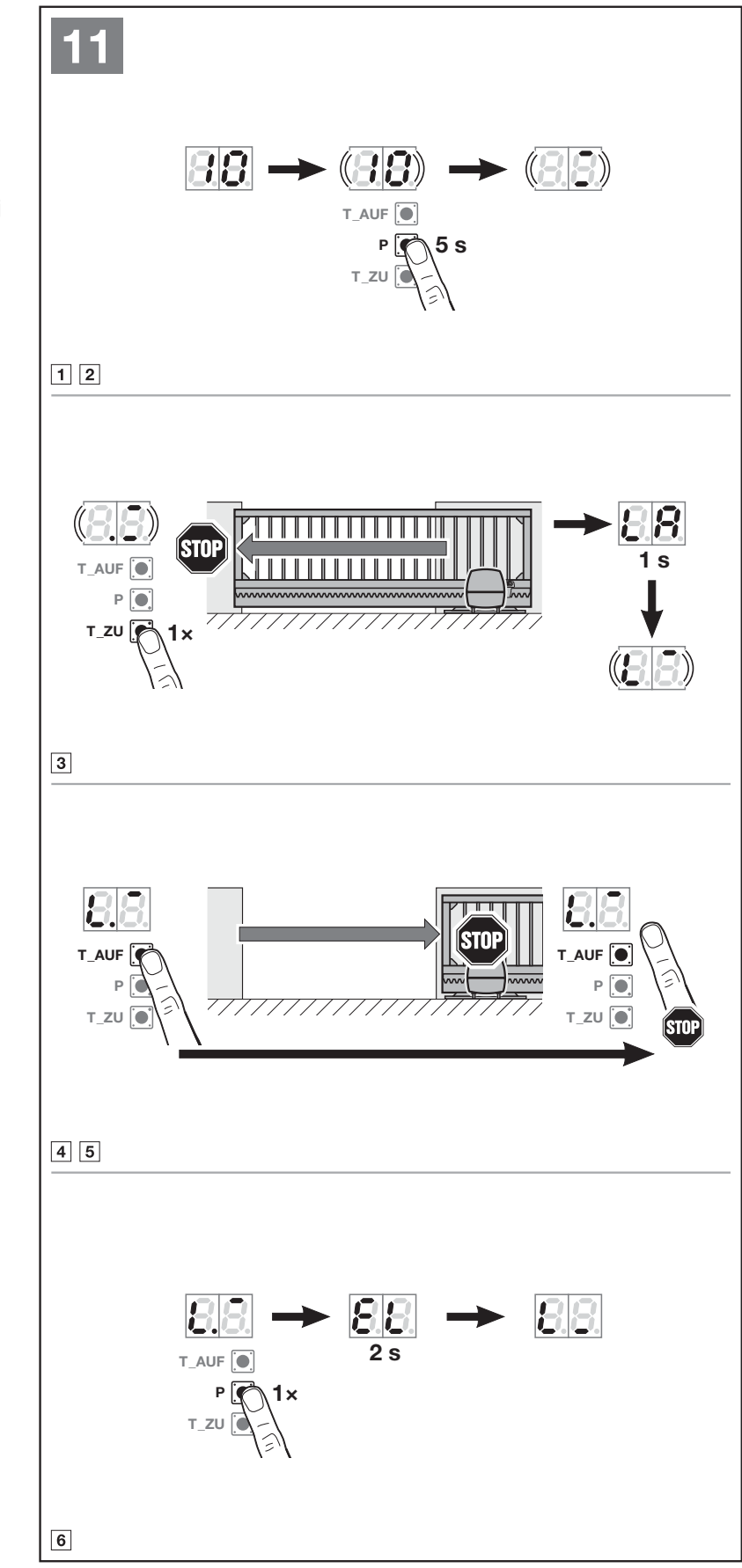
Menu 10 erases the stored travel and force values. Once activated, it cannot be exited early; the learning procedure must be completed. Use this after changing end positions or mechanics, after servicing, or after adding photocells or a safety edge. There is no standard time limit.
- Open the gate by approximately 1 m, select menu 10, and hold P for 5 seconds.
- Press T_ZU and let the gate travel to the closing limit switch.
- Press and hold T_AUF until the desired open position is reached, adjust as needed, then confirm with P.
- Run T_ZU to fully close the gate and T_AUF to fully open it so the forces are learned again.
- When complete, check all safety devices and operating settings.
Programming via the display
To enter, press and hold P for approximately 5 seconds, until 00 is displayed. T_AUF/T_ZU selects the menu or parameter. For a standalone function, hold P for 2 seconds; for a menu with parameters, briefly press P first, select the parameter, then hold P for 2 seconds to save. A dot next to the number indicates the active selection. Menu 00 followed by a brief press of P exits programming; the standard time limit is 60 seconds, or 25 seconds for radio learning. Do not assume a new parameter has been saved unless it has been confirmed.
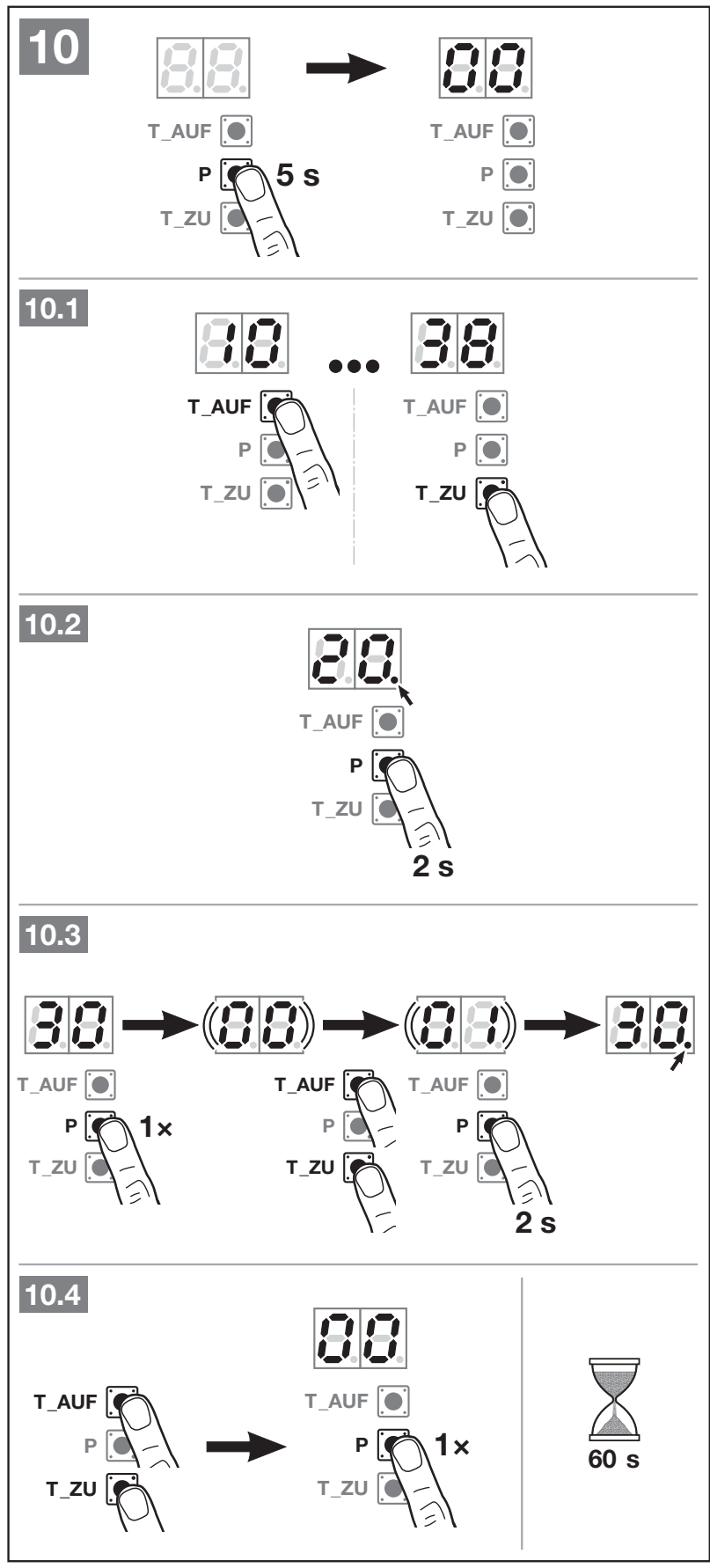
Only the factory-marked defaults for the standard LineaMatic are shown in bold. The documented public menus are listed; force, speed and reversal-limit service settings are for qualified technicians.
Menus 30 and 31 – relay parameters
| Parameter | Description |
|---|---|
| 00 | Lighting function: external for 30, internal for 31. Menu 30/00 activates 26; 31/00 activates 22. |
| 01 / 02 / 03 | Signal indicating the open / closed / partially open position. |
| 04 | Pulse signal on an opening command; in menu 30, also on partial opening for the external relay. |
| 05 | Error signal. |
| 06 | Continuous signal during startup/pre-warning. |
| 07 | Default flashing during startup/pre-warning. |
| 08 | Relay energized during movement and de-energized at the end positions. |
| 09 | Service interval notification In. |
| 10 | Flashing during startup/pre-warning only when closing. |
For parameters 01–10, menu 25 is activated for the external relay and menu 20 for the internal relay. Pre-warning is effective only when menu 32 is activated. Therefore, always check relay changes together with the automatically linked menu.
Menus 32, 34 and 35 – time settings
| Menu 32 parameter | Time / function |
|---|---|
| 00 | off |
| 01 | 1 s |
| 02 | 2 s |
| 03 | 3 s |
| 04 | 4 s |
| 05 | 5 s |
| 06 | 10 s |
| 07 | 15 s |
| 08 | 20 s |
| 09 | 30 s |
| 10 | 60 s |
| Menu 34 parameter | Time / function |
|---|---|
| 00 | off |
| 01 | 5 s |
| 02 | 10 s |
| 04 | 30 s |
| 05 | 60 s |
| 06 | 90 s |
| 07 | 120 s |
| 08 | 180 s |
| 09 | 240 s |
| 10 | 300 s |
| Menu 35 parameter | Time / function |
|---|---|
| 00 | off |
| 01 | same as 34 |
| 02 | 5 min |
| 03 | 15 min |
| 04 | 30 min |
| 05 | 45 min |
| 06 | 60 min |
| 07 | 90 min |
| 08 | 120 min |
| 09 | 180 min |
| 10 | 240 min |
Activate the 34/35 automation only after teaching in the photocell. When they are switched on, the 32/02 pre-warning is set automatically, i.e. 2 seconds. During automatic closing, a new command will stop the gate. Set partial opening in menu 36; if it is too close to the closed position, the unit reports error 1 and uses the minimum permitted position.
Storing remote controls
The integrated receiver stores up to 150 radio codes, divided among functions. When capacity is exceeded, the oldest codes are deleted. If you store the same code for another function, its original assignment is removed. A code is not automatically an entire transmitter with all its buttons.
- The gate must be stationary, with no active pre-warning or automatic closing time.
- Select 11 for impulse operation or 12/13/14/15 for the desired alternative function, then briefly press P. The number flashes.
- Hold down the button on a compatible transmitter in code-transmission mode; when BiSecur is displayed, the red/blue LED alternates after approximately 5 seconds.
- When the menu number on the operator flashes rapidly, the code has been recognised. Release the button. Another code can be added within 25 seconds.
- Briefly press P to interrupt the learning process; use 00 and P to return to operation. Then test each stored function with the area secured.
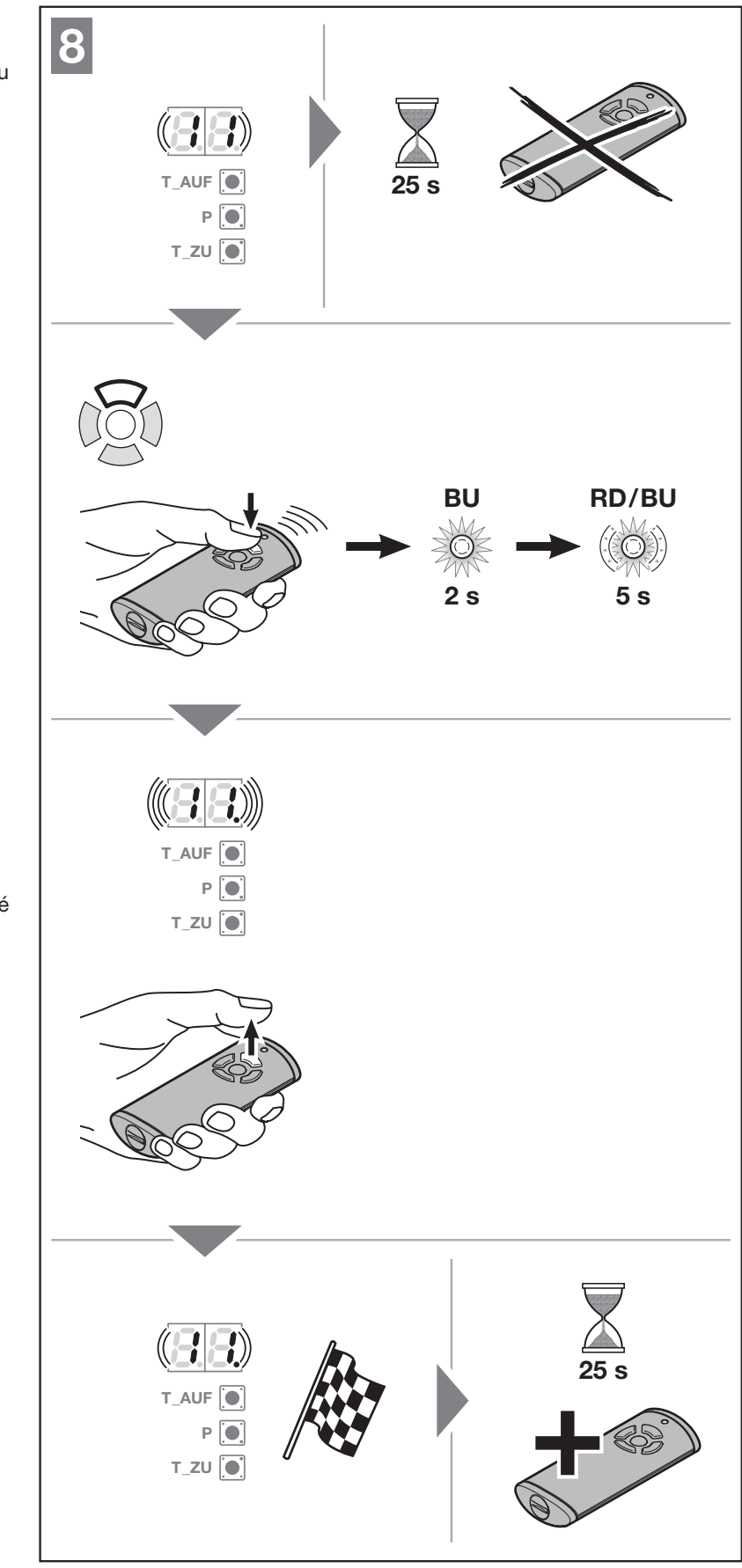
Status feedback requires a suitable bidirectional transmitter with a position-check function; the 868 MHz frequency alone does not confirm this capability. Not every transmitter has a status button or uses the same battery replacement procedure. When sharing a code or resetting a specific transmitter, refer to its own instructions.
Connecting an external receiver later
When adding an external radio receiver, the manufacturer requires you to delete the radio codes from the integrated receiver via menu 19. This procedure deletes all transmitters and functions stored in the receiver; before proceeding, make a note of the remotes in use and their assignments. Then teach the codes into the external receiver according to its own instructions. The external receiver's antenna wire must not touch metal objects.
Deleting radio codes and factory reset
Menu 19 – delete all codes
Select 19 and hold P for 5 seconds. The number 19 first flashes slowly for 5 seconds, then rapidly for approximately 3 seconds; a steady 19 confirms deletion. All transmitters and all functions will be deleted. This procedure does not support deleting an individual button or function.
Resetting the operator to factory settings
A factory reset restores the settings and deletes the learned travel limits and forces; radio codes are retained. Menu 10 only relearns the travel limits/forces, while menu 19 deletes radio codes separately. Do not confuse these three procedures.
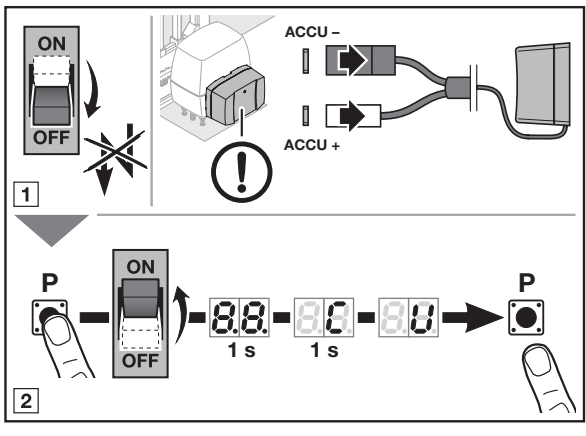
- Disconnect the mains and emergency battery as shown in the illustration. Secure the gate against movement.
- Hold down P and restore the mains power.
- Keep holding P while 8.8. and C are displayed, until U appears; then release it.
- Select the correct type, 01, and repeat the entire commissioning process. Also check the retained remotes, safety devices, travel times and forces.
Reference run after manual release or power failure
A reference run may be required if the position is unknown following a power failure or after the force limit has been triggered three times. The next impulse starts it in the closing direction only, at reduced speed and without force limitation. The area must be secured; if it is not protected by a photocell or other device, the run may only be performed while keeping the gate in view. After manual release without a power failure, disconnect the power once more after securing the gate so the new reference run can be carried out as instructed.
Display diagnostics
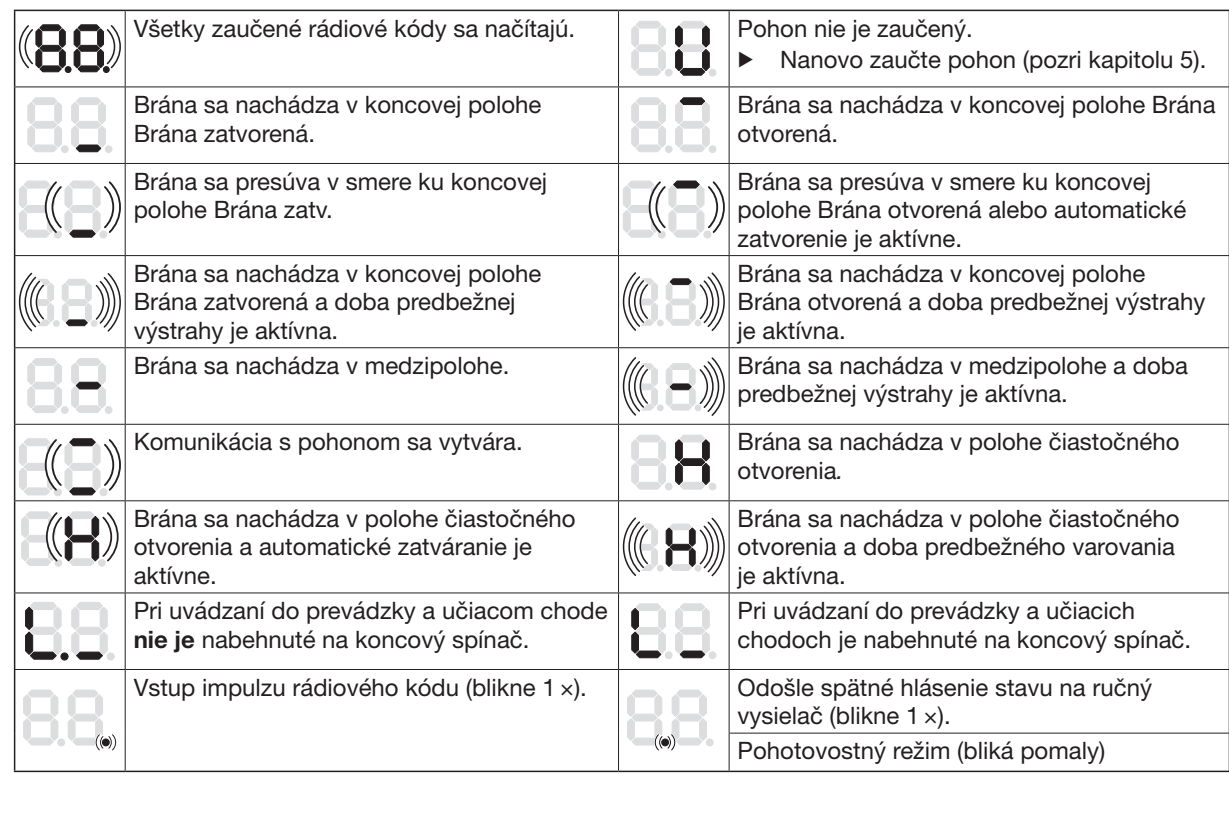
| Display | Meaning / procedure |
|---|---|
| U | The operator has not been taught in; carry out commissioning. |
| 8.8. | Start-up or loading radio codes; this is not necessarily an error. |
| 1 with flashing dot | Reversal limit or partial position cannot be set; check for obstacles and clearance from the closed position. |
| 2.1 / 2.2 / 2.3 | SE1 / SE2 / SE3 safety device: obstacle, misalignment, wiring or device damage. |
| 3 / 5 | Force limit during closing / opening; remove the obstacle and check mechanical travel rather than automatically increasing the force. |
| 4 | HALT12–13 circuit interrupted; check the NC circuit and wiring. |
| 6 | System error or travel-time limit; a specialist should check whether a reset and relearning are needed, and repair or replace the operator if it is faulty. |
| 7 | Communication error on the add-on board; check the wiring, connectors and module. |
| 8 | Invalid entry or command; check the selected value. |
| 9 | Fault/tripping of the tested safety device or 8k2; remove the obstacle and check the safety device. |
| 13 / 17 | Undervoltage / voltage error; check the power supply and battery. |
| C | Reference point unknown; secure the area and carry out a reference run. |
| In | The service interval has elapsed; have the assembly inspected. |
Maintenance and safe handover
The manufacturer describes the operator as maintenance-free, but the entire gate requires regular inspection. Check safety and protective functions monthly, and check 8k2 safety edges and untested protective devices every six months as instructed. Check that the gate moves freely, the rack is securely fastened, the guides are aligned, cables are undamaged, photocells are clean and the release mechanism works. Have any defects rectified immediately by a specialist.
Before maintenance, disconnect all power sources and prevent them from being switched on again. After installation and any modifications, a technician must check the effectiveness of the safety devices, reversal and operating forces. Train the user, provide the instructions and attach the warning label in a visible position on the gate. Children must not play in the movement area; cross only after the gate has come to a complete stop.
Technical specifications of the Hörmann LineaMatic 4511323
| Parameter | Value |
|---|---|
| Model / type selection | Standard LineaMatic /01 |
| Maximum gate width / height | 6000 mm /2000 mm |
| Max. weight – ground track / cantilever | 300 kg /250 kg |
| Mains supply | 230/240 V AC,50/60 Hz; permitted range 170–260 V AC. |
| Control voltage | 24 V/37 V DC, switchable internal control; not a universal output for accessories. |
| Accessory power supply | 24 V DC; 5 = positive, 20 = 0 V; total max. 250 mA. |
| Radio frequency / memory | 868 MHz / up to 150 radio codes |
| Protection rating / temperature | IP44 / −20 to +60 °C |
| Maximum humidity | 93%, non-condensing |
| Standby power consumption | Less than 0.5 W |
| End positions | Magnetic REED sensor and electronically learned positions/forces. |
| Cycles per day/hour | As stated on the rating plate. |
| Housing | Cast aluminium and glass-fibre-reinforced plastic. |
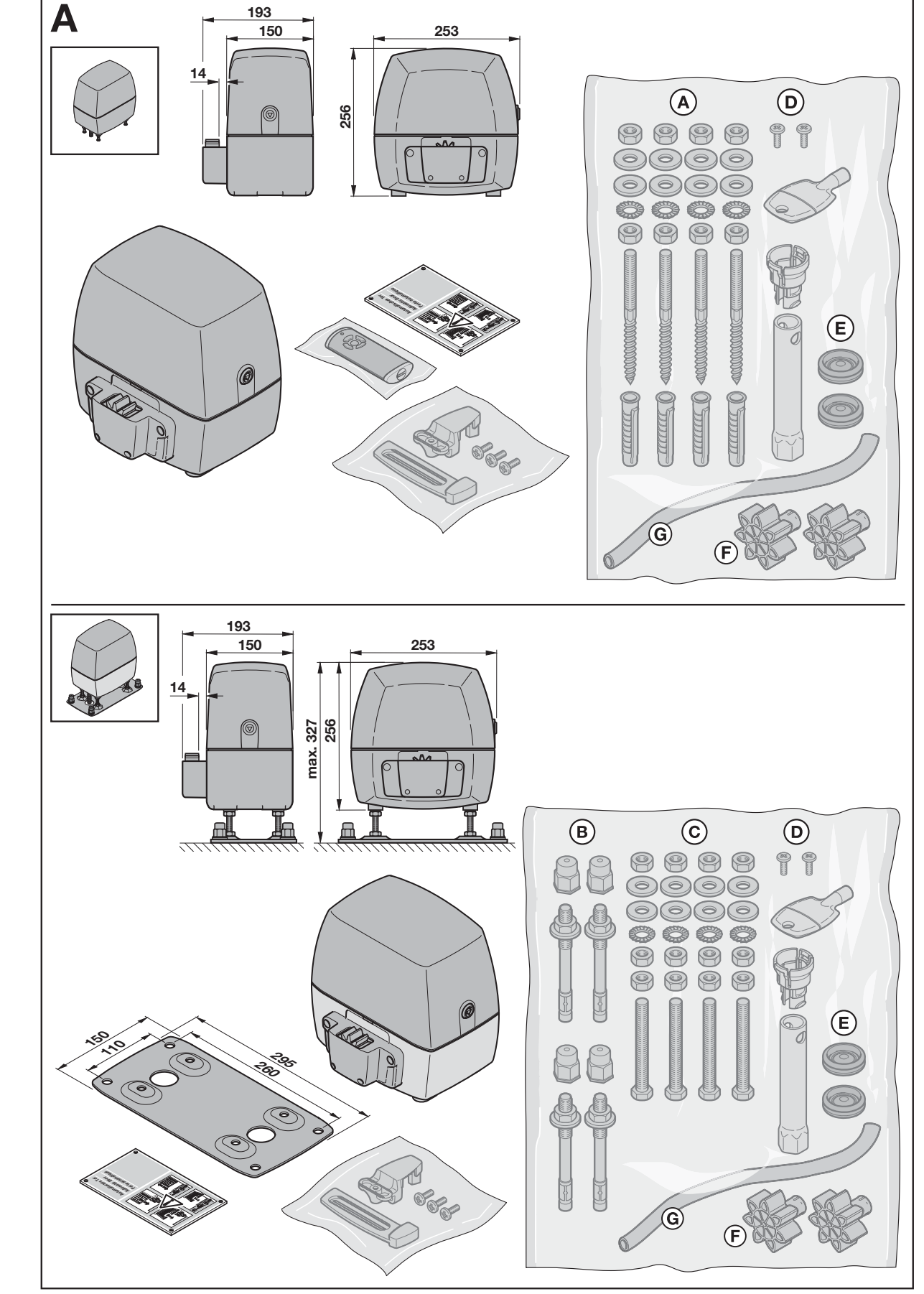
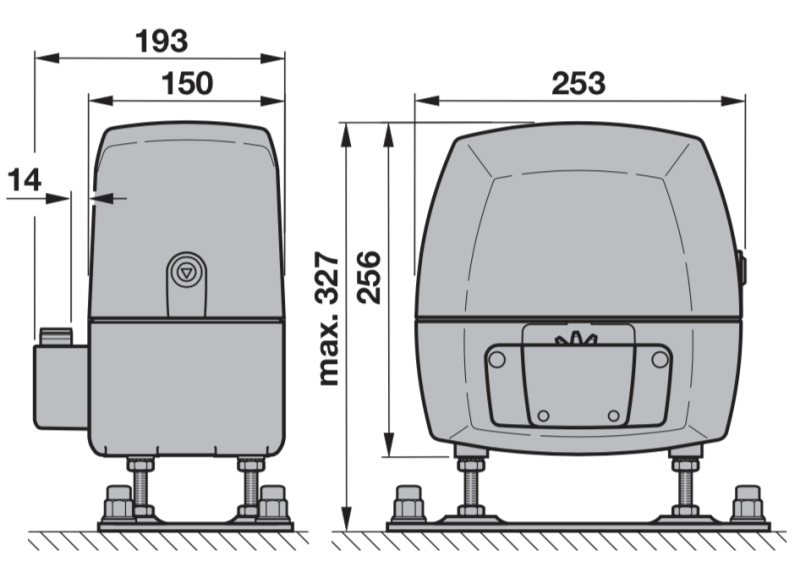
The dimensional drawing shows the housing 193 × 253 × 256 mm. When installed on a floor plate, the overall height can be adjusted up to 327 mm; the plate shown has a footprint of 260 × 295 mm. Choose the actual installation height relative to the rack based on dimension A, not just the outer dimensions of the cover.
How can I order this item?
Choose the option that suits you:
- order online: use the buy button to add the goods to your shopping cart (you will find the buy button here in the product variants table).
- order by email: place your order at [email protected]






