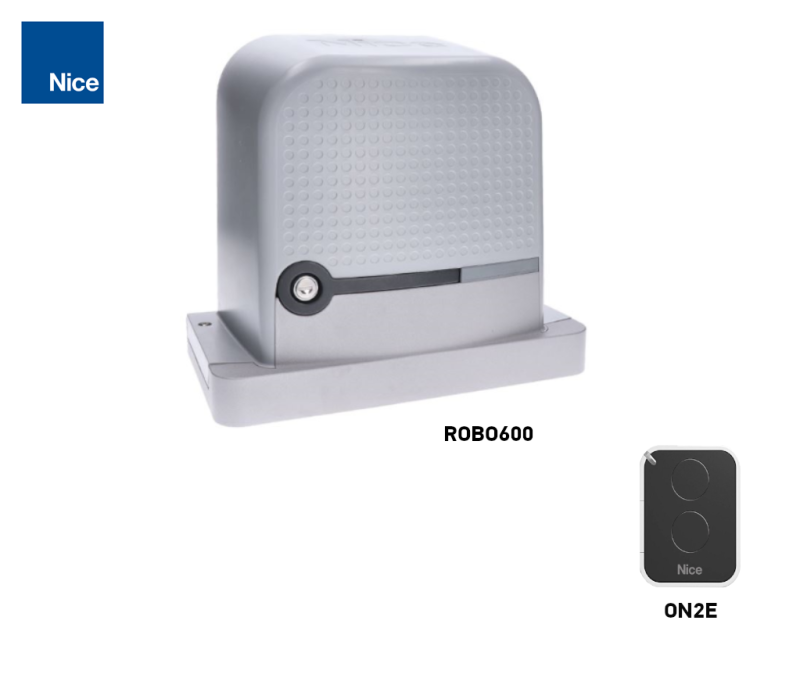
Drive kit for sliding gates up to 600 kg/6 m NICE ROBO600 (B)
| Product availability: | within 3 days | We usually ship the goods within 3 days. |
|---|

within 3 days
€454.50 including VAT
| Weight |
|---|
| 12 kg |
Description of Drive kit for sliding gates up to 600 kg/6 m NICE ROBO600 (B)
NICE ROBO600 is an electromechanical operator for a sliding gate with a 230 V AC, built-in control unit and radio receiver. This kit is offered for gates weighing up to 600 kg and with a passage width of up to 6 m. Mechanical limit switches define the open and closed positions. The operator is non-reversible; in the event of a power cut, it can be released with a key so the gate can be moved manually.
Which gate is the ROBO600 suitable for?
Weight, length and number of cycles must be considered together with the resistance to gate movement, wind, ice and the condition of the track. The operator does not replace repairing a misaligned or sticking gate. The gate leaf must move smoothly along its entire travel, remain stationary in any position, and have protection against derailment as well as solid mechanical stops in both directions.
| This kit's specifications | Up to 600 kg / 6 m passage width. |
|---|---|
| Motor-only limit according to the manual | Up to 600 kg and a gate leaf length of up to 8 m. For gates longer than 6 m, have the complete system checked for suitability. |
| Manual operating force | No more than 25% of the peak force of 600 N, i.e. 150 N, throughout the entire travel. This is a selection criterion, not an allowable impact force on a person. |
| Rack | Module 4; Z15 pinion. |
Cycle limits
| Gate leaf length | Max. cycles/hour | Max. consecutive cycles |
|---|---|---|
| Up to 4 m | 40 | 20 |
| Over 4 m up to 6 m | 25 | 13 |
| Over 6 m up to 8 m | 20 | 10 |
One cycle means opening and closing. The maximum continuous operating time of the motor is 4 minutes. These limits do not waive the requirements for low operating resistance and correct operating-time settings.
Choosing a larger motor does not in itself replace safety devices or force testing on the completed gate.
Kit contents
The NICE RO600-B kit contains an operator with a built-in control unit and receiver, and a remote control. For complete installation, you will need a suitable rack, mounting hardware, end stops and safety devices appropriate for the specific gate. Select the exact components of the expanded system when placing your order.
What else do you need for safe operation?
| What | Why | Type |
|---|---|---|
| Photocells | Passage-area monitoring; wiring here. |
|
| Flashing beacon | Movement warning; output 4–5 provides 230 V AC. |
|
| Remote control | Built-in receiver, pairing remote controls. |
|
| STOP and safety edges | Protection of hazardous areas as specified in the design. |
|
| Rack and end stops | Motion transmission and mechanical securing of the travel path. |
|
| Service programming | Diagnostics and settings by a technician. |
Installing the operator and rack
Installation and electrical work must be carried out by a qualified technician. Before opening the operator, disconnect the power supply and secure it against being switched on. Prepare the conduits and cable entries to prevent water from entering the motor; the foundation must not be flooded. Keep the cover and manual release accessible.
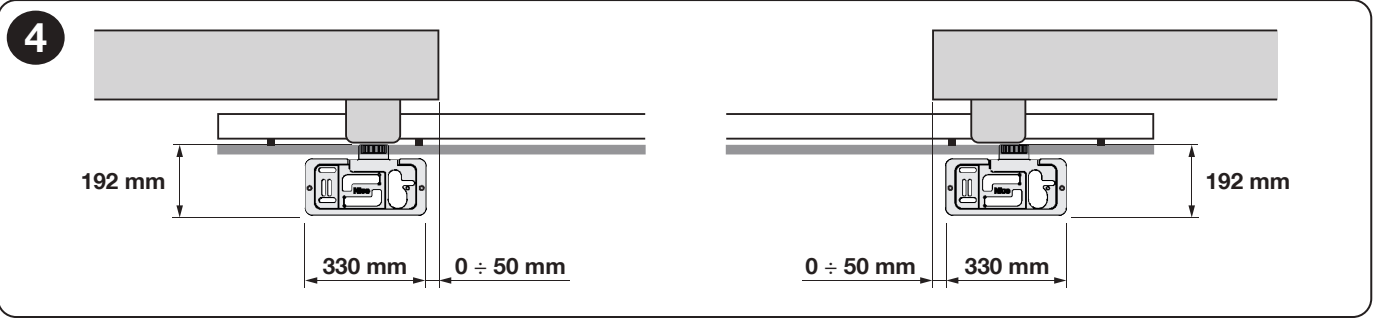
- Prepare the foundation and conduits according to the installation drawing. The base plate must be level, parallel to the gate’s travel, and securely anchored. Determine its position based also on how the rack will be fixed.
- Install the operator only after the foundation has cured. Adjust its height and secure it; the operator pinion must not bear the weight of the gate leaf.
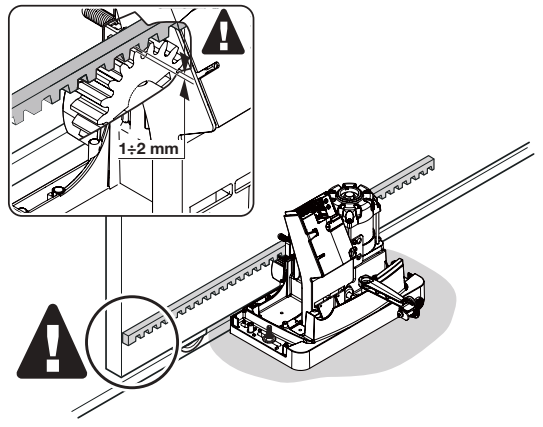
- Disengage the gearbox and fit the rack while moving the gate leaf by hand. The individual sections must form a straight line without any change in height.
- Maintain approximately 1–2 mm clearance between the rack and pinion along the entire travel path. Check the full travel manually in both directions and tighten the fixings.
Setting the limit switches
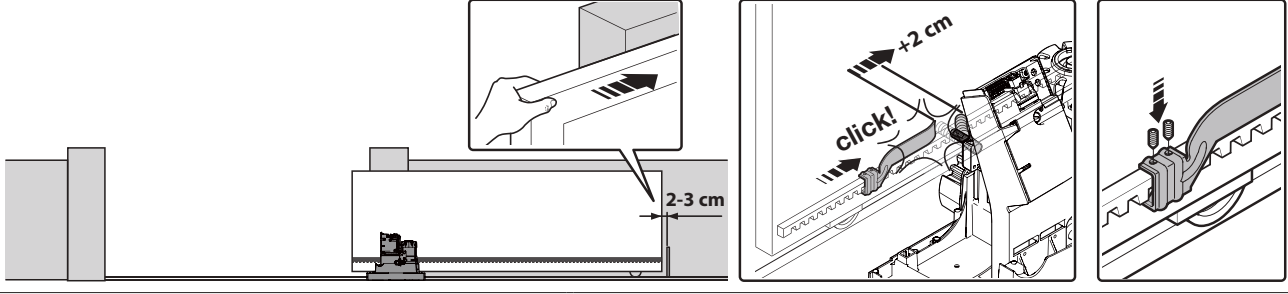
- With the gate disengaged, move it by hand towards the open position and stop approximately 2–3 cm before the fixed mechanical stop.
- Slide the corresponding limit-switch bracket along the rack until the switch is activated. Then slide it further in the same direction by at least 2 cm and secure it.
- Set the closing position in the same way. The bracket must reliably engage the lever without striking the operator housing.
- Engage the gearbox, slowly test both directions, and check the overrun and that the correct FCA/FCC LED lights up. The gate leaf must not hit the fixed stops while moving.
Manual release in the event of a power failure
The gate must be stationary. Disconnect the power and secure the gate leaf against moving on its own, especially on a slope or in windy conditions. Do not handle the gate while it is moving, and keep your hands away from the rack.
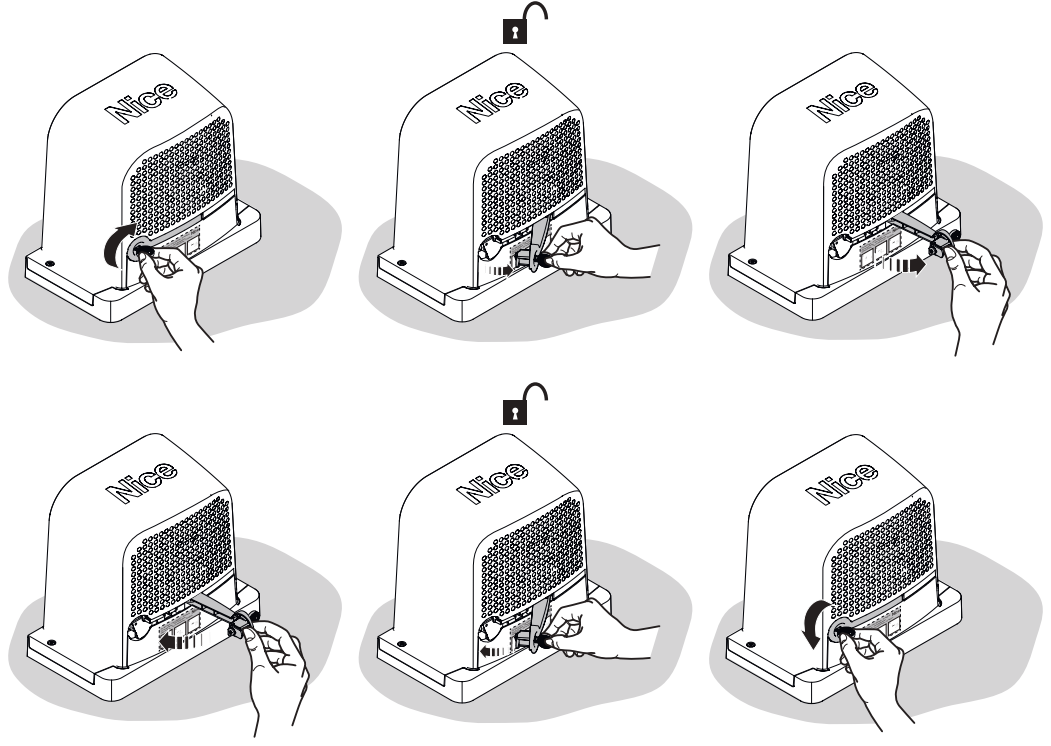
- Uncover the lock and insert the supplied key.
- Turn the key in the direction shown by the arrow in the illustration and open the release lever. The gate can now be moved slowly by hand.
- To re-engage the operator, close the lever, secure the lock, and remove the key. Move the gate leaf slightly so the gearbox engages mechanically. Only then restore the power and test the operation.
Wiring
| Connection | Cable as specified in the manual | Max. length |
|---|---|---|
| Power supply | 3 × 1.5 mm² | 30 m |
| Flashing light | 2 × 1.5 mm² | 10 m |
| Antenna | RG58 coaxial cable | 10 m; less than 5 m recommended |
| Photocells TX / RX | 2 × 0.25 mm² / 4 × 0.25 mm² | 30 m / 30 m |
| Key switch | 2 × 0.5 mm² per contact; 4 × 0.5 mm² for two contacts | 20 m |
For a power cable longer than 30 m, a technician must specify a larger cross-section, for example 3 × 2.5 mm², and protective earthing at the operator. Cable cross-sections and types must be checked for the specific route, protective device, and environment; install power and control cables separately.
Control board, terminals, and polarity
The following wiring applies to the ROBO600 board with 10 DIP switches, TL/TP/F trimmers, and RADIO, PROGRAM, and SbS buttons. The newer version also has the Standby function .
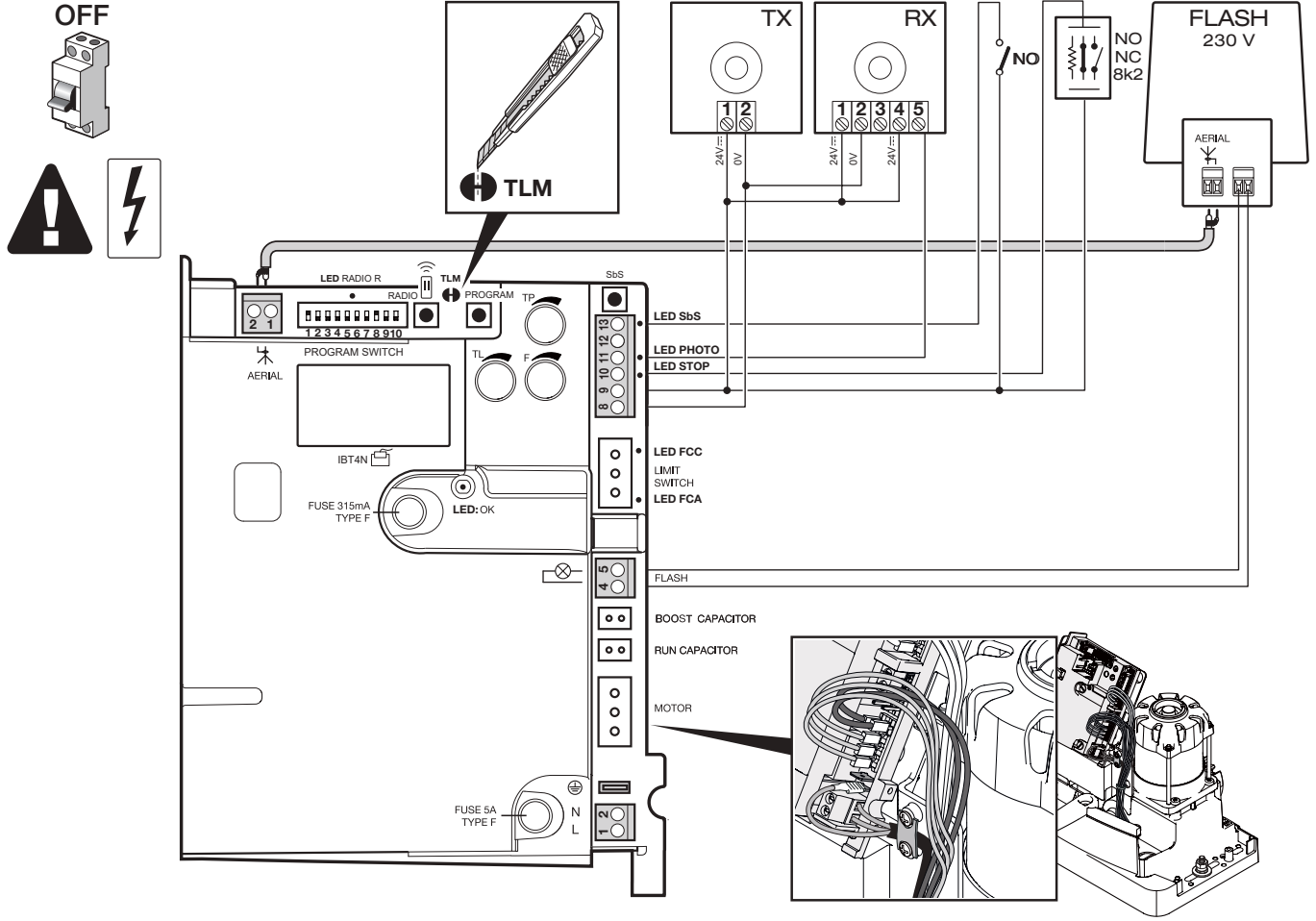
| Terminal / connector | Function and connection |
|---|---|
| Mains L / N / PE | 230 V AC, 50/60 Hz. L is live, N is neutral, and PE is protective earth; these are not DC polarity terminals. |
| 4–5 FLASH | Switched 230 V AC output for a mains-powered flashing light; no +/− polarity. |
| 8 (0 V) / 9 (+24 V) | Auxiliary power supply 8 = minus (−), 9 = plus (+), 24 V DC ±10%, total max. 100 mA. |
| 9–10 STOP | Learned safety input for an NO/NC contact or resistive device, as shown in the wiring diagram. After making a change, perform a new learning procedure. |
| 9–11 PHOTO | Voltage-free NC photocell contact. An interruption during closing reverses the direction of travel. |
| 8–12 PHOTOTEST | Tested power supply for the TX transmitter; 8 = 0 V (−), 12 = tested +24 V, max. 100 mA. This is not a permanent power supply for external controls. |
| 9–13 SbS | Voltage-free NO Step-by-Step command. An external relay only closes 9–13; do not apply an external voltage to these terminals. |
| AERIAL 1–2 | 1 = coaxial cable centre conductor, 2 = shield; this is not an accessory power supply. |
| LIMIT SWITCH / MOTOR | Limit-switch and motor connectors; change the orientation only with the power off, following the procedure for the opposite direction. |
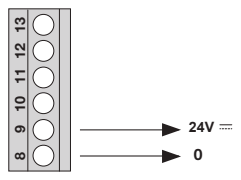
When using the auxiliary output, account for the total current draw of all connected devices. One pair of EPM photocells can draw up to 55 mA; two pairs may exceed the 100 mA limit even before additional accessories are connected. In that case, a separately designed power supply is required. Voltage-free NO/NC contacts have no +/− polarity.
STOP safety input 9–10
You can connect a voltage-free NO make contact, an NC break contact, or a safety edge with a constant resistance of 8.2 kΩ. The input type is detected during learning; a change in the learned state stops movement and briefly reverses direction.
More NO contacts are connected in parallel; more NC contacts are connected in series. Resistive safety edges can be connected in a cascade with a single 8.2 kΩ end resistor, as specified in the edge’s instructions. Combined types must be wired according to the installation manual; do not create arbitrary jumper combinations. An 8.2 kΩ resistor is not a substitute for a required safety device. After each change, repeat device recognition and test their operation.
Connecting NICE EPM photocells
| EPM | Without photocell testing | With photocell testing |
|---|---|---|
| TX terminal 1 (+) | 9 (+24 V DC) | 12 (tested +24 V DC) |
| TX terminal 2 (−) | 8 (0 V) | 8 (0 V) |
| RX terminal 1 (+) / 2 (−) | 9 / 8 | 9 / 8 |
| RX terminal 4 COM / 5 NC | 9 / 11 | 9 / 11 |
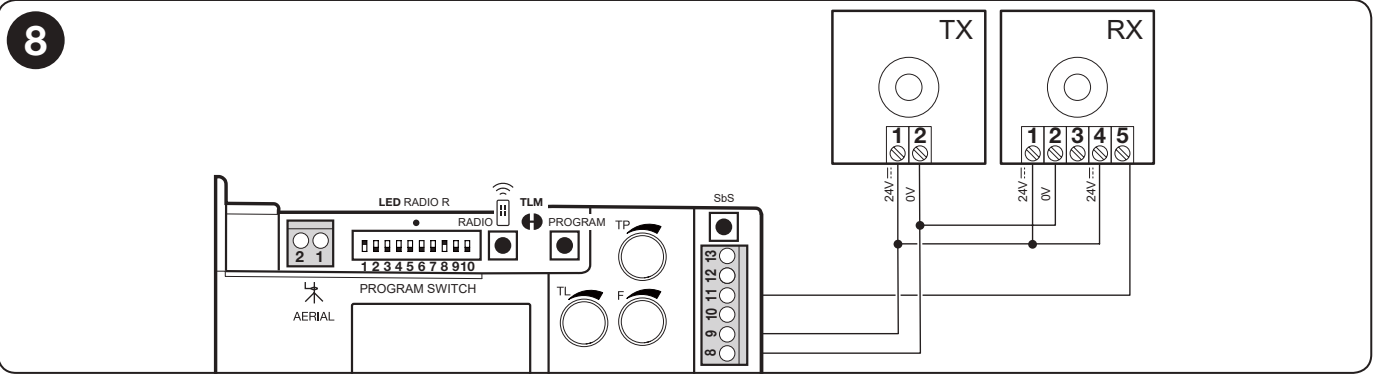
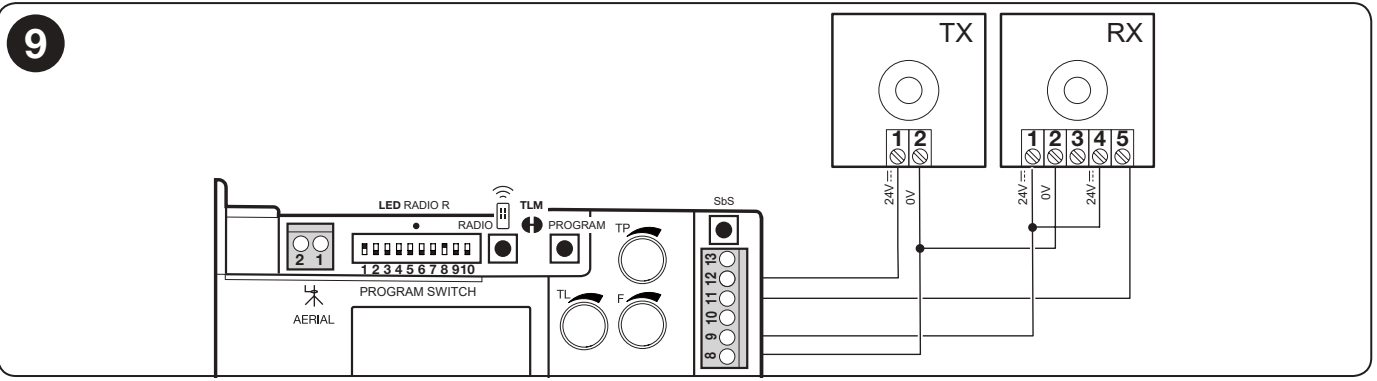
RX terminal 3 (NO) is not used for the PHOTO safety function. Once wiring is complete, perform device recognition and test by interrupting the beam. When powering the EPM with DC, do not cut the SYNC jumper, which is intended for synchronisation with AC power. Connecting two pairs also requires checking power consumption and mutual interference.
The TX and RX must be exactly opposite each other. For distances over 10 m, adjust the +10m jumper on the RX as specified in the EPM instructions. The EPM’s typical effective range is 15 m; fog, rain and dust can reduce it. Photocells protect the passageway, not every potential crushing or shearing point on the gate.
Initial startup and direction check
Before connecting the power, the mechanical stops, limit-switch brackets, protective earth and safety input wiring must be in place. If the gate leaf has a pedestrian gate, opening it must block automatic operation.
- Disengage the motor, move the gate leaf by hand to approximately the midpoint of its travel, then re-engage the drive.
- After switching on, the OK LED should flash approximately once per second. With the path clear and the gate away from its end positions, PHOTO/FOTO, FCA and FCC should be lit; the NO command input should be unlit when no command is given. The gate should not move by itself.
- Operate the limit-switch lever and check that the correct FCA or FCC LED goes out. If there is a fault, disconnect the power and check the connectors, safety devices and fuses.
- Once setup is complete—and, on the ROBO600, after the safety devices have been recognised—use a brief SbS/P.P. command to check that the first movement after power-up is opening. Stop it if it moves in the opposite direction. The opposite direction may also reverse the action of the safety devices.
If the initial direction is reversed
Disconnect the mains and verify that the circuit is de-energised. Following the original diagram, rotate the motor connector and the limit-switch connector by 180°. Switch on and repeat the opening test from the midpoint of travel. Do not reverse the direction by swapping the safety inputs or increasing the force.
Recognising STOP and PHOTO
The ROBO600 must store the connected safety devices. Repeat this after changing them, and also after changing the position of DIP 1 or DIP 2.
- Press and hold PROGRAM. After approximately 3 seconds, recognition will start and the OK LED will flash faster; keep holding the button.
- Wait for recognition to finish: the STOP LED will light up and the OK LED will remain green.
- Release the PROGRAM button within 10 seconds. Three green flashes confirm success; five red flashes indicate failure.
- Check the STOP and PHOTO LEDs and test both devices. If recognition fails, fix the cause and repeat the procedure.
Testing the completed gate
- Test a full opening and closing cycle, ensure the gate stops correctly before the mechanical stops, and check that it moves smoothly.
- Test each safety device separately. Interrupt the photocell beam at the TX, at the RX and between them; check that the gate stops or reverses as expected.
- A technician must measure the forces on the completed gate and set the lowest force that ensures reliable operation. Photocells and the F setting do not replace an assessment of all hazardous areas.
- Only after the tests have been passed should you hand over the manual, keys, instructions for manual operation and maintenance schedule.
DIP switch and trimmer settings
Settings must be changed by a technician while the gate is stationary. Disconnect the power before working on the wiring. After changing the mode, time or force, retest a full opening and closing cycle and all safety devices.
| DIP 1 | DIP 2 | Mode |
|---|---|---|
| OFF | OFF | Dead-man mode – movement only while the command is held. |
| ON | OFF | Semiautomatic – a brief command initiates a complete movement. |
| OFF | ON | Automatic – closing follows opening and a pause. |
| ON | ON | Automatic + Always close – when power returns, the gate may close after a 5-second pre-flash warning. |
| DIP | Function | Effect |
|---|---|---|
| 3 ON | Condominium mode | While opening, further Step-by-step commands are ignored; while closing, a command reverses the direction. Not in dead-man mode. |
| 4 ON | Pre-flashing | 5 seconds before movement; 2 seconds in dead-man mode. |
| 5 ON | Closing after photocell activation | Automatic mode: the gate closes 5 seconds after the passageway is clear. Semiautomatic mode: PHOTO activation while closing initiates automatic closing after the set pause. |
| 6 ON | PHOTO also active during opening | Interrupting the beam also stops opening; in semiautomatic/automatic mode, movement resumes once the beam is clear. |
| 7 ON | Soft start | Reduces jolting on startup. |
| 8 ON | Slowdown | The TL setting must account for the slowdown starting approximately 50–70 cm before the limit switch. Motor torque is also reduced; the gate may stop if there is too much resistance. |
| 9 / 10 | Electric braking | OFF/OFF = off; OFF/ON = low; ON/OFF = medium; ON/ON = high. |
Factory setting according to the manual: DIP 1 and 8 ON, all others OFF (semiautomatic mode with slowdown). After changing DIP 1–2, always reload the devices. During deceleration, the speed is approximately 30% of the rated speed; torque is reduced by 70%. Deceleration starts at TL/2. The default TL of 90 s means deceleration starts after 45 s; check the effect of the change during the next opening from the end position.
| Trimmer | What it adjusts | How to check |
|---|---|---|
| TL | Maximum opening/closing time. | In semi-automatic mode, perform a complete opening and closing cycle. Allow a margin of 2–3 s. If the range is insufficient, use a TLM extension, depending on the control board. When deceleration is enabled, set the time according to its start point as well. |
| TP | Pause time before automatic closing. | Enable automatic mode, open the gate fully, and measure the actual pause before it closes. |
| F | Force / motor torque. | Confirm the setting by measuring impact forces and carrying out a safety test. Increasing F is not a way to overcome a mechanical fault in the gate. |
Newer version – Standby mode
This section applies only to the ROBO600 version that supports Standby. It does not apply to older control boards without this feature. After the devices are loaded, the default standby time is 300 s; on a new or completely cleared control board, before loading, it is 600 s. In Standby mode, the auxiliary power output is inactive, which is important when using external control.
- Briefly press PROGRAM and read the OK LED: 2 flashes = Standby active; 1 flash = inactive.
- Use further brief presses of PROGRAM to select the desired state.
- To save, hold PROGRAM for at least 5 s, until the OK LED resumes its normal 1 Hz flashing. A technician changes the standby time using Oview or ProView, not with this button sequence.
Built-in receiver and remote controls
ROBO600 has a built-in receiver 433.92 MHz with O-CODE coding. Choose a transmitter to match the specific control board; the same frequency alone does not guarantee compatibility. Program the remote controls while the gate is stationary.
Mode I – storing the entire remote control
- Hold the RADIO/receiver button until its LED lights up (approximately 4 s), then release it.
- Within 10 s, hold the chosen button on the new remote control for approximately 3 s, until the receiver confirms storage with three flashes.
- Another remote control can be stored in the same way within the next 10 s; otherwise, wait for the mode to end.
| Button in Mode I | Assigned command |
|---|---|
| 1 | Step-by-step |
| 2 | Partial opening for pedestrians |
| 3 | Open |
| 4 | Close |
A one- or two-button remote control uses only the corresponding first button(s). According to the manual, the ROBO600 can store up to 100 remote controls in Mode I.
Mode II – assigning one command to a selected button
| Number of RADIO button presses | Command |
|---|---|
| 1 | Step-by-step |
| 2 | Partial opening |
| 3 | Open |
| 4 | Close |
| 5 | Stop |
Briefly press RADIO as many times as the number assigned to the desired command. The LED will flash the same number of times. Within 10 s, hold the selected button on the remote control for approximately 3 s, until three flashes confirm storage. Repeat the procedure for each additional button.
Adding a remote control using a working remote control
Near the receiver, at approximately 10–20 m, hold the button on the new remote control for at least 5 s and release it. On the old remote control, press the corresponding button 3 times; then press the button on the new remote control once. The new remote control will inherit the assignment of the old one. In Mode I, you can use any button on the old remote control; in Mode II, use the button assigned to the desired command. Only leave powered the receiver you want to program.
Radio memory lock
If storing or deleting does not work, the memory may be locked. Switch off the power, hold RADIO, and switch the power back on. After approximately 5 s and two slow flashes of the radio LED, release the button. Within 5 s, use brief presses of RADIO to select: LED off = unlocked; LED on = locked. Five seconds after the last press, two slow flashes confirm that the procedure has ended.
Diagnostics and common faults
| Indication | Meaning / what to check |
|---|---|
| OK: 1 green flash/s | Normal operation. |
| OK: 2 quick green flashes | Change in the status of an input, photocells, or a radio command. |
| OK: 1 red flash, pause, then 1 again | The devices were not loaded correctly or DIP 1–2 has changed. Check the wiring and repeat the loading procedure. |
| OK: 2 red flashes | Photocell triggered. Check for an obstruction, TX/RX alignment, and the NC contact. |
| OK: 4 red flashes | STOP active. Check the safety device and its wiring. |
| OK: 5 red flashes | Internal parameter error. Wait at least 30 s; if the error persists, a technician should perform a reset and reload. |
| OK: 7 red flashes | Internal circuit error or DIP 1–2 has changed. After disconnecting and restoring the power, check the wiring; if the mode has changed, repeat the loading procedure. A persistent error should be dealt with by a service technician. |
| OK: 8 red flashes | A command remains active. Release the button or de-energize the relay that is permanently switched on. |
| OK off / continuously on | Check the power supply and fuses; a persistent fault indication may indicate a control board fault. |
| PHOTO / STOP off | A safety input is preventing movement. Do not bypass it; check the device and loading procedure. |
| Radio LED: 1 / 6 / 8 rapid flashes | Remote control already stored / incompatible coding / memory full. |
If the motor does not respond, first check the power supply, circuit protection, status of the safety inputs, and command. If the direction of movement is reversed, correct the direction according to of the procedure described. If you hear unusual noise or notice damage or jerky movement, stop using the gate; do not increase the force as a substitute for repairs.
Erasing the memory
Erasing all transmitters
With the memory unlocked, hold down RADIO, until the LED lights up, goes out, and starts flashing. Release the button during the 3rd flash. Five flashes confirm that the transmitters have been erased. All stored transmitters will be erased, so be ready to program them again.
Erasing the control unit and learned devices
- With the motor stopped, switch off the power.
- Hold down PROGRAM and switch the power back on. Keep holding the button until the OK LED lights up, goes out, and starts flashing.
- Release PROGRAM during the 3rd flash of the OK LED. Five flashes confirm that the procedure was successful.
- Repeat the safety-device setup and perform a complete test. This procedure does not erase the transmitters, but it disables the radio memory lock. The mechanical DIP switch and trimmer settings do not change automatically.
Regular inspection and maintenance
Arrange for professional maintenance at least every 6 months or after 20,000 manoeuvres, whichever comes first. For intensive use or harsh environments, the service plan may specify a different interval.
- With the power disconnected, check the fastenings, corrosion, cables, and for water ingress.
- Check the pinion, rack, guides, and stops for wear and play, and check that the gate moves freely by hand.
- Clean the photocells and check the manual release. After restoring power, test all safety devices, the stopping function, and the forces.
- Keep the service record and manual. Do not enter the gate opening while it is moving; keep remote controls and fixed controls out of children's reach.
NICE ROBO600 technical specifications
| Motor and control unit power supply | 230 V AC, 50/60 Hz |
|---|---|
| Rated power consumption | 300 W |
| Rated / peak torque | 9 / 18 Nm |
| Corresponding rated / peak force | 300 / 600 N; drive force is not the weight of the gate |
| No-load speed / speed at rated torque | 11 / 8.5 m/min |
| Rack / pinion | Module 4 / Z15, pitch diameter 60 mm |
| Max. gate weight | 600 kg |
| Max. gate leaf length / opening width offered with this kit | 8 m according to the manual / 6 m opening width for this listing |
| Continuous operation | Max. 4 minutes; cycles depend on gate leaf length |
| Ingress protection / electrical class | IP44 / Class I – protective earth |
| Temperature | −20 to +55 °C |
| Auxiliary output | 24 V DC ±10%, max. 100 mA |
| FLASH output | 230 V AC, max. 60 W according to the technical table |
| Weight of the drive unit alone | 11 kg |
| Radio | 433.92 MHz, built-in O-CODE receiver |
Dimensions and installation space
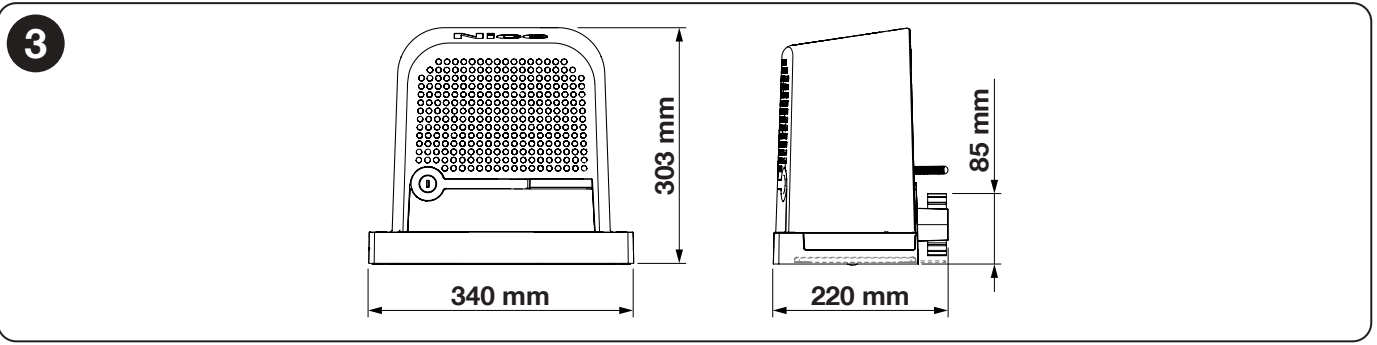
The ROBO600 installation drawing gives the overall dimensions 340 × 220 × 303 mm (height) and the pinion axis 85 mm above the base. Use this drawing as the basis for installation. When choosing the location, leave enough room to open the cover, access the key, and operate the manual release safely.
We can help you choose a kit via contact. Please provide the gate length and weight, the expected number of cycles, and, for a replacement, a photo of the rating plate and control board.
How can I order this item?
Choose the option that suits you:
- order online: use the buy button to add the goods to your shopping cart (you will find the buy button here in the product variants table).
- order by email: place your order at [email protected]






