Connecting the NICE OX2 external receiver to the drive
Note: This page also applies to NICE SMX2R, NICE OX2FM .
What will you find here?
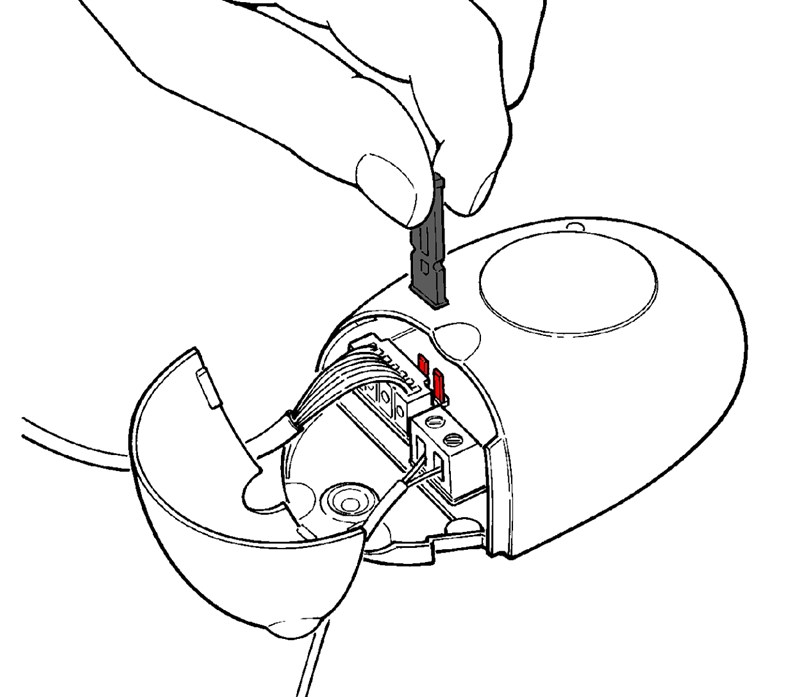
The device comes with pre-wired leads that you simply connect to a power source (12V or 24V DC or AC). The power supply is selected using the jumper, as shown in the following table:
 |
Jumper | Power supply type | Voltage range |
|---|---|---|---|
| Not inserted | 24 V AC/DC | 18–28 V | |
| Inserted | 12 V AC/DC | 10–18 V |
Electrical wiring
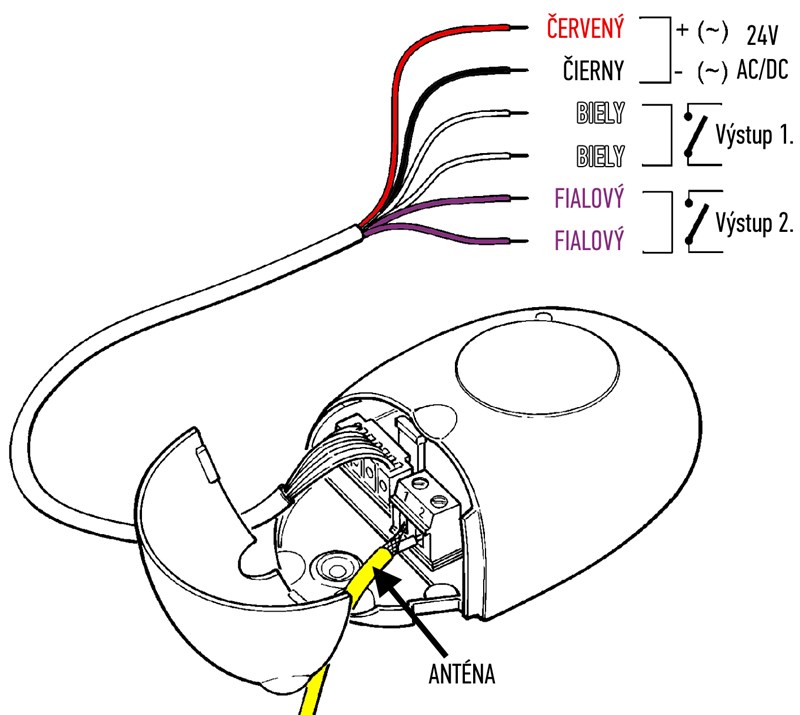
The receiver comes with leads for the power supply, the outputs of two relays, and the antenna input:
| Wire color | Input/output | Description |
|---|---|---|
| Red/Black | Power supply | Red is positive; black is negative. If you are using AC, polarity does not matter. |
| White/White | Relay 1 output. i.e. control with button 1. |
For normally open (NO) contacts. To use normally closed (NC) contacts, follow these steps. |
| Purple/Purple | Relay 2 output. i.e. control with button 2. |
For normally open (NO) contacts. To use normally closed (NC) contacts, follow these steps. |
| Yellow | Antenna | The antenna is optional; you can leave the receiver with just the supplied short wire, giving you a range of approximately 40-50 m. |
Wiring the first control output (white wires)
First relay output from OX2 (switch 1 – white wires) connect to the terminals on the control unit to the same input you would use to connect a wired push button. These inputs are usually marked as follows:
- switch symbol
- GND + PB (Ground + Push Button)
- START
- SBS (Step By Step)
You can then pair the remote controls with the NICE OX2 external receiver as follows:
- Press once the button on the OX2; the LED next to it will start flashing at one-second intervals.
- Within 10 seconds, press and hold the button on the remote control you want to use to operate the gate until the LED on the OX2 flashes three times for longer (approx. 3 seconds), then release it.
- Wait for the LED on the OX2 to finish flashing, and you're done. Pressing the button on the remote repeatedly should open, close, and stop the gate.
Optional wiring of the second control output (purple wires)
If your control unit has another input (e.g. for pedestrian opening), or if you want to control another device, you can also optionally connect the second relay output from the OX2 (switch 2 – purple wires). To pair the remote button for the purple wires, follow these steps:
- Press twice the button on the OX2; the LED next to it will start flashing in this sequence: flash flash pause flash flash
- Within 10 seconds, press and hold the button on the remote control you want to use to operate the gate until the LED on the OX2 flashes three times for longer (approx. 3 seconds), then release it.
- Wait for the LED on the OX2 to finish flashing, and you're done. You should be able to activate the purple-wire output using the button on the remote.
Using normally closed (NC) contacts
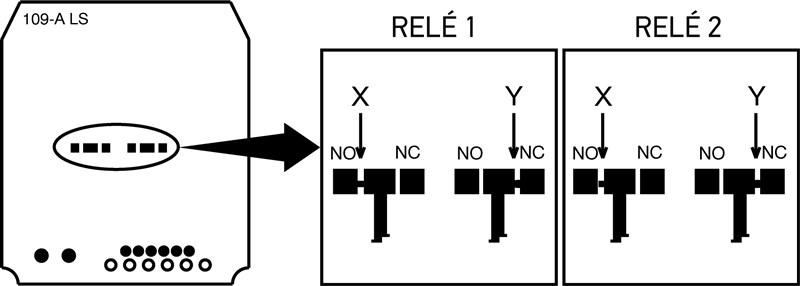
The receiver is configured by default for normally open (NO) contacts, which means that when a command is sent from the remote control, it closes the circuit for approximately 300 ms, thereby sending the controlled device a command to operate. If you need the opposite function, i.e. the circuit is closed and then opens for approximately 300 ms after a command is sent, follow these steps:
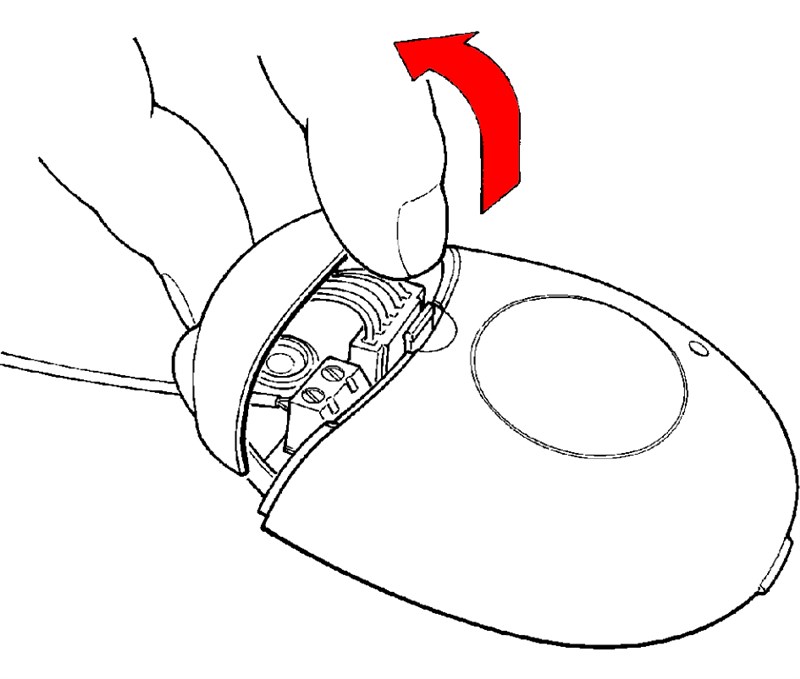
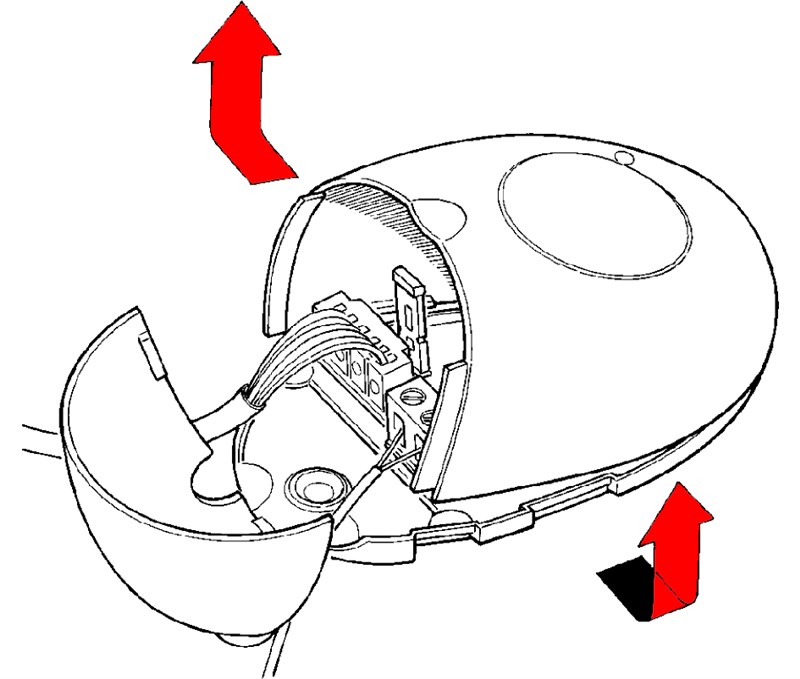
| 1. Open the receiver's top cover | 2. Open the receiver's bottom cover |
|---|---|
 |
 |
| 3. Remove the circuit board and turn it over | |
 |
|
|
The same procedure applies to both relays:
This modification is reversible and can be made to just one relay if needed. |
|






