Connecting photocells to the NICE Robus RBS drive
Robus RBS operators use BlueBUS technology, making them compatible with photocells that support this technology. Robus RBS also supports conventional relay photocells.
Photocells are always used in pairs: a transmitter (TX) and a receiver (RX). Photocells are divided into three types:
- Both photocells are wired (transmitter TX and receiver RX). The most commonly used models are EPMB and EPSB, followed by EPLB, F210B, or the obsolete, discontinued MOFB.
- One photocell is wired, while the other is battery-powered and wireless. Model FT210B.
- Both photocells are wireless. Model EPMOW used with the IBW device.
Before connecting the photocells, disconnect the operator from the power supply. Once they are connected, restore the power and identify the connected devices by holding down the OPEN+STOP/SET buttons until the L1+L2 LEDs start flashing, then release the buttons.
BlueBUS photocells
The entire BlueBUS system is wired using two-core cables. The cable should be 2x0.5m². If you use network cables (FTP, UTP, STP, or any other twisted pair cable) for wiring, the cross-sectional area of each conductor is generally between 0.10 and 0.25 mm2. We therefore recommend doubling up the wiring: instead of connecting two conductors, connect four—two together for each wire. Otherwise, you may get continuity on the cable and the photocell may flash, yet still fail to work properly.
Wiring wired photocells
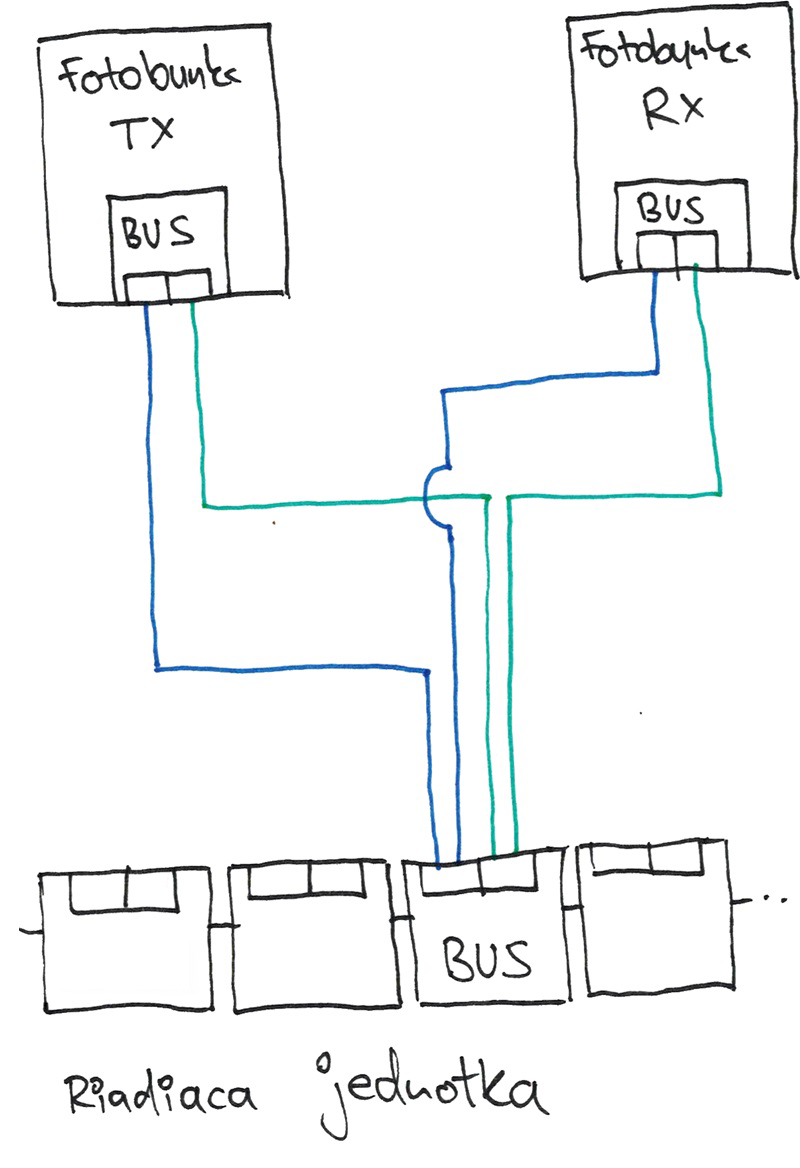
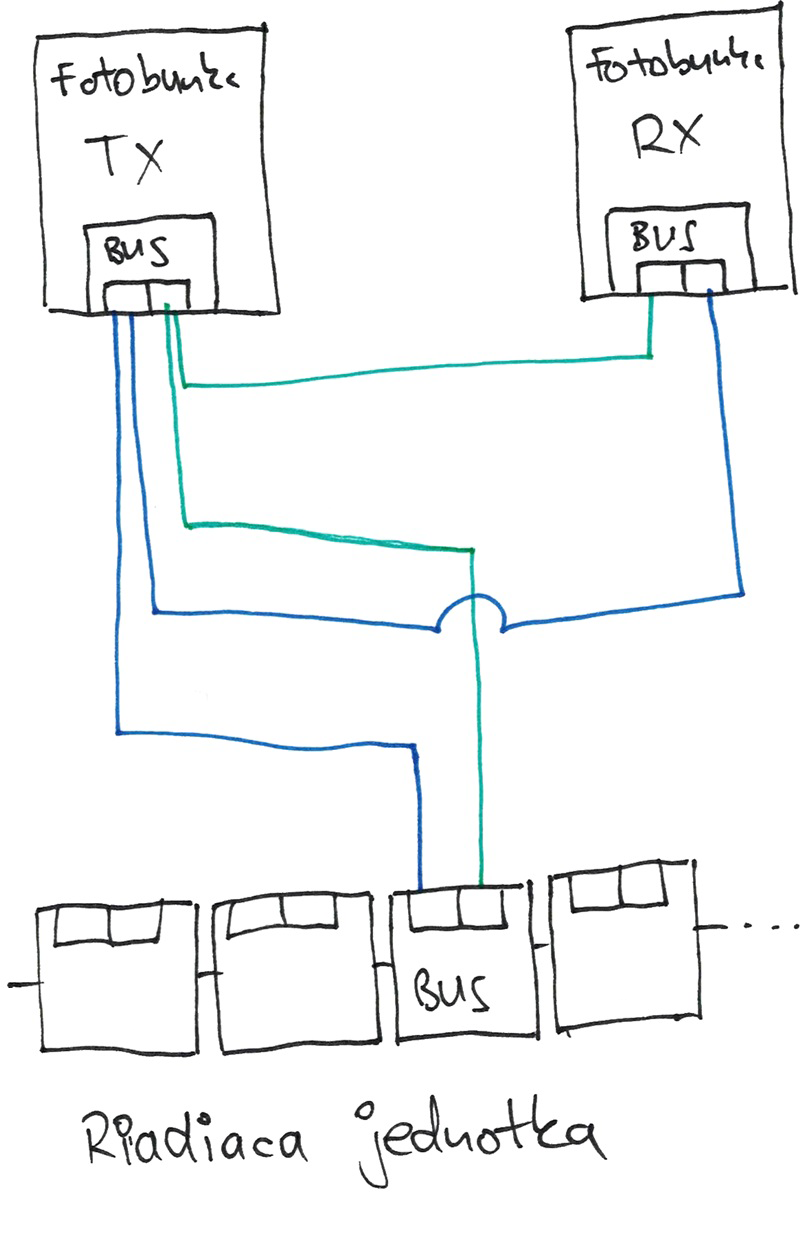
Connect the photocells in parallel to the BlueBUS input using two-core cables; polarity does not matter. You can connect both photocells directly to the control unit, or run a two-core cable from the control unit to one photocell and then another two-core cable from there to the next.
| Connecting both photocells to the control unit | Connecting the control unit to one photocell and then to the other |
|---|---|
 |
 |
Wiring one photocell and using a wireless one for the other
This setup uses NICE FT210B photocells. One photocell is connected with a two-core cable from the BlueBUS terminal on the control unit to the BUS (BlueBUS) terminal, while the other is battery-powered.
Connecting wireless photocells
Wireless photocells do not need to be wired, as the name suggests. Only the IBW communicator needs to be connected; the photocells communicate with it wirelessly. For the connection procedure, go to Connecting and programming the NICE IBW device with NICE EPMOW photocells.
Relay photocells
NICE Robus RBS operators also support conventional hardwired circuits, making them compatible with virtually all 24V relay photocells.
The control unit includes a PHOTOTEST function that improves the reliability of safety devices. This allows the control unit and safety photocells, as a complete system, to achieve “Category II” in accordance with EN 13849-1.
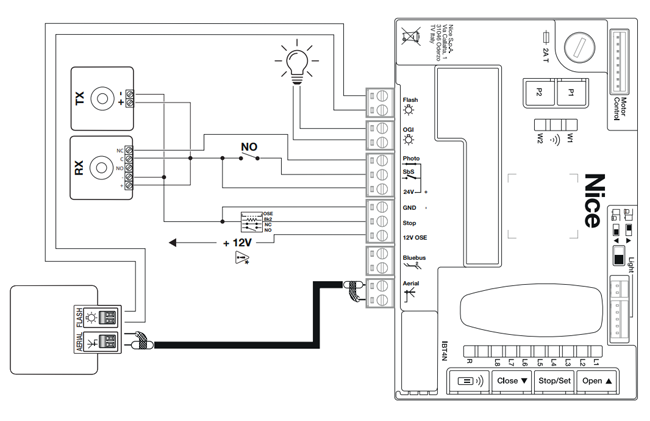
Wiring relay photocells with the PHOTOTEST function
To activate the PHOTOTEST function, configure the system using compatible Wi-Fi interfaces and the MyNice Pro app.
At the start of each operation, the relevant safety devices are checked, and the operation starts only if everything is in order. If the test fails (for example, the photocell is blinded by sunlight or the cables are short-circuited), a fault is detected and the operation will not be carried out.
Wiring diagram for relay photocells with the PHOTOTEST function:
Wiring relay photocells without the PHOTOTEST function
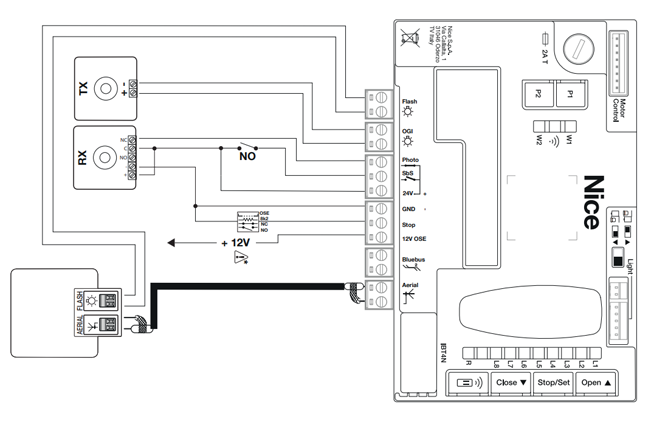
The control unit has a dedicated PHOTO input for connecting the normally closed contact of relay photocells. Unlike the “PHOTOTEST” configuration, the operation starts when a command is given without checking whether the signal from the photocells is valid. However, the system still responds to changes in the state of the external photocells.
Wiring diagram for relay photocells without PHOTOTEST: